

OpenAI just gave ChatGPT a clock, but not a free hand. As of June 17, 2026, the assistant can wake itself up on a schedule, check the web or your connected apps, and then — stop and tell you. It notifies; it does not act.
Notify or Act? ChatGPT Schedules Itself but Won't Click for You
ChatGPT's relaunched scheduled tasks let it run instructions on a timer without a live prompt, but every task ends in a notification rather than an action. On June 17, 2026, OpenAI promoted what started as a limited beta reminder feature into a first-class control surface, complete with a dedicated "Scheduled" page in the sidebar where you can see each task's next run time and pause, resume, edit, or delete it . The design boundary is deliberate: this is bounded autonomy framed around alerting you, not transacting on your behalf.
Quick Answer: ChatGPT's June 17, 2026 scheduled tasks can monitor the web or connected apps on a timer and alert you when something changes — but they only notify, never act. Transactions like sending email or making purchases stay out of scope, and tasks run at most once per hour.
Two capabilities define the relaunch. Scheduling is more flexible: tasks can be one-off or recurring, and you can set them for exact times or broad windows such as morning, afternoon, or evening . More significant is conditional monitoring — tasks can now search the web or check connected apps for changes and ping you only when there is something worth reporting . That is the "alert me only when something changes" pattern, and it is what the original beta lacked.
The contrast with the 2025 reminder beta is concrete. That version, which shipped the week of January 14, 2025, could perform scheduled web browsing — checking monthly for ticket availability, for instance — but it could not fire an instant alert the moment tickets dropped, nor could it complete the purchase . OpenAI positioned that beta as its "initial venture into AI agents," signaling from the start that proactive timing, not unattended action, was the goal .
The 2026 version sharpens that line further. Transacting — sending emails, making purchases, completing forms — remains explicitly outside scope at launch; the release notes emphasize notify-only behavior, and it is still unresolved whether monitoring tasks will ever act on what they find . For developers, that distinction matters more than any feature toggle: ChatGPT now owns the "watch and warn" layer natively, but the "click the button" layer still belongs to you or to the heavier agent products that run a virtual computer.
The Hourly Maximum, Inactivity Pausing, and the Project Isolation Rule
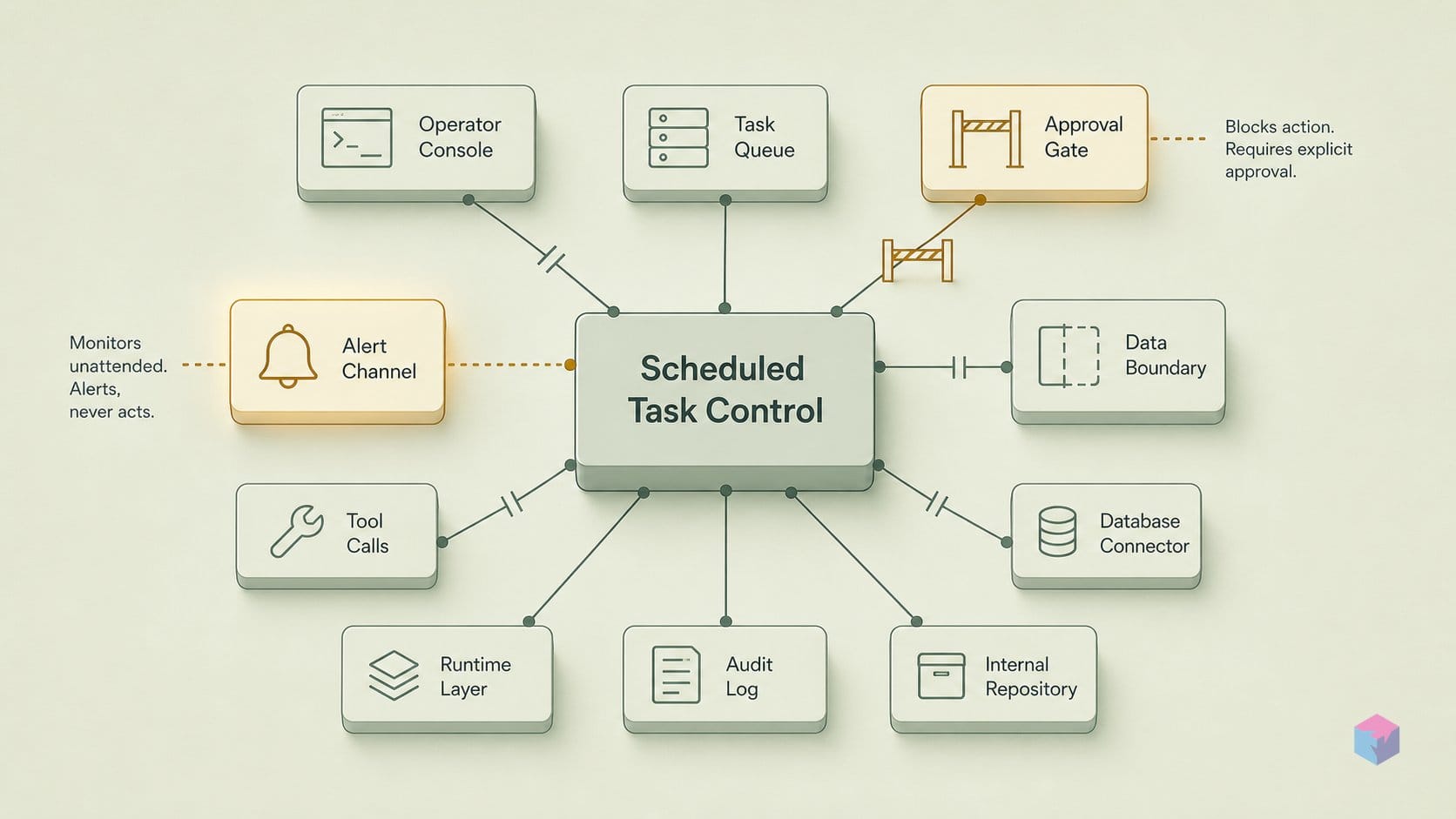
The relaunched scheduled tasks ship with hard limits that shape every workflow you can build on them. The most important is a rate floor: a task cannot fire more than once per hour, so 60 minutes is the minimum interval regardless of whether you pay for Go, Plus, Pro, or Enterprise . That single rule decides what "monitoring" actually means in practice — ChatGPT can watch for a price drop or a ticket release, but it polls on an hourly cadence at best, not in real time. If your use case needs sub-minute reaction, this native layer is not the tool.
Two safeguards govern the lifecycle of a task rather than its frequency:
- Auto-pause on inactivity. Unattended tasks may automatically pause after a period of inactivity, a backstop against recurring jobs that run forever with nobody watching the output . OpenAI's Help Center does not disclose the exact inactivity threshold, so you cannot currently design around a known cutoff — treat any long-idle recurring task as something the system may quietly stop .
- Chat-deletion coupling. Each task is bound to the chat that created it. Deleting that chat pauses the task automatically; the inverse does not hold — deleting the task leaves its associated chat intact . So a routine "clean up old chats" habit can silently disable monitoring you meant to keep running.
The constraint most likely to trip up document-aware workflows is project isolation. A scheduled task created inside a project that contains files cannot access those project files . This is an explicit data boundary, not a bug: the unattended run does not inherit the project's uploaded context. If you imagined a task that periodically re-checks a spec, a contract, or a dataset you uploaded to a project, that pattern does not work — the task runs without those files in scope. The same release notes also carve out other unsupported surfaces inside scheduled tasks, including file uploads, voice chats, and Custom GPTs .
Read together, these rules describe deliberately bounded autonomy. The hourly floor caps how often ChatGPT acts, inactivity pausing caps how long it acts unsupervised, and project isolation caps what private context it can act on. None of them is configurable today, which means the engineering question is not "how do I tune this" but "does my workflow fit inside the box OpenAI drew." For simple recurring checks and notify-only monitoring, it does; for file-grounded or low-latency jobs, you will still reach for external orchestration.
Scheduled-Tasks Capacity by Subscription Grade
Active-task capacity is now tiered by plan: ChatGPT Go allows up to 3 active scheduled tasks, Plus up to 5, and Pro and Enterprise up to 15, per OpenAI's Help Center at launch . That replaces the flat 10-task ceiling that applied to every eligible subscriber under the original 2025 beta . The number is a hard count of concurrently active tasks, not a daily run budget — pausing or deleting a task frees a slot.
Quick Answer: ChatGPT's scheduled-tasks limit scales by plan: Go gets 3 active tasks, Plus 5, and Pro and Enterprise 15, per OpenAI's Help Center . The Business/Edu figure is disputed inside OpenAI's own docs, so treat the Help Center as authoritative until clarified.
| Plan | Active scheduled tasks |
|---|---|
| Go | 3 |
| Plus | 5 |
| Pro | 15 |
| Enterprise | 15 |
| Business / Edu | Disputed in OpenAI docs — verify on Help Center |
One caveat before you plan around the table: the Business/Edu count is reported inconsistently across OpenAI's own documentation, so it is omitted here pending clarification. Because some granular figures come from secondary tech press and others from internal docs that disagree, the official Help Center article should be treated as the canonical reference for current limits .
The task ceiling is not the only constraint. Normal plan usage limits apply to task runs, so a scheduled job consumes the same message budget as an interactive chat . Pro's 15 tasks therefore draw against Pro's normal quota — the same tier whose heavier agent runs were capped at 400 messages per month at the 2025 agent launch . Filling all 15 slots with frequent recurring checks can quietly erode the headroom you have left for live work.
Capability gaps are uniform across grades. Regardless of plan, scheduled tasks do not support voice chats, file uploads, or Custom GPTs, and they are unavailable on Pro models . So a higher tier buys more concurrent automations, not a richer per-task feature set — paying up widens the queue but does not unlock file-grounded or voice-driven runs. If your workflow depends on any of those, the tier you choose will not change the answer.
How Monitoring Differs from Scheduling — and What Permissions Cover It
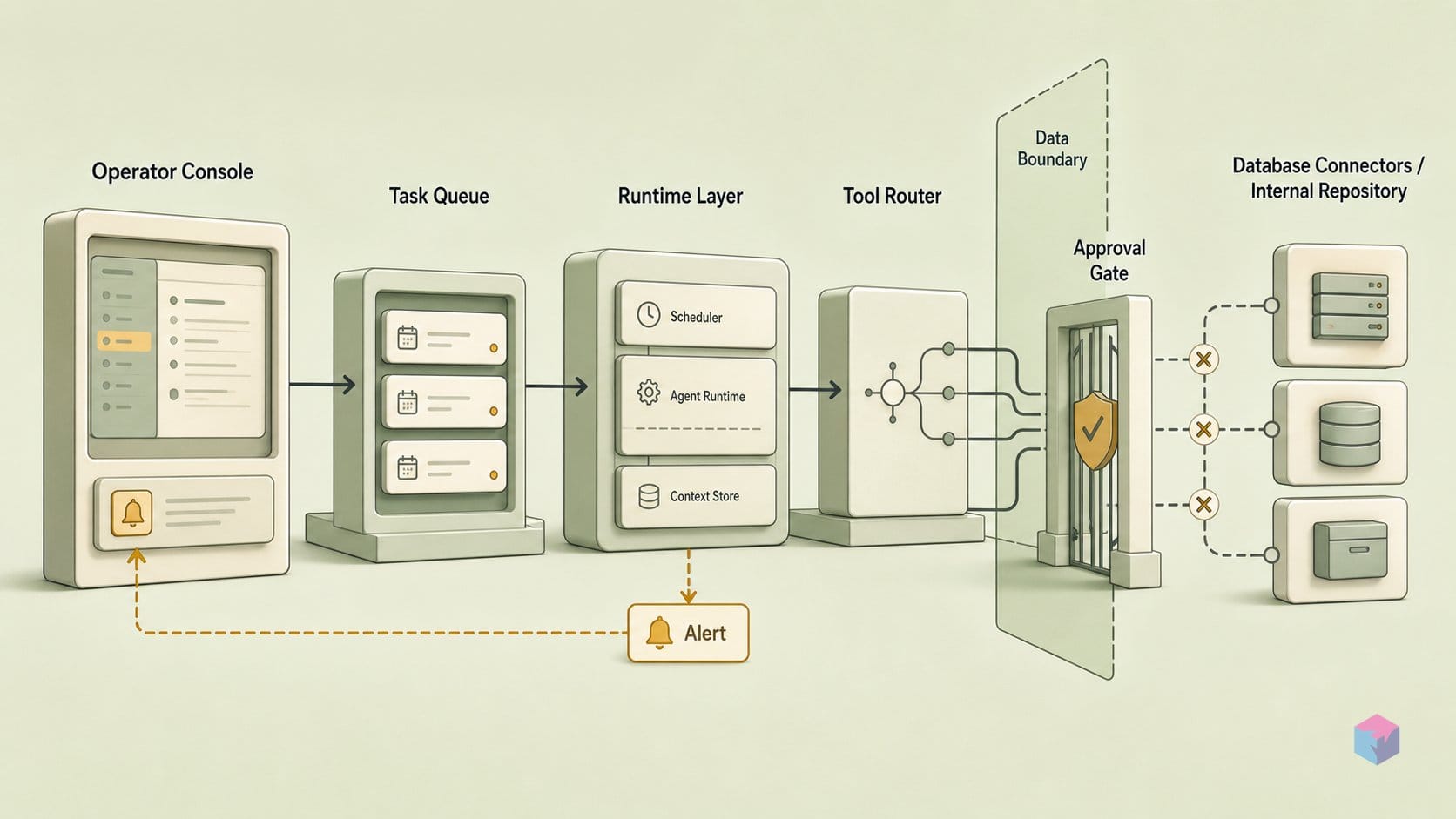
A scheduled task fires on a fixed cadence and returns a result every time; a monitoring task evaluates a condition at each interval and notifies you only when that condition is met. That distinction is the core upgrade in the June 17, 2026 relaunch . The original 2025 beta could run scheduled web browsing — checking monthly for ticket availability, for instance — but could not fire an instant alert the moment tickets dropped . The 2026 version closes that gap: a monitoring task can search the web or poll a connected app for changes and stay silent until something is worth reporting.
What it still will not do is transact. The relaunch notes frame monitoring as notify-only — ChatGPT surfaces the change and leaves the click to you . Whether a monitoring task can ever act on its findings is unresolved; the 2025 beta could not, and the current documentation emphasizes notification rather than execution .
| Property | Scheduled task | Monitoring task |
|---|---|---|
| Trigger | Fixed cadence (time or window) | Condition evaluated each interval |
| Output | Result every run | Notification only when condition is met |
| Typical use | Daily briefing, weekly digest | Price drop, ticket availability, inbox change |
| Acts on findings? | No — returns output | No — notify-only, no transaction |
Where a task touches a connected app, a separate permission framework governs how far its autonomy reaches. The default is "Important actions": ChatGPT reads automatically but asks before any action with meaningful external effect . The available settings may include Always ask, Any changes, Important actions, and Never ask — though Never ask is not offered everywhere. Important actions cover writes, sends, and deletions that are hard to undo, specifically:
- Sending emails or messages
- Deleting content or canceling appointments
- Purchases, refunds, or financial transactions
- Uploading or moving files
- Changing sharing or security settings
- Sharing sensitive personal, financial, health, identity, or authentication data
In practice, this means an unattended monitoring task can read your calendar or inbox to detect a change, but it will pause and ask before it sends a reply or cancels an event under the default setting . The exact matrix of which connected-app actions can run unattended under each permission level has not been published, so treat write-capable automations as confirmation-gated by default.
For managed workspaces, admins hold the controls. They can restrict which apps are available, which action permission levels users may select, role-based access, allowed domains, and whether users can save persistent approval choices at all . That last lever matters: disabling persistent approvals forces a confirmation on every consequential action rather than letting a "Never ask" choice stick.
Auditability follows the same enterprise path. App calls made during scheduled tasks are logged as part of Compliance Logs, and tasks are included in the Compliance API available for Enterprise and Edu workspaces . The compliance platform exposes logs and metadata for enterprise workspaces, so unattended runs and their connected-app calls are reviewable rather than invisible .
Pulse Is Retired: Daily Briefings Now Live in Scheduled Tasks
Pulse — OpenAI's proactive daily-briefing surface — is being retired as a standalone capability, and its function is folding into scheduled tasks . Pro users keep Pulse for 14 days from June 17, 2026; after that window, the morning-briefing behavior no longer ships as its own feature and must be recreated as a recurring scheduled task . The practical effect is consolidation: one proactive layer instead of two overlapping ones.
Replicating Pulse is a one-line setup. Once the grace period closes, a Pro user asks ChatGPT to schedule a recurring daily briefing built from their stated interests and past chats, and the Scheduled page takes over from there . The briefing becomes an ordinary recurring task — visible alongside every other monitor and reminder, with the same pause, resume, edit, and next-run controls covered earlier in this article. Nothing about the output changes; what changes is where it lives and who can manage it.
That relocation is the real shift. Proactive daily updates were previously a semi-hidden beta behavior; now they sit on a first-class, discoverable sidebar surface that any paid subscriber can inspect and adjust . A briefing is no longer a black box that arrives each morning — it is a task object with a schedule, a state, and an audit trail.
"After 14 days, Pro users can ask ChatGPT to schedule a recurring daily briefing based on their interests and past chats," — OpenAI Help Center, Tasks in ChatGPT (source: help.openai.com).
For developers tracking OpenAI's surface area, the lesson is structural: proactive intelligence is no longer a separate product to learn but a configuration of the same scheduling primitive. If you built around Pulse's daily cadence, the migration is to a recurring task with an explicit schedule — and the same once-per-hour and auto-pause guardrails apply to it as to any other unattended job.
What Becomes Redundant: Scheduling Wrappers and Reminder Middleware
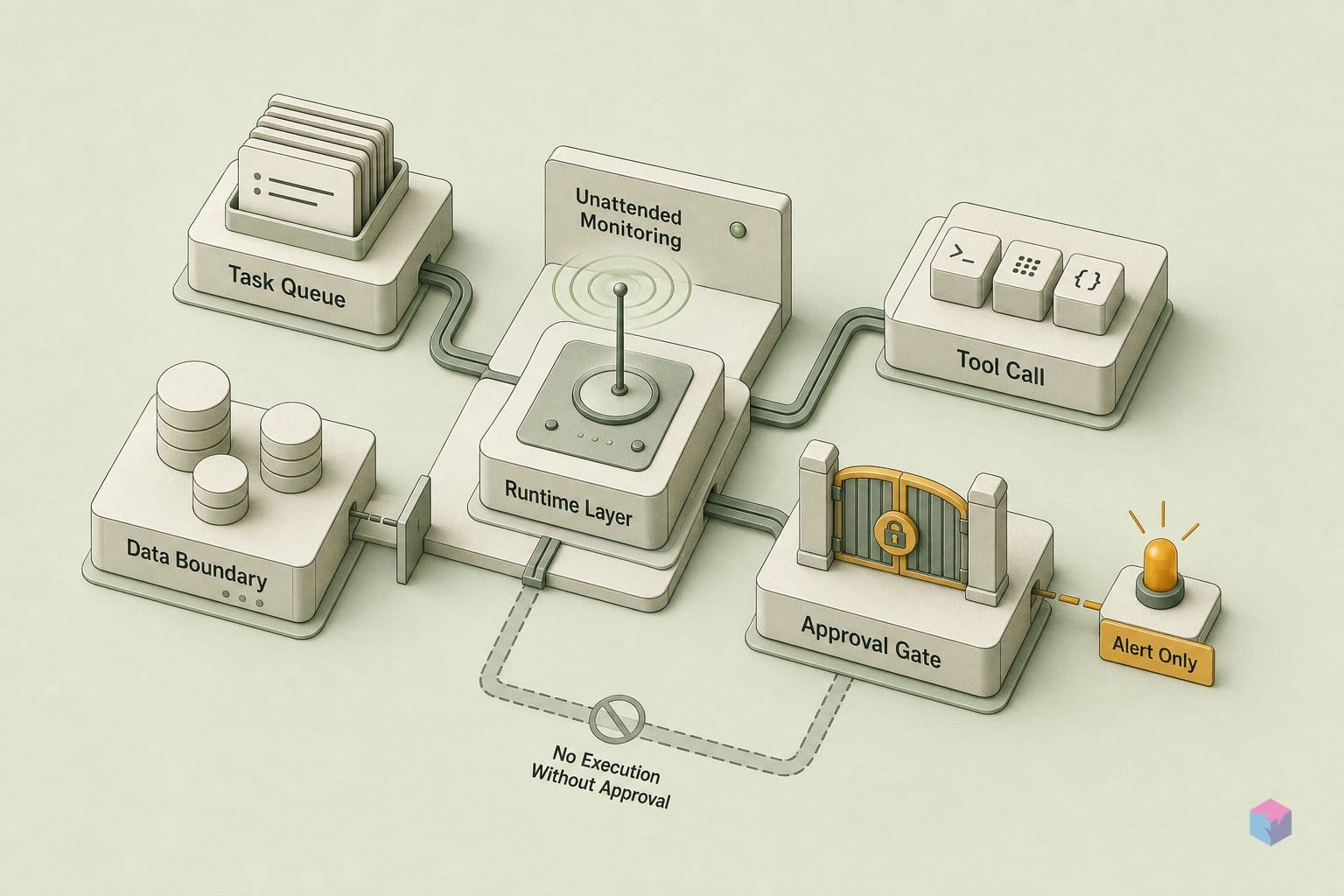
Native scheduled tasks now compete directly with the third-party glue developers built to make ChatGPT proactive. The most exposed pattern is the recurring-prompt pipeline — chaining the Assistants API to an automation layer such as make.com or Zapier to fire a prompt on a cron and route the output somewhere. With OpenAI's June 17, 2026 relaunch of scheduled tasks , that orchestration is no longer the only path to a recurring or monitoring run, and for the simplest cases it is no longer the lower-friction one.
The clearest collapse is in lightweight monitoring. A "check this URL daily and notify me if it changes" workflow previously meant standing up an external scheduler, a diffing step, and a notification channel. Native tasks fold all three into a single instruction defined once in the sidebar, with the once-per-hour floor and auto-pause guardrails handling cadence and cleanup . For non-developers, that removes the entire integration burden — no API keys, no scenario builder, no webhook plumbing.
Higher-complexity scenarios are a different story. Because tasks cap at notification rather than action, anything that needs a write — sending the email, completing the purchase, updating a record — still requires external orchestration or ChatGPT's separate agent and connector surfaces, which sit behind the "Important actions" permission default . Multi-model routing, custom data pipelines, and transactional completion remain outside the scheduling primitive. The native feature eats the simple recurring-and-monitor use cases; it does not eat the workflow engine.
The middleware most directly undercut is the consumer "AI reminder/agent" wrapper whose entire value proposition was scheduled, proactive ChatGPT runs . That is the platform-eats-ecosystem dynamic that specialized alarm and reminder apps faced once native OS reminders matured: when the base platform ships the 80% case for free, the standalone tool has to justify the remaining 20%.
"Once the platform ships the recurring trigger natively, the only automations worth building are the ones it still can't do — write-back, routing across models, and end-to-end completion," notes the walkthrough on automated content pipelines (source: AI Andy) (video: AI Andy).
The practical read for builders: treat native tasks as the new baseline. If your product's differentiator is "we schedule ChatGPT for you," that moat is gone. If it is "we act on what ChatGPT finds," it holds — for now.
Opaque by Design? Monitoring Frequency, Reliability, and Transaction Permissions
The biggest unknowns in the June 2026 relaunch are not features — they are the missing operational details OpenAI has not published. There are no reliability SLAs, no documented failure-rate data, and no stated policy for how a scheduled task behaves when it silently fails, retries, or drifts off its intended run time . For a feature now framed as a first-class control surface rather than a beta toy, that gap matters: if you wire a morning market check or an inventory monitor into your day, you currently have no published number for how often it just doesn't fire.
Monitoring granularity is the next blind spot. OpenAI states that tasks cannot run more than once per hour , but the documentation says nothing about sub-interval behavior inside that ceiling. A monitoring task that "checks for changes" could poll every minute or every 30 minutes — the docs do not clarify which, so the real latency between a web or connected-app change and your notification is undefined . For time-sensitive use cases like price-drop or ticket-availability alerts, "within the hour" is the only guarantee you can actually rely on.
Then there is the question that defines the whole product: can a monitoring task ever act, or is it permanently notify-only? The launch notes emphasize notification, and the 2025 beta explicitly could not complete a transaction — it could check monthly for ticket availability but could not buy when prices dropped . The June 2026 documentation does not resolve whether scheduled monitoring can trigger write actions through the separate app-permission framework, where defaults like "Important actions" gate sending messages, deleting content, or financial transactions . Until OpenAI publishes a complete matrix of which actions can run unattended under each setting, treat unattended tasks as read-and-alert only.
The auto-pause-on-inactivity safeguard is equally undocumented. OpenAI says unattended tasks may pause after a period of inactivity , but no threshold, no warning criteria, and no recovery path are disclosed — so a long-running monitor could quietly stop without telling you why.
The concrete takeaway: ChatGPT's scheduled tasks are a reliable new baseline for proactive alerts, not a system you can yet trust with autonomous action or guaranteed timing. Build on them for notify-only workflows, keep the human in the loop for anything that writes, deletes, or spends, and watch the Help Center — not the press coverage — for the reliability and permission details that are still missing .
Frequently asked questions
Can ChatGPT scheduled tasks send emails or complete purchases on my behalf?
No. Scheduled tasks are notify-only at launch — they search the web or check connected apps and alert you, but they do not transact on their own . Any write action is mediated by a separate app-permission framework whose default, "Important actions," reads automatically but asks before consequential effects. Sending emails or messages, deleting content, canceling appointments, and purchases, refunds, or financial transactions all require explicit confirmation before they run .
What happens to my scheduled tasks if I delete the associated chat?
The task auto-pauses. If you delete a chat tied to a scheduled task, that task automatically stops running rather than continuing in the background . The reverse is not symmetric: deleting a task does not delete its associated chat, so your conversation history stays intact. Both behaviors are explicitly documented in OpenAI's Help Center, which should be treated as the authoritative reference over secondary coverage .
How many scheduled tasks can I run on a free ChatGPT account?
The Go (free) plan allows up to 3 active scheduled tasks. Plus raises that to 5, and Pro and Enterprise to 15, per OpenAI's Help Center figures . These tiered ceilings replace the original 2025 beta's flat 10-task limit . Normal plan usage limits still apply to each task run, and tasks cannot run more than once per hour .
Why would I use ChatGPT monitoring instead of a webhook or a cron job with a script?
ChatGPT monitoring adds natural-language condition evaluation: instead of a binary state match, it can judge "is there anything here worth my attention?" and notify you only when there is something to report . That is the trade for a script's precision. The downsides are real — no published reliability SLA, a once-per-hour maximum cadence, notify-only output, and no programmatic handling of the result . Use it for fuzzy, human-judgment alerts; keep cron and webhooks for deterministic timing and downstream automation.
Does ChatGPT's scheduling replace the Assistants API for recurring workflows?
Only for the simplest cases. For check-and-notify workflows, native scheduled tasks remove the external scheduling glue — chaining the Assistants API with platforms like make.com — that wrapper tools previously supplied . But scheduled tasks remain notify-only, single-model, and unstructured. For write actions, multi-model logic, structured output, or programmatic downstream use, the Assistants API and external orchestration are still necessary .