
Self-hosting a full AI stack usually means hand-wiring a half-dozen projects — inference, a chat UI, RAG, voice, workflow automation — and hoping the ports and GPU flags line up. Dream Server's pitch is that one command does the wiring for you.
What Does Dream Server Actually Include?
Dream Server is an Apache-2.0 orchestration layer that turns a PC, Mac, or Linux box into a private, self-hosted AI server with a single command — not a new model or inference engine, but the glue that installs and connects the components home-lab builders otherwise assemble by hand . The v2.0.0 release bundles 13 integrated services covering inference, chat, RAG, voice, workflow automation, image generation, and privacy tooling .
Here is what ships in the bundled stack :
| Category | Service(s) | Role |
|---|---|---|
| Inference | llama-server | Local model serving with continuous batching |
| Chat UI | Open WebUI | ChatGPT-style front-end |
| Gateway | LiteLLM | OpenAI-compatible API, optional cloud fallback |
| Workflow | n8n | Automation and agent workflows |
| Image gen | ComfyUI | Diffusion image generation |
| Voice | Whisper + Kokoro | Speech-to-text and text-to-speech |
| Retrieval (RAG) | Qdrant, TEI, SearXNG, Perplexica | Vector search, embeddings, web search |
| Privacy | Privacy Shield | PII scrubbing |
| Observability | Token Spy, Dashboard, Langfuse (optional) | Monitoring and control |
The defining design choice is local-first binding. By default every service binds to 127.0.0.1, so nothing reaches the LAN unless you explicitly set BIND_ADDRESS=0.0.0.0 — prompts, chat history, embeddings, and workflow secrets stay on-device . That matches the project's stated position that "if AI is becoming critical infrastructure, it shouldn't be rented" .
Cloud is opt-in, not default. LiteLLM can fall back to OpenAI, Anthropic, or Together AI for hybrid local-then-cloud routing, but enabling that is a deliberate configuration step rather than out-of-the-box behavior . NetworkChuck's walkthrough of running the stack on a desktop-class machine frames the same tradeoff: keep inference local, reach for an API only when the workload outgrows the hardware (video: NetworkChuck).
For access points, the normal entry is the web UI at http://localhost:3000. Linux Docker installs expose llama-server on localhost:11434, while native macOS and Windows paths use localhost:8080 . The remaining sections trace how those 13 services are declared, wired, and brought up in order.
How Services Get Declared and Wired
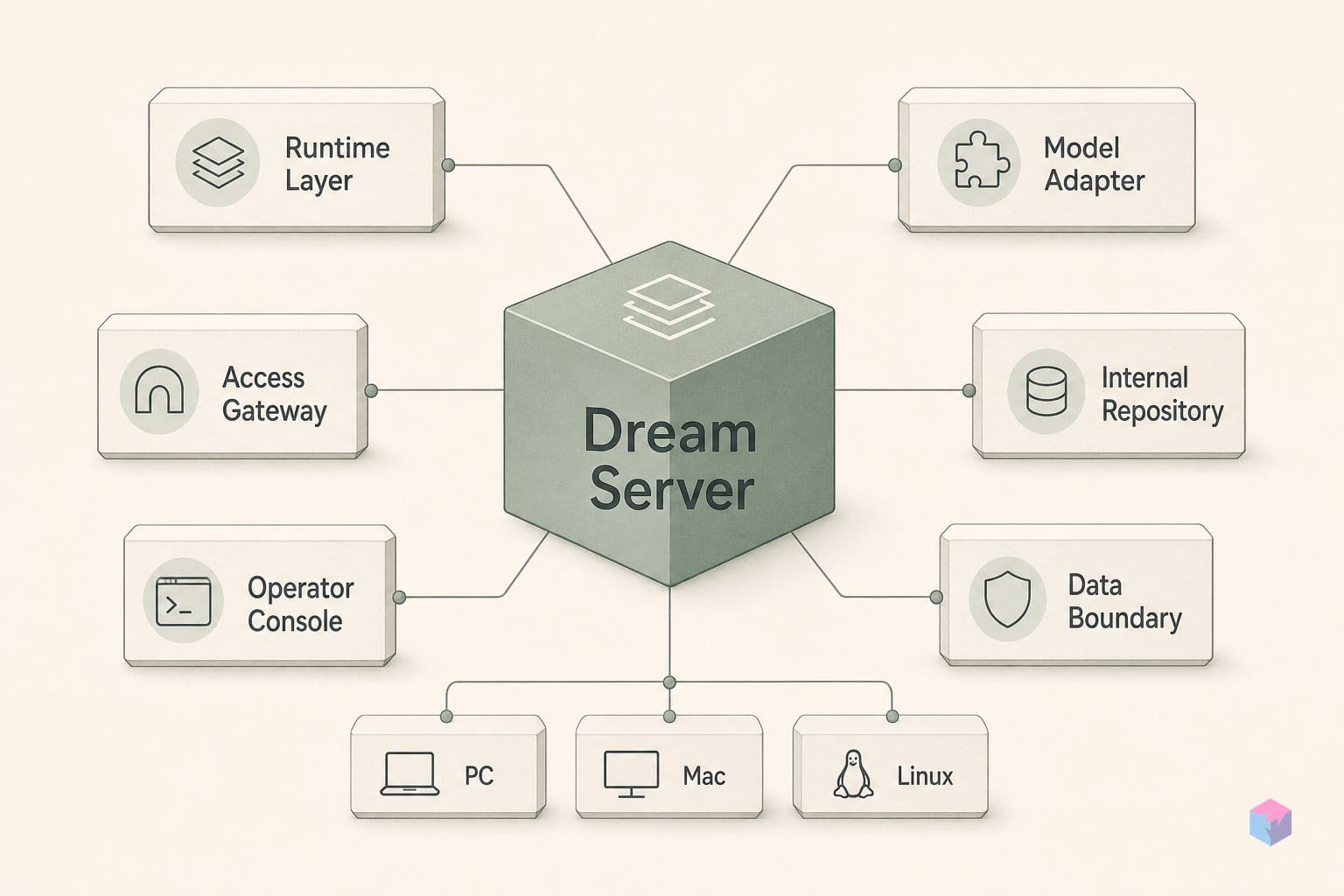
Dream Server declares each service as data, not code. Every bundled service lives in its own directory at extensions/services/<id>/ with a manifest.yaml that names the service id, its port, a health endpoint, a category, GPU support flags, and dependencies . That manifest schema is enforced by JSON Schema, so adding a new service is a configuration change rather than a patch to installer logic — you write a manifest, not a function.
Quick Answer: Dream Server wires services through manifests, not code. Each service ships a JSON Schema-validated manifest.yaml (id, port, health endpoint, GPU flags, dependencies), and resolve-compose-stack.sh merges base, GPU overlay, and extension fragments at deploy, with health checks gating dependents across all 13 bundled services .
Alongside the manifest, a service can carry an optional compose.yaml and GPU-specific overlays — compose.nvidia.yaml and compose.amd.yaml — that swap in the right backend image for the detected hardware . At deploy time, a resolve-compose-stack.sh script reads the enabled services from .env, merges the base stack with the GPU overlay and each service's extension fragment, then hands the final composed file to Docker Compose. Nothing is pre-baked: the stack you run is assembled from whichever services you turned on and whichever compute tier Phase 02 detected.
Wiring order is enforced by health checks, not luck. Dependents stay down until their dependencies report healthy — Open WebUI, for example, will not start until llama-server passes its health endpoint . The practical effect is that you do not get a chat UI that loads but errors on the first prompt because inference never came up. A service is either wired correctly or the dependent refuses to launch.
That refusal is deliberate. The project states its design priorities in plain order:
"Let It Crash > KISS > Pure Functions > SOLID" — Dream Server design priorities (source: ARCHITECTURE.md).
"Let It Crash" sits at the top for a reason. The installer runs under set -euo pipefail throughout, so an unset variable, a failed command, or a broken pipe halts the run instead of limping forward . The team treats silent failures and partial starts as bugs, not tolerable states — a posture that matches the manifest-and-health-check model, where every service must explicitly declare how it proves it is alive. For developers, this is the part worth borrowing even if you never run the full stack: the trust boundary is a schema plus a health gate, and adding capability means adding data the validator already understands .
Dream Server's Phased Startup
Dream Server starts in phases so the chat UI becomes usable before the heavy download finishes. In bootstrap mode, a small model loads first and serves a working chat interface in roughly two minutes, while the full primary model downloads in the background . That ordering is the practical payoff of the v2.0 rewrite: instead of one long blocking install, startup is broken into discrete, resumable stages that each prove they completed before the next runs.
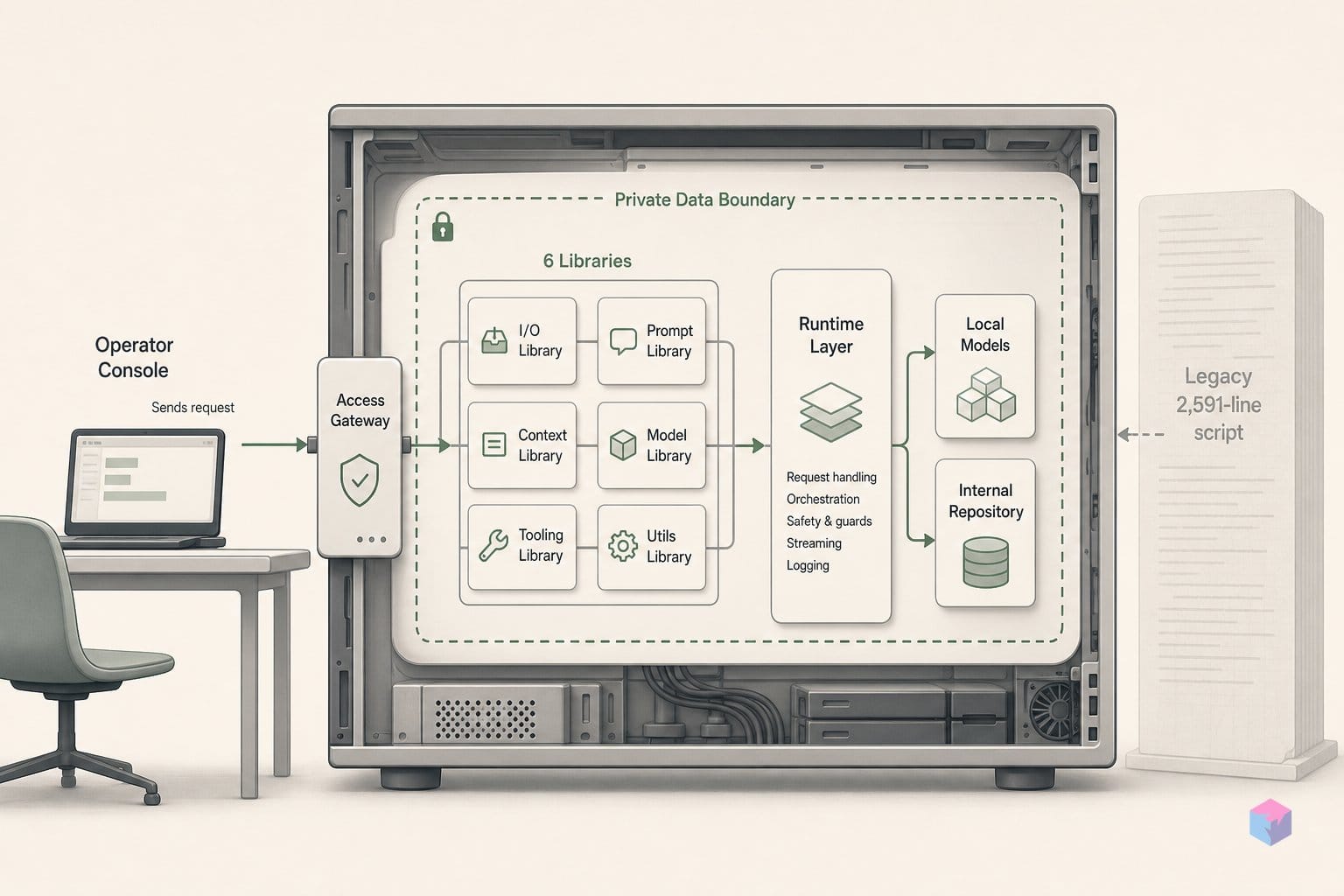
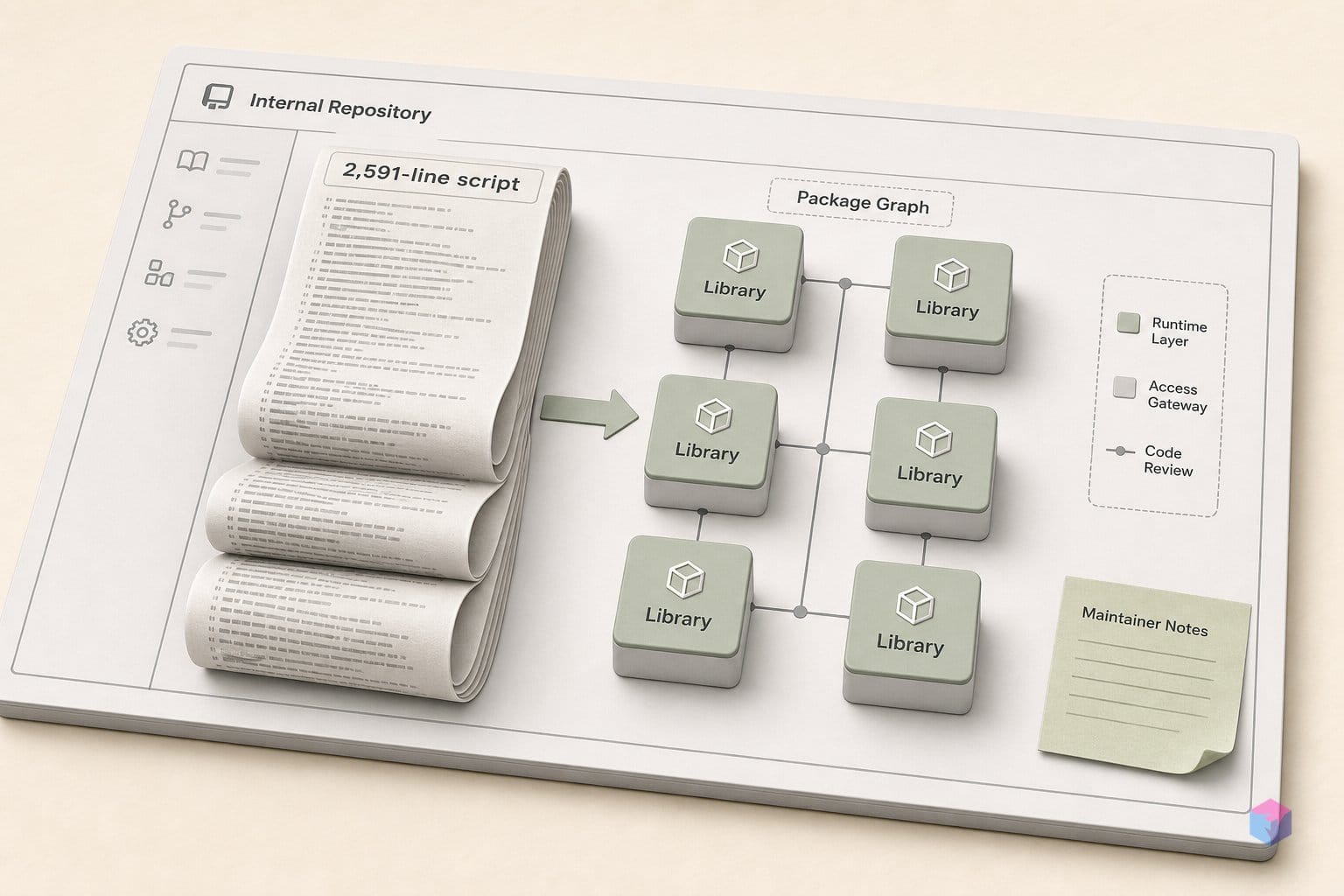
The v2.0.0 release (March 4, 2026) refactored the installer from a 2,591-line monolith into six libraries plus a 13-phase pipeline . The same release added AMD Strix Halo support through ROCm 7.2 unified-memory tiers and introduced an "ultra" tier (NV_ULTRA) targeting 90GB+ multi-GPU NVIDIA rigs . Phase 02 of that pipeline runs GPU detection and assigns the hardware tier that decides which GGUF model, context window, and compute overlay you get — so the phased structure is also where the model-routing decision lives.
Later 2.5.x releases spent their effort on the failure modes that phased startup exposes. v2.5.2 (May 26, 2026) patched a crash-loop: discrete NVIDIA GPUs with under 4GB of VRAM had been routed to the CUDA llama-server, which then crash-looped; they now fall back to a CPU/Tier-0 path instead . That is the kind of bug that only surfaces once tier detection drives a real backend choice — a low-VRAM card detected as "GPU" but unable to run the CUDA build.
v2.5.3 (May 26, 2026, tag d778467) is marked the latest release and ships a validation receipt covering the pipeline's phases . The reported numbers:
- 15/15 regression checks
- 6/6 zero-prerequisite bootstrap passes
- 10/10 Docker distro lanes
- 5/5 Incus VM lanes (plus 4/4 each for install, verify, cloud-mode, dashboard, Hermes, and lifecycle phases)
Read these as the project's own receipts, not third-party verification. Every figure here comes from Light-Heart-Labs' GitHub, and there is no independent audit of the pipeline yet . The validation matrix is genuinely useful as a regression signal — it tells you the maintainer tests bootstrap-resume and lifecycle recovery across ten distros — but a green receipt is a claim the project makes about itself, which the trust-boundary section takes up next.
Which Distros and Machine Classes Are Validated
Dream Server's primary development path is AMD Strix Halo on Linux, not NVIDIA. Per the support matrix updated May 25, 2026, Linux + AMD Strix Halo is the only Tier A target, driven through ROCm 7.2 unified-memory tiers . That ordering matters for anyone deciding what to deploy: Tier A is where day-to-day development happens, where fixes land first, and where regression coverage is deepest. If you run NVIDIA, you are on a supported path — but not the path the maintainer dogfoods.
The fully supported tier covers Linux NVIDIA x86_64 (up to 90GB+ VRAM in multi-GPU rigs), macOS Apple Silicon on M1 or later, and Windows 11 via Docker Desktop with WSL2 . These are validated, but the AMD-first signal means an NVIDIA-specific bug may surface a release later than it would on Strix Halo.
Distro breadth widened sharply in v2.5.0 (May 21, 2026), which expanded validation across:
- Ubuntu 24.04 and 22.04, Debian 12, Linux Mint 21.3
- Fedora 41+, Rocky Linux 9, openSUSE Tumbleweed
- Arch, Manjaro, and CachyOS
The same release added Incus VM lanes, which test the installer against real systemd, a live Docker daemon, Compose, and dry-runs rather than a sandboxed approximation . For a project whose value proposition is "one command," that lifecycle-level coverage is the difference between a script that installs and one that survives a reboot.
At the experimental edge sits Intel Arc via SYCL, marked Tier C. A770 and A750 runtime is confirmed, but there is no ComfyUI or Whisper GPU acceleration yet — image generation and speech-to-text fall back to slower paths on those cards . There is also a deliberate safety rail at the low end: as of v2.5.2 (May 26, 2026), discrete NVIDIA GPUs with under 4GB VRAM are routed to a CPU/Tier-0 path instead of a crash-looping CUDA llama-server .
The practical read for builders: pick Strix Halo or a fully supported NVIDIA/Apple/Windows class if you want reliability, and treat Intel Arc as a project to watch rather than a daily driver.
What Dream Server Doesn't Sign: The Trust Boundary
Dream Server's trust model is "good enough for a home lab," not enterprise attestation — and the difference is worth understanding before you pipe its installer into a shell. The default Linux/macOS bootstrap follows the main branch and there is no full signed-release, checksum, or SBOM chain covering every installer artifact . The practical trust surface is narrower than that gap suggests: GitHub HTTPS for transport, explicit Git refs for what you actually run, localhost-first binding so nothing is exposed by default, and the project's own validation receipt as the evidence of correctness .
The single most useful hardening step is pinning. Instead of tracking main, set DREAMSERVER_REF to a specific tag — for example d778467, the commit behind v2.5.3 (May 26, 2026) — or clone that tag directly . That converts a moving-target install into a reproducible, auditable one: you can read the exact code before it runs and re-run the identical stack later. Generated credentials stay local — WEBUI_SECRET, N8N_PASS, and LITELLM_KEY are minted on your machine and never transmitted (video: NetworkChuck), which is consistent with the project's data-sovereignty stance .
There is also a naming hazard. At least five near-identical forks exist on GitHub — imajus/dream-server, tarunag10, Flink-JP, DINHCHUNG93, and others — so confirm that Light-Heart-Labs/DreamServer is the canonical upstream before you clone or curl anything . A fork that looks correct can ship a modified bootstrap, and the curl-pipe pattern gives you no second chance to inspect it.
"For a home lab, the trust boundary is your own GitHub clone and your own hardware — that's a reasonable bar. It is not the same bar as a signed enterprise supply chain, and you shouldn't pretend it is," — paraphrasing the self-hosted posture discussed in VirtualizationHowto's home-lab AI tools walkthrough (source: VirtualizationHowto).
Finally, calibrate expectations on the numbers. As of June 2026, no independent security audit or third-party benchmark of Dream Server appears to exist; the v2.5.3 receipt — 15/15 regressions, 6/6 zero-prereq bootstrap, 10/10 Docker distro lanes, 5/5 Incus VM lanes — is entirely self-reported . That is appropriate evidence for a privacy-focused home-lab tool and a fair signal of engineering discipline, but it is not external attestation. Read the validation figures as the maintainer's word, verify the upstream and the ref yourself, and keep BIND_ADDRESS on localhost until you have a reason not to.
Dream Server vs. the DIY Route: Honest Tradeoffs
The choice between Dream Server and hand-rolling your own stack comes down to one tradeoff: time-to-working-stack versus auditability. Dream Server wins on the first — GPU tier detection, health-check ordering, multi-distro compatibility, and bootstrap-resume are already solved, and roughly 2,100 GitHub stars and 322 forks (project-reported) suggest the community has exercised the happy path. The DIY route wins on the second: you pin exact image tags, write every compose file yourself, and never run an unsigned bootstrap script that follows a remote main branch.
Neither side is strictly better. What Dream Server compresses into one command — wiring llama-server, Open WebUI, LiteLLM, n8n, ComfyUI, Qdrant, and the voice/RAG plumbing — is exactly the surface a careful builder may want to inspect line by line. The modular v2.0.0 rewrite (March 4, 2026) that replaced a 2,591-line installer with six libraries and a 13-phase pipeline makes the project easier to read than its monolithic predecessor, but reading it is still work you inherit if auditability is your priority.
| Dimension | Dream Server | DIY (Compose by hand) |
|---|---|---|
| Time to first chat | ~2 minutes via bootstrap mode | Hours to days |
| GPU routing | Phase 02 auto-tiers CUDA/ROCm/Metal/SYCL/CPU | You configure per backend |
| Image tag control | Managed by manifests/overlays | Full — you own every tag |
| Supply-chain trust | Bootstrap follows main; no full signed/SBOM chain | Whatever you verify |
| Maintenance | Upstream releases (v2.5.3, May 26, 2026) | Yours |
A workable heuristic: if you would spend more than a weekend wiring inference, a chat UI, RAG, workflow automation, and image generation together — and you are not operating in a regulated environment — Dream Server is worth evaluating. If you need provenance you can attest to an auditor, the DIY path keeps that control in your hands.
Privacy-sensitive teams sit in the middle. The localhost-first binding (services default to 127.0.0.1) and generated local secrets like WEBUI_SECRET, N8N_PASS, and LITELLM_KEY are genuine strengths; the unsigned bootstrap is the real gap. Mitigate it deliberately: pin DREAMSERVER_REF to a reviewed tag rather than tracking main, read the compose overlays before deploy, and add your own SBOM and checksum layer on top.
The concrete takeaway: treat Dream Server as a fast, well-structured starting point you still verify — pin the ref, confirm Light-Heart-Labs/DreamServer is the canonical upstream (several near-identical forks exist ), and keep BIND_ADDRESS on localhost until you have a reason not to. For a weekend home lab it saves real time; for a compliance-bound deployment, borrow its architecture and own the supply chain yourself.
Frequently asked questions
What machines can run Dream Server?
Linux on AMD Strix Halo is the Tier A, primary development path, with 120GB+ unified memory in scope . Linux NVIDIA x86_64, macOS Apple Silicon (M1 and newer), and Windows 11 via Docker Desktop + WSL2 are fully supported. Intel Arc SYCL (A770/A750) is Tier C/experimental — the runtime works, but ComfyUI and Whisper get no GPU acceleration yet . As of v2.5.2 (May 26, 2026), discrete NVIDIA cards with under 4GB VRAM are routed to a CPU/Tier-0 path instead of a crash-looping CUDA llama-server .
Does Dream Server require an internet connection after initial setup?
No. Once models are downloaded, all inference runs locally on your own hardware, and nothing phones home unless you opt in . The bootstrap needs the internet once — to clone the repo and pull GGUF models — after which the stack runs fully offline. LiteLLM provides an opt-in hybrid path: local-first inference with cloud fallback to OpenAI, Anthropic, or Together AI, which you enable deliberately rather than by default .
Is it safe to expose Dream Server on a LAN or the public internet?
By default every service binds to 127.0.0.1, so the stack is reachable only from the host machine — the normal UI entry point is http://localhost:3000 . Setting BIND_ADDRESS=0.0.0.0 enables LAN mode, and that is opt-in. The project explicitly does not recommend public internet exposure without further security review . TLS termination, authentication hardening, and firewall rules remain your responsibility; generated local secrets such as WEBUI_SECRET, N8N_PASS, and LITELLM_KEY protect the services but do not substitute for an exposure plan.
How do I add a new service to Dream Server?
Add services by data, not code. Drop a manifest.yaml into extensions/services/<your-id>/ declaring id, port, health endpoint, category, GPU support flags, and dependencies, then add an optional compose.yaml plus GPU overlays (compose.nvidia.yaml / compose.amd.yaml) if needed . A JSON Schema validates the manifest, and resolve-compose-stack.sh merges your fragment into the final stack with health checks gating dependents — no edits to core installer code required .
How does Dream Server compare to just running Ollama with Open WebUI?
Ollama + Open WebUI covers local inference and chat — and little else. Dream Server bundles that plus voice (Whisper speech-to-text, Kokoro text-to-speech), image generation (ComfyUI), a retrieval stack (Qdrant, TEI embeddings, SearXNG, Perplexica), workflow automation (n8n), a Privacy Shield PII scrubber, and optional Langfuse observability — all wired together and health-checked, with v2.0.0 shipping 13 integrated services . The tradeoff is a heavier, more complex stack and a curl-to-main bootstrap that lacks a complete signed-release, checksum, and SBOM chain . If you only need chat, the simpler pair is fine; if you want the full self-hosted suite without assembling it yourself, Dream Server is the faster route — provided you pin the ref and confirm the canonical upstream.