

From turn-by-turn to declared objectives: the /goal difference
/goal is a Grok Build mode that swaps step-by-step approval for a single declared objective, running until that objective is met and verified. You type one high-level instruction — xAI's canonical example is /goal Migrate the auth module to the new API — and the agent plans, executes, and checks its own work instead of pausing for a prompt-and-approve cycle on each step .
That is a real change to the agent's contract. Before /goal, Grok Build operated turn-by-turn: each step required a prompt and a per-step accept or reject. The new mode replaces that loop with one objective declaration and a persistent goal object that tracks state across subtasks .
At launch, the agent generates a progress checklist and tracks it in real time. The panel flips to Complete only when every checklist item is checked and built-in verification passes — not merely when code is generated .
A few practical specifics matter before the deeper mechanics:
- Access: available to SuperGrok and X Premium Plus subscribers as of June 22, 2026 .
- Not a lockout: you can feed additional instructions to the agent between subtasks without abandoning the goal .
- No new model:
/goalis a runtime layer over existing Grok Build infrastructure, which launched in early beta on May 25, 2026 .
That last point is worth holding onto. /goal does not introduce a foundation model — your existing model selection still governs what executes underneath, whether that is grok-build-0.1, priced at $1 per million input tokens and $2 per million output tokens , or Composer 2.5, made selectable via /model on June 1, 2026 . The orchestration is new; the engine is not.
The /goal execution cycle: from objective intake to completion
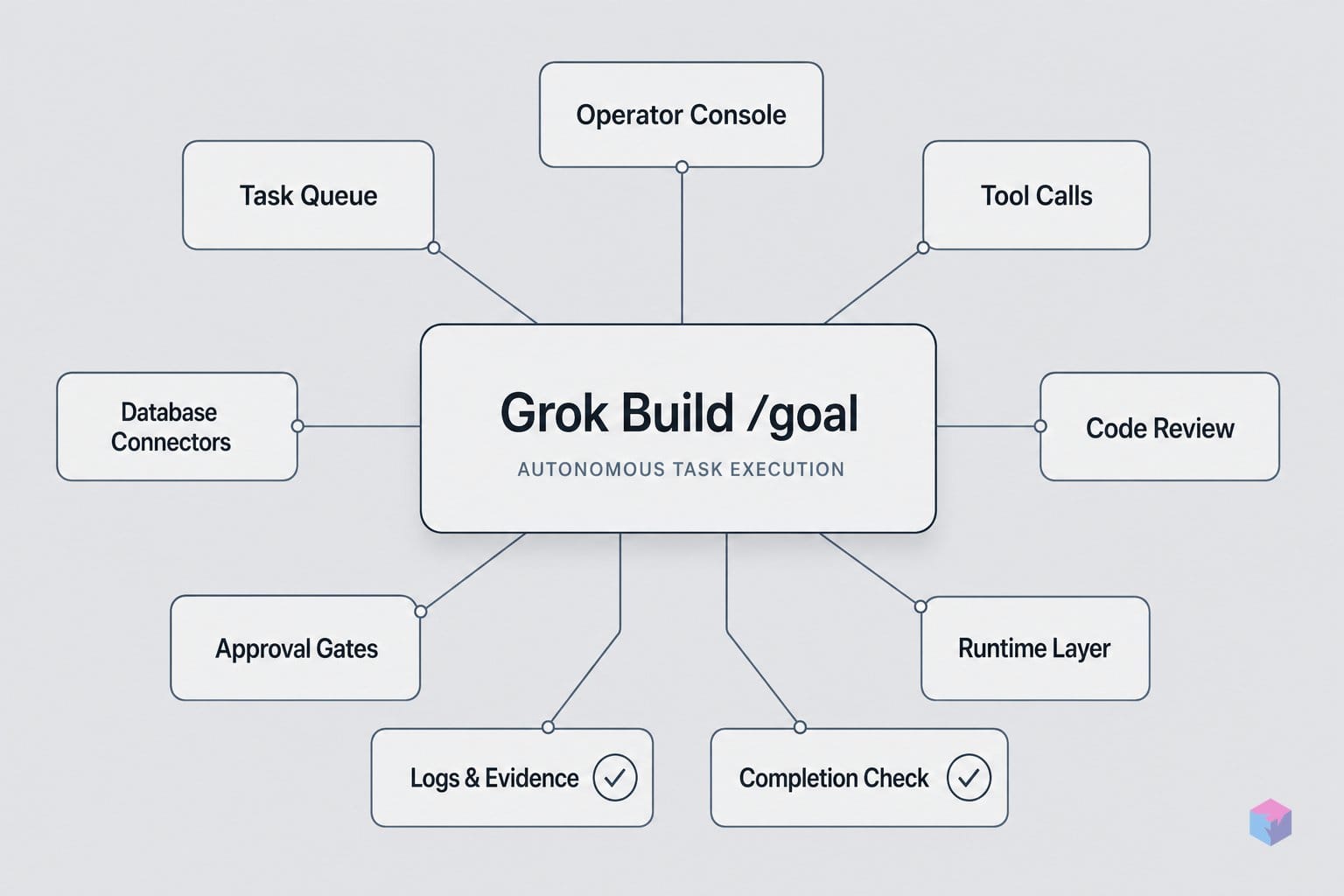
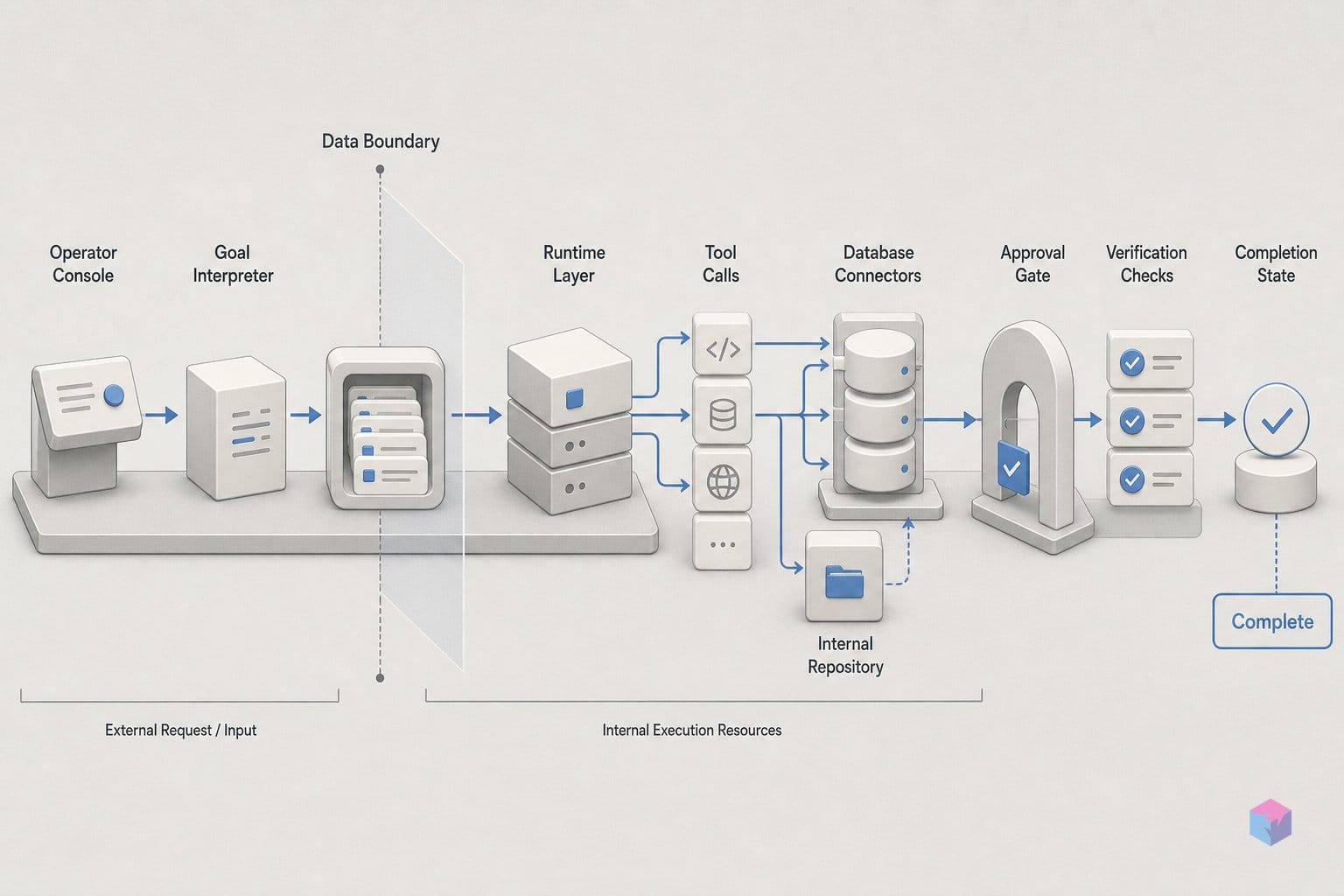
What that orchestration actually does is run a three-phase loop. First, Grok Build reads the declared objective, generates an approach, and breaks it into a progress checklist. Second, it executes those checklist items one at a time. Third, it verifies the output before marking the work done. The cycle repeats until both the completion and verification conditions are satisfied .
The checklist is generated dynamically, not pulled from a fixed template. Secondary write-ups characterize the pattern as an observe–plan–act cycle with subtask chaining, where planning produces the task breakdown on the fly and implementation and verification run as a pipeline until the work is done and tested . That distinction matters: the agent re-plans against what it finds, rather than executing a sequence decided before it touched the repository.
Verification here is operational, not formal. The agent does not require a CI-equivalent test suite to pass. Instead, it may review the code it produced, inspect webpages to confirm behavior, or execute scripts and tests to confirm the output actually works rather than merely having been generated . When the run finishes, the progress panel flips to Complete with every checklist item checked.
As xAI frames the loop in its launch documentation:
"After receiving the objective, the agent plans an approach, breaks the work into a progress checklist, then executes items one at a time — iterating until the task is both completed and verified," — xAI, /goal launch coverage.
So what happens when verification keeps failing? That is the gap. The launch specification documents no maximum retry count and no loop-exit condition for the case where the agent cannot get an item to pass . For a turn-by-turn assistant that does not matter, because you approve each step. For a long-running executor that loops unattended, an open-ended retry behavior is the single most consequential unknown for production use.
The practical reading: treat verification as a confidence signal, not a guarantee. A few things worth knowing before you hand it a large migration:
- Checklist is emergent. The plan you see in
/goal statuscan change as the agent learns more about the codebase. - "Verified" is whatever the agent could run. If it could not execute your real test suite, verification may mean a code review or a page inspection instead.
- No documented loop cap. Until xAI publishes retry and exit semantics, scope objectives small enough to inspect, and use
/goal pauseif a run stalls on one item.
How to steer /goal while it's in-flight
You steer a live /goal run with four in-session commands — /goal status, /goal pause, /goal resume, and /goal clear — typed inside the same Grok Build session that started the run . They cover the full control surface: inspect progress, halt, continue, or abandon — without killing the terminal.
| Command | What it does |
|---|---|
/goal status | Opens the current progress panel and checklist |
/goal pause | Halts work but preserves the goal and its state |
/goal resume | Continues from the pause point |
/goal clear | Abandons the objective entirely |
The distinction worth internalizing: pause keeps the goal object and checklist intact so resume picks up where it stopped, while clear throws the objective away . Use pause when a run stalls on one item; reserve clear for objectives you have decided to scrap.
You are not locked out during a run. xAI documents that additional instructions can be fed to the agent while it works, so you can correct course between subtasks without discarding the goal . That matters for migrations, where you often spot a convention the agent missed mid-run.
For multiple concurrent runs, the Agent Dashboard — shipped June 15, 2026 and opened via grok dashboard, /dashboard, or Ctrl+\ — manages parallel sessions, sorting those awaiting input to the top and letting you answer inline without leaving the view . Sessions keep running after the dashboard closes.
The dashboard surfaces per-session state so you can triage at a glance:
- working — actively executing a checklist item
- thinking — planning or reasoning before acting
- running commands — e.g.
cargo test --workspaceduring verification - awaiting input — blocked on your approval or answer
- idle — nothing in flight
Practically, the dashboard is where supervision scales: you launch several /goal runs, then step in only for the sessions flagged awaiting input, leaving the rest to loop.
What /goal can reach without approval: Grok Build's permission layers
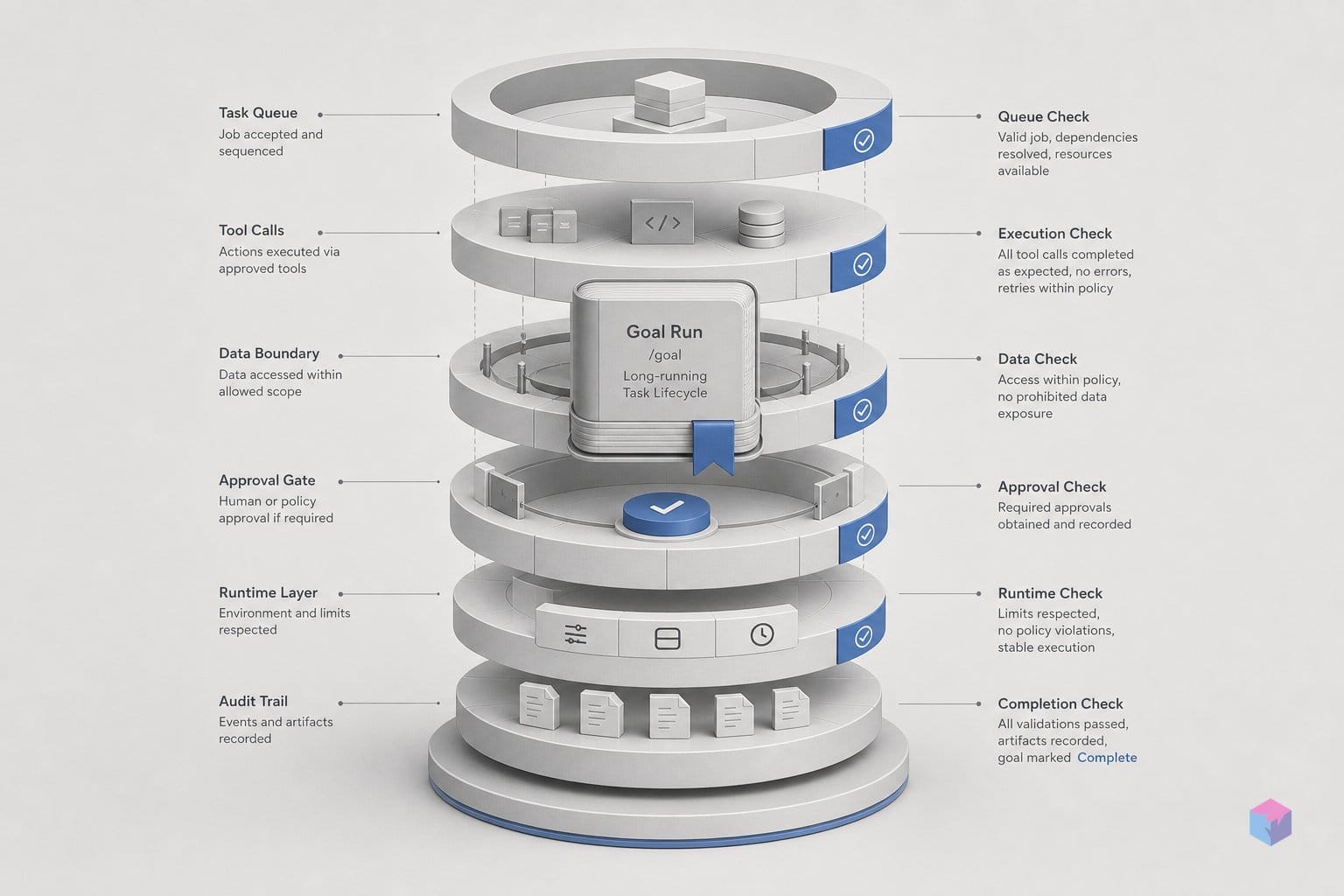
Whatever /goal reaches without stopping to ask you is governed by Grok Build's existing permission and sandbox layers, not by /goal itself. The autonomous loop runs inside the same framework that controls every tool call: a permission mode decides whether the agent prompts before acting, and a sandbox profile decides which files and network it can touch. The conservative reading is that /goal orchestrates planning, checklist state, and verification, while these pre-existing controls bound how far it can actually go .
The default permission mode is ask: the agent prompts before each tool call, and that prompt still fires inside a /goal run . For genuinely unattended execution you have to relax it. The config accepts permission_mode = "ask" or "always-approve", where always-approve skips prompts entirely .
Enterprise Grok Build adds two more modes. dontAsk silently denies anything without an explicit allow rule, and acceptEdits auto-approves file edits but still prompts for shell commands — the most defensible profile for an unattended /goal run, since the agent can rewrite code freely but a human gates anything that touches the shell .
| Mode | Behavior | Fit for /goal |
|---|---|---|
ask (default) | Prompts before every tool call | Supervised runs |
acceptEdits (enterprise) | Auto-approves edits, prompts for shell | Recommended unattended |
always-approve | Skips all prompts | Fully unattended, higher risk |
dontAsk (enterprise) | Silently denies unpermitted calls | Locked-down allow-listing |
Sandbox profiles add a second wall. read-only blocks child-process network on Linux and limits writes to ~/.grok/ and tmp; strict limits reads to the working directory plus system paths and writes to CWD, /tmp, and ~/.grok/ .
"Sensitive directories such as ~/.ssh, ~/.gnupg, ~/.aws, and cloud config folders are always write-protected regardless of profile." — Grok Build enterprise documentation (source: Grok Build CLI)
That last guarantee matters most for autonomous runs. Even in always-approve mode, credential exfiltration is structurally blocked: the agent cannot write into your SSH, GPG, AWS, or cloud-config folders no matter what the objective says . One open question remains — xAI has not stated whether /goal changes any of this or simply inherits it .
/goal's persistent-job bet — and how it differs from rivals
The closest comparisons are Anthropic's Claude Code and OpenAI's Codex CLI. All three are terminal-native, multi-file agentic coders, and xAI positions Grok Build directly against them . What sets /goal apart is narrower than a new model: a named, stateful goal object, an explicit pause/resume/clear lifecycle, and a mandatory verification pass before the panel reports done .
The runtime underneath is shared, not bespoke. xAI shipped grok-build-0.1 through its API in public beta on May 29, 2026, priced at $1 per million input tokens and $2 per million output tokens, with a claimed 100+ tokens/second . Composer 2.5, described as fast on long-running instruction chains, landed in Grok Build on June 1, 2026 and is selectable via /model . So /goal is a CLI mode layered over existing model choices.
The architectural bet is supervision, not a single blocking chat. The Agent Dashboard, announced June 15, 2026, lets you run multiple concurrent sessions and surfaces those awaiting input at the top . That is structurally different from a single-session, one-conversation focus.
"Planning, implementation, and verification are handled as a pipeline of subtasks until the work is done and tested," characterizes the technical write-up at AI Made Tools (source: Grok Build complete guide).
Before you hand it a repository, weigh the open gaps. The public spec does not yet state:
- Maximum runtime per goal
- Crash-recovery and retry policy
- Token or credit budget caps
- Headless-mode compatibility and ACP availability
It also matters that the official Modes and Commands docs, last updated June 21, 2026, had not yet listed /goal — leaving xAI's launch post as the primary specification .
The concrete takeaway: treat "Complete" as "planned, executed, and self-checked" — not as audited. Until xAI documents runtime, recovery, and budget limits, scope /goal to bounded, testable jobs like migrations, run it under a sandbox profile, and read the diff before you trust the green checkmarks.
Frequently asked questions
How is /goal different from a regular Grok Build session?
A regular Grok Build session is turn-by-turn: you prompt, the agent acts, and you approve each step. /goal accepts a single high-level objective, generates a progress checklist, then plans, executes, and verifies the work until it is done — without step-level approval at every turn . The exception is permission mode: if permission_mode is set to ask, the agent still prompts before tool calls (Grok Build Modes and Commands).
What does /goal actually check before calling a task complete?
Verification is operational, not formal. Before flipping a checklist item to done, the agent may review the code it produced, inspect webpages to confirm behavior, or execute scripts and tests to confirm the output works rather than merely being generated . There is no required test suite or CI gate. It checks what it can reach in your repository — so "Complete" means self-checked, not audited.
Can /goal run unattended in headless or API mode?
Unconfirmed at launch. Grok Build supports headless sessions with flags including -p, --session-id, --resume, and --always-approve, stored under ~/.grok/sessions (Grok Build enterprise docs). But the June 22, 2026 announcement does not state whether /goal is callable through headless mode, Agent Client Protocol, or the grok-build-0.1 API endpoint. Treat unattended /goal as unverified until xAI documents it.
Which permission and sandbox settings are safest for an unattended /goal run?
For a bounded, unattended run, pair the strict sandbox with the acceptEdits permission mode. strict limits reads to the working directory and system paths and writes to CWD, /tmp, and ~/.grok/; acceptEdits auto-approves file edits but still prompts for shell commands . Sensitive directories — ~/.ssh, ~/.gnupg, ~/.aws, and cloud config folders — stay write-protected regardless of profile .
How does /goal compare with Claude Code's support for long-running tasks?
Both run multi-file agentic execution across plan, implement, and verify stages. /goal's distinguishing additions are a named, resumable goal object, a real-time progress checklist, and explicit /goal pause and /goal resume steering commands . The open gaps are maximum runtime and crash-recovery semantics, which xAI has not yet specified (Grok Build guide) and which Claude Code documents more explicitly.