
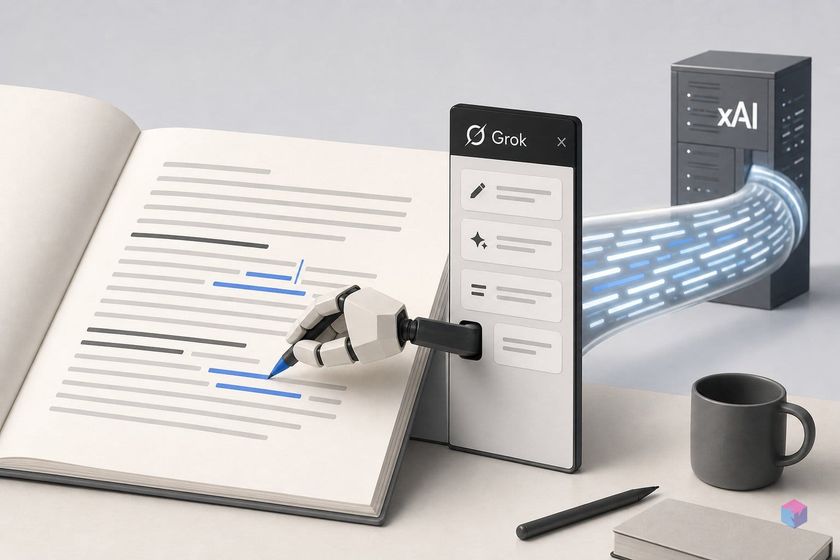
xAI has pushed Grok off its own chat surface and into Microsoft Office, shipping it as docked task-pane add-ins that read and rewrite the document you already have open. For developers and teams who live in Word and PowerPoint, that changes where AI edits happen — and where your file content travels.
What the Grok sidebar does in Word and PowerPoint
The Grok sidebar is a Microsoft 365 task-pane add-in that operates directly on your open Word document or PowerPoint deck, rather than as a separate chatbot window. Grok for PowerPoint reached the public on June 16, 2026 , and xAI announced Grok for Word on June 18, 2026 . In both, the diff lands in your actual file — edits are visible, undoable, and editable.
For PowerPoint, the panel generates full multi-slide decks from a prompt or outline, adds and restructures individual slides, matches theme and master styles, writes speaker notes, generates diagrams and images, and pulls live research from the web and X with citations — all docked beside real, editable slides .
For Word, Grok converts rough notes into structured long-form documents using real Word headings and lists, rewrites for clarity and concision, fixes grammar, normalizes headings and terminology, and brings in web research .
One caveat for the technically minded: the official add-in pages do not state which model handles each Office action. The April 20, 2026 tease — where xAI engineer Matthew Dabit demoed Grok turning a neuroscience paper into a nine-slide deck — ran on Grok 4.3 , which xAI lists as its default general-purpose model with a 1-million-token context window and API pricing of $1.25 per 1M input tokens and $2.50 per 1M output tokens . At that demo, Elon Musk said plugins for Excel, Word, and PowerPoint were "coming soon," without a firm date . Treat Grok 4.3 as the demonstrated default, not a confirmed per-action router.
What the Marketplace install grants: document write and off-device send
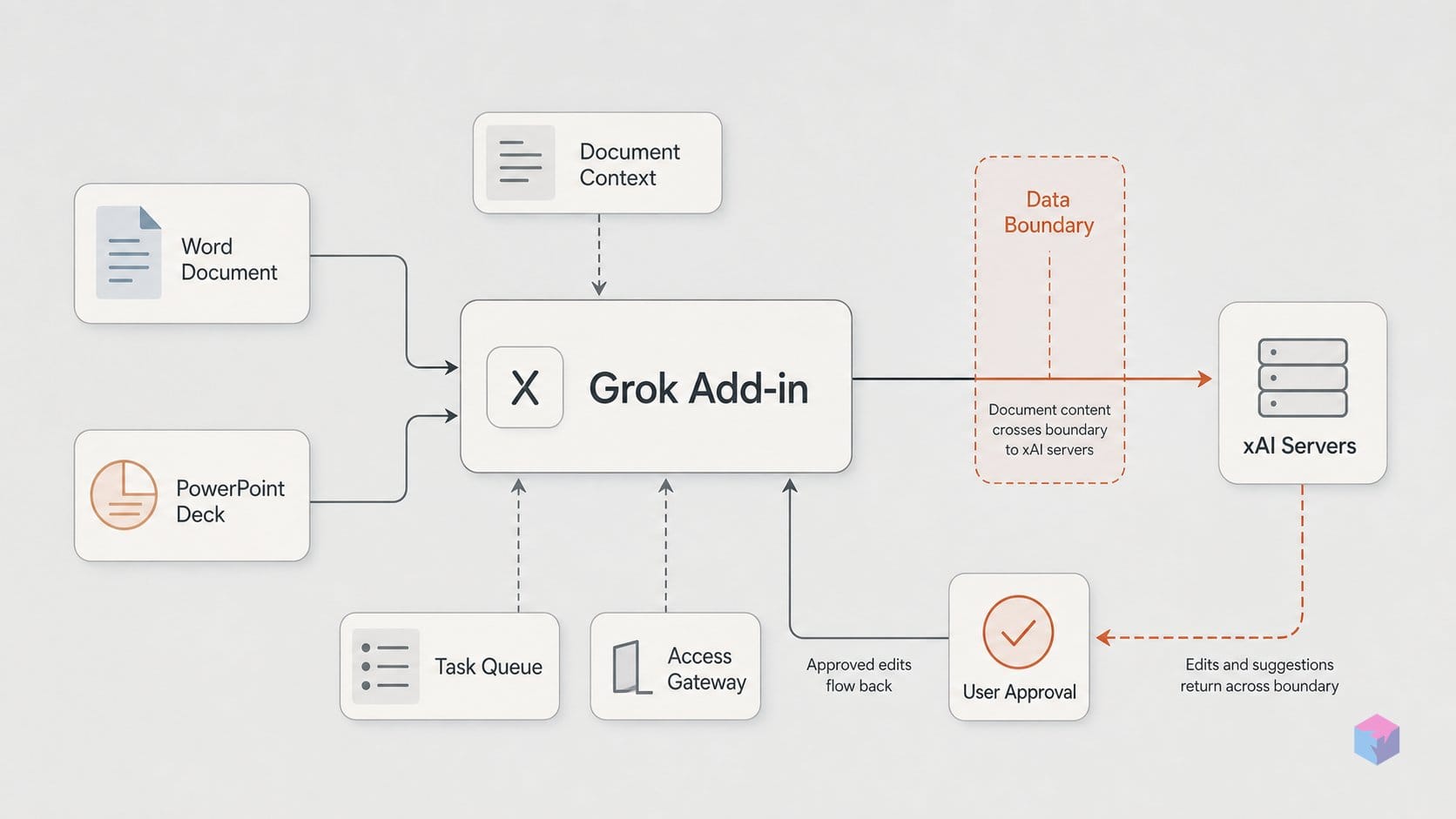
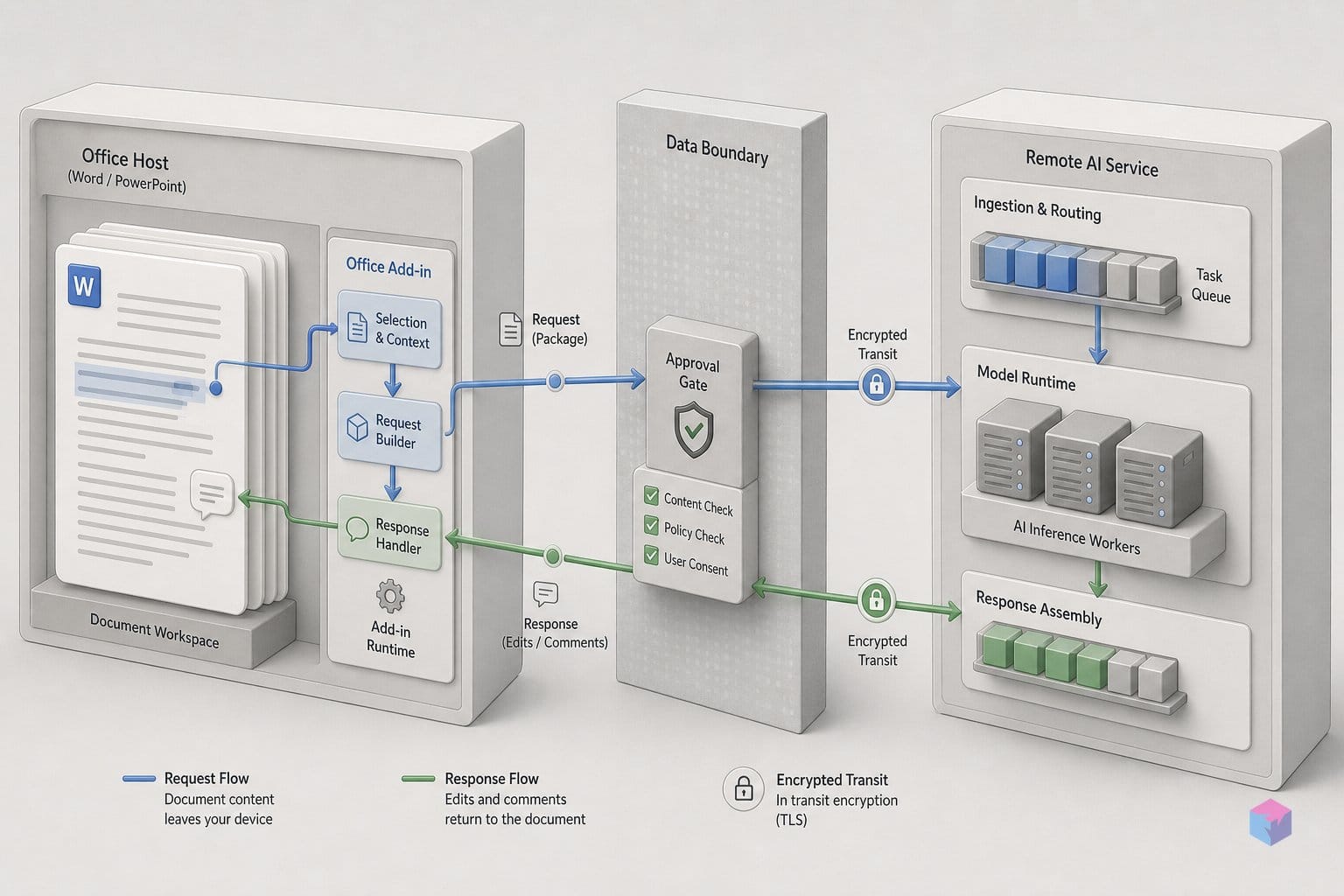
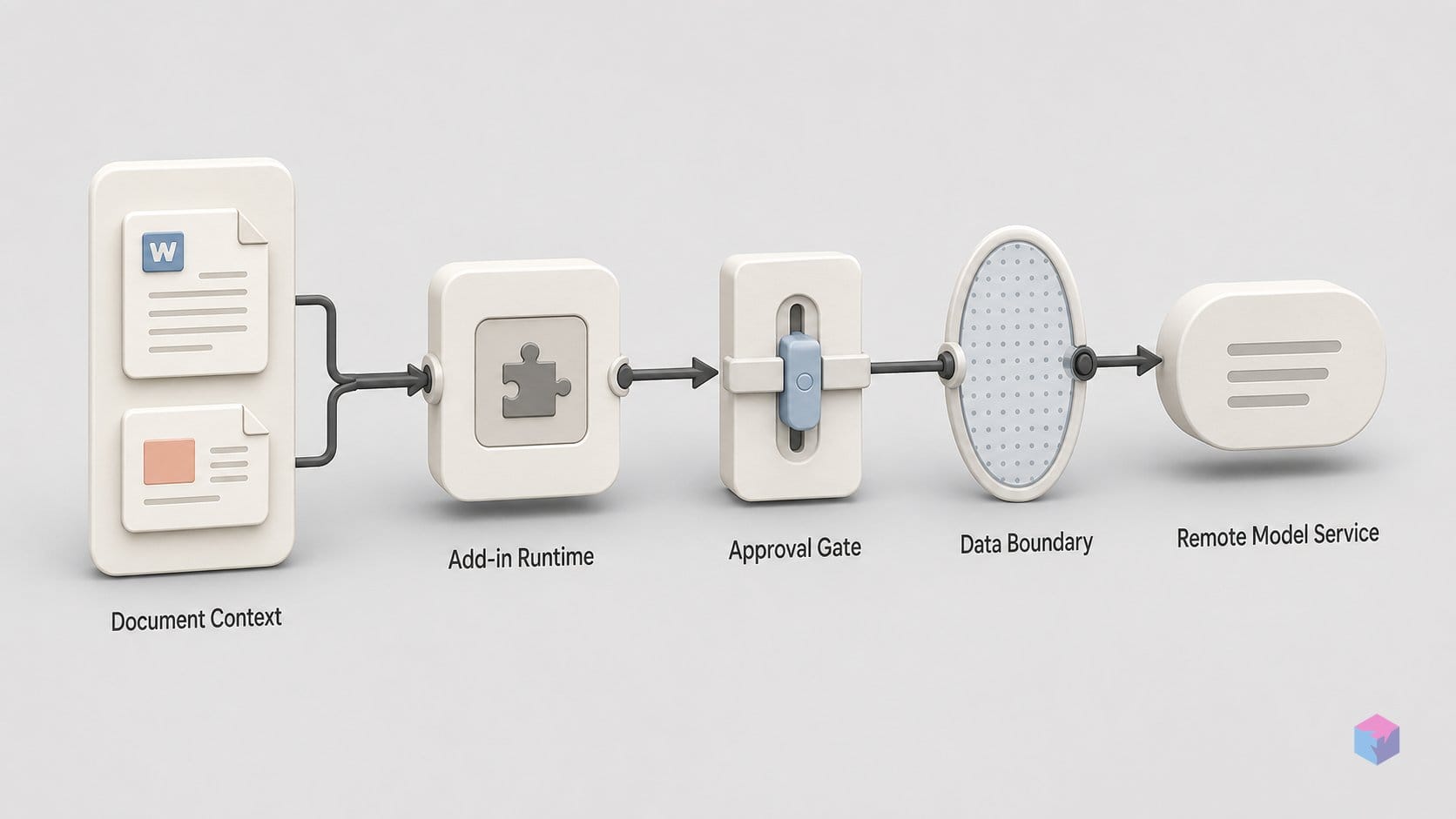
The Microsoft AppSource listings spell out exactly what you authorize when you install the add-in: each one "can read and make changes to the document" and "can send data over the Internet" . The same two-line permission profile appears on both the Word listing (product ID WA200011055) and the PowerPoint listing (product ID WA200011057) . For an agent whose entire job is to edit the open file and pull live web research, that is the expected and necessary surface — it cannot rewrite a paragraph it cannot read, or cite a source it cannot fetch. The disclosure is honest, not alarming on its own.
What is missing matters more than what is stated. As of June 19, 2026, neither Marketplace listing publicly links an xAI security whitepaper, a tenant-isolation document, or a data-residency certification . You are granting document read/write and outbound transmission without published architecture details on where that data goes or how it is segregated.
Microsoft's own framing reinforces the point: Office add-ins are external third-party software, most can read or write the active document, and IT should vet them before an org-wide rollout rather than trusting the install button. Admins can centrally assign or remove access and block user-initiated Marketplace installs so only approved add-ins run .
That combination — full document access plus off-device send, minus public isolation or residency proof — makes Grok in Office a data governance decision before it is a productivity one. For legal, finance, HR, regulated, or IP-sensitive teams, the relevant question is not whether the sidebar writes good prose but whether contract drafts, deal models, and personnel records should leave the tenant at all.
The plan requirement: org-wide rollout starts at $30/user/month
Before any of that governance question reaches a vote, a simpler gate decides who can even open the panel: a paid Grok subscription. The add-in itself installs free from the Microsoft Marketplace, but the AppSource listings state that availability is currently limited to SuperGrok, Heavy, Business, and Enterprise plans, with usage limits . Acquisition is open; useful access is gated. A user on the free tier can install the sidebar and still hit a paywall on the first real edit.
xAI's published pricing sets the entry point. The Free plan is $0/month and carries no add-in entitlement; SuperGrok is $30/month for individuals; Business is $30/month per user; Enterprise is quote-based ("Contact Sales") . For a team, that means an org-wide rollout effectively starts at $30 per user per month.
| Plan | Price | Office add-in access |
|---|---|---|
| Free | $0/mo | No |
| SuperGrok | $30/mo (individual) | Yes, with usage limits |
| Business | $30/mo per user | Yes, with usage limits |
| Enterprise | Contact Sales | Yes, with usage limits |
Deployment control sits on the Microsoft side. Microsoft 365 admins can push the add-in to users or groups through Centralized Deployment in the Admin Center, and can equally restrict or block user-initiated Marketplace installs so only centrally approved add-ins run. One caveat worth flagging for budgeting: no per-action or per-token metering for add-in usage is publicly documented, and the listings describe only unspecified "usage limits" . How the sidebar draws down a plan's quota — and what happens when a heavy Word or PowerPoint session exhausts it — is unstated.
What Grok offers that the built-in Office assistant lacks
Grok's clearest edge over Microsoft 365 Copilot is where it sources information: it can ground output in live web search and X posts rather than only the open file or Microsoft's own ecosystem. xAI frames web/X search, connector access, direct file editing, and in-slide deck construction as its strongest differentiators on the official add-in pages (xAI, Word add-in; xAI, PowerPoint add-in). For research-heavy writing, pulling current sources with citations into a draft — instead of staying boxed inside one tenant — is a meaningful workflow difference.
The connector story extends past Microsoft's walls. xAI lists SharePoint, Google Drive, and email as connectors, letting Grok read across Microsoft and non-Microsoft document stores in the same task and grounding edits in a user's own corpus rather than just the active document (Basenor; xAI release notes). Its headline workflow is PowerPoint: building full multi-slide decks from an outline or prompt inside real, editable slides — matching theme and master styles, generating speaker notes, and restructuring sections by natural-language instruction (xAI, Grok for PowerPoint). Deck construction from scratch is not a Copilot positioning priority in the same way.
| Capability | Grok add-in (vendor-stated) | Built-in Office assistant |
|---|---|---|
| Live web + X search | Cited results pulled into drafts | Tenant-centric grounding |
| External connectors | SharePoint, Google Drive, email | Microsoft graph / SharePoint |
| Deck-from-scratch in slides | Headline workflow | Secondary priority |
| Tenant integration | None formal — sits beside the stack | Teams, Calendar, permissions model |
The trade is real, though. Microsoft's assistant carries deep tenant integration — Teams, Calendar, email context, and the SharePoint permissions model — that a third-party add-in does not. Grok has no formal Microsoft partnership and runs through the standard Office add-in model, sitting beside rather than inside the Microsoft AI stack. As one industry comparison put it, Copilot holds the built-in advantage but behaves like a "jack-of-all-trades," while Grok zeroes in on specific document and deck workflows. The decision is less about which is smarter and more about whether your team values cross-corpus reach or native tenant context.
xAI's privacy documentation on document handling: plan-by-plan breakdown
Data handling under Grok's Office add-ins is not uniform — it changes with your plan, and the default consumer tier is the most permissive. Under xAI's consumer privacy policy, content you submit "may be used to provide, analyze, maintain, develop, improve, and research the service," which means training is not excluded by default on Free or SuperGrok accounts . For a sidebar that reads and rewrites the open document, that is the term legal teams should read first.
The business-facing terms are stricter. xAI's API security FAQ states it does not train on API inputs or outputs without explicit permission, and retains request and response logs for 30 days solely for abuse auditing . The catch is that Zero Data Retention — the option that drops those logs — is Enterprise-only, unavailable on the Business plan or an individual SuperGrok seat . So a $30/user Business deployment inherits 30-day retention without a way to opt out short of an Enterprise contract.
One connector carve-out is documented clearly, and one is not. xAI's consumer policy states that Google Apps content connected via Google OAuth is explicitly excluded from internal AI and other training . There is no equivalent published statement for SharePoint content reached through the Business plan's connectors — a gap worth flagging to legal before approving the add-in for regulated data. The practical takeaway: do not assume consumer, API, Business, and Enterprise terms are interchangeable; map each team's plan to the matching clause.
Vendor claims without independent corroboration: what to treat skeptically
Every capability described so far comes from xAI release notes, Microsoft Marketplace listings, and secondary aggregators — not from independent testing. As of June 19, 2026, there are no published Word- or PowerPoint-specific benchmarks, edit-acceptance rates, citation-accuracy figures, or formatting-regression tests for the add-ins . Treat the feature lists as vendor-stated until someone outside xAI verifies them on real documents.
The most-cited proof point is a controlled showcase, not an evaluation. In the April 20, 2026 demo, Grok 4.3 converted a tDCS/TMS neuroscience paper into a clean nine-slide deck "in minutes" . That tells you the happy path works on a hand-picked input; it says nothing about failure rates, hallucinated citations, or formatting drift on messy enterprise files.
Public user signal is also absent. The AppSource listings for Grok for Word (WA200011055) and Grok for PowerPoint (WA200011057) expose a "Ratings + reviews" tab but show no visible star ratings or review corpus at launch .
Finally, the Excel add-in is intent, not delivery. Its April-demoed features — formula suggestions, PivotTable building, dataset cleaning, and summary charts — have no published ship date as of June 18, 2026 . Plan around what shipped, not what was teased.
Whether to approve the sidebar org-wide: an IT and legal lens
Approving Grok's Office add-ins org-wide is a data-governance decision, not a software install. Because each add-in can read and modify the active document and send data over the internet , regulated, legal, finance, or IP-sensitive teams should require a formal sign-off before deployment — the permission profile is normal for an editing agent, but the off-device transmission is the part your reviewers will care about.
Business-plan buyers should verify their tier's exact terms. xAI's API security FAQ reserves Zero Data Retention for enterprise and applies a 30-day retention window for abuse audits , while the consumer privacy policy permits using content to improve and research the service . No-training assurances and ZDR sit on different rungs; an individual on SuperGrok at $30/month falls under the consumer policy, not enterprise terms .
Microsoft 365 admins have a middle path: use Centralized Deployment to assign the add-in only to vetted groups, or disable user-initiated Marketplace installs entirely while evaluating. Developer and technical teams handling no privileged content can fairly test the feature set — but run it on a sandboxed tenant with dummy documents first.
The takeaway: free to install, but not free to deploy blindly. Match the plan tier to your data sensitivity, gate access centrally, and pilot before you let it touch anything that matters.
Frequently asked questions
Does using Grok for Word count against my xAI API quota?
No. The Office add-ins run on xAI's own product backend, not the developer API endpoint, so usage draws down your Grok plan allowance — SuperGrok, Business, or Enterprise — rather than your API credits. The Marketplace listings note that access is limited to those paid tiers with usage limits applied . Per-action token metering inside the add-in is not publicly documented, so treat the "usage limits" wording as plan-level, not a published per-edit token count.
Can Microsoft 365 admins block employees from self-installing the Grok add-in?
Yes. Through Centralized Deployment in the Microsoft 365 Admin Center, admins can disable user-initiated Marketplace installs across the tenant so only centrally approved add-ins run, and can assign or remove the Grok add-in for specific users or groups. This makes org-wide availability an administrative decision rather than something individual employees enable on their own — useful for piloting the add-in with one group before any broader rollout.
How does Grok for Office differ from Microsoft's built-in assistant?
Microsoft 365 Copilot is integrated into the tenant itself, with deep context across Teams, calendar, email, and SharePoint permissions. Grok ships as a third-party docked task pane installed from the Microsoft Marketplace, adding web and X search plus cross-platform connectors such as Google Drive and email to ground output in your own corpus . No formal Microsoft–xAI partnership exists; Grok sits alongside Copilot through the standard add-in model rather than inside Microsoft's AI stack.
Is the Grok for Excel add-in available yet?
Not as of the Grok for Word announcement on June 18, 2026 . Excel was demoed in April 2026 with planned behavior including formula suggestions, PivotTable building, dataset cleaning, and summary charts , and Excel is referenced as part of the same Office family. But xAI has not published a ship date or a finalized feature breakdown, so treat Excel as announced-but-unshipped.
Does xAI train on my documents when I use the Word or PowerPoint add-in?
It depends on your plan tier — do not assume the terms are identical. Under xAI's consumer privacy policy, user content may be used to develop and improve the service, and training is not excluded by default for consumer and SuperGrok usage . Business and Enterprise API terms state no training on inputs or outputs without explicit permission, with API requests retained 30 days for abuse audits; Zero Data Retention is Enterprise-only . Match your tier to your data sensitivity before deploying.