
Comment "website" under a slick 3D-hero demo and someone DMs you a link to MotionSites — but what lands in your inbox isn't a website builder at all. It's a text file.
What MotionSites actually sells
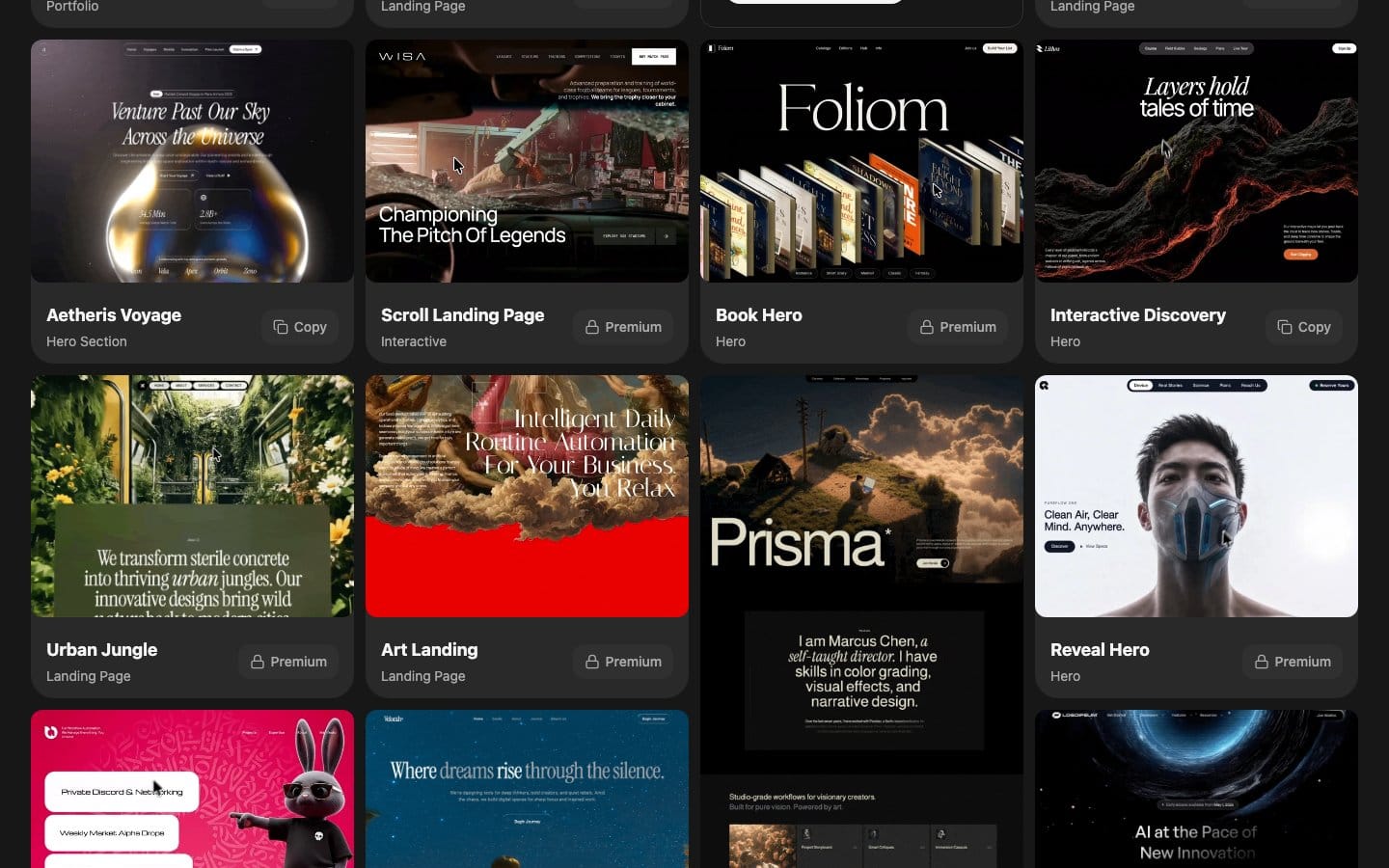
MotionSites.AI is a prompt and brief library, not a website builder in the class of Framer, v0, or Webflow. Its homepage pitches "Premium Hero Prompts" and "ready-to-use prompts" to "build beautiful landing pages in minutes" — the deliverable is copy-paste text, never a runtime. No CMS, no hosting, no build system ships with it.
The catalog is organized by use case: landing pages, hero sections, portfolios, agency, SaaS, e-commerce, 3D, and Web3/crypto, plus a dedicated "Scroll Landing Page" template and an animated "Backgrounds" section . Prompts are marked "Copy" (free) or "Premium" under a paid "Go Unlimited" tier, and no numeric pricing page is indexed as of July 2026 .
The business logic is narrow and honest: front-load design intent into a brief so a coding agent — Claude Code, Lovable, v0 — beats its generic default output. That gap between "functional but bland" and "agency-grade" is what MotionSites monetizes. It sells the prompt; your downstream agent does the actual building.
Before you copy a MotionSites brief
Before you paste anything, get four things in place — because MotionSites ships only text, and every gap in your setup becomes your problem. You need: (1) a downstream agent that accepts a pasted brief, (2) a React project scaffold, (3) awareness of the dependencies the agent will pull, and (4) the design judgment the brief cannot supply.
- An agent to do the building. Claude Code is the reference target, but Lovable or v0 work too — MotionSites is agent-agnostic because it only front-loads intent .
- A React scaffold, or willingness to let the agent create one. Next.js 14 and Vite are both confirmed targets; Claude Code reads the codebase, edits files, and runs commands to initialize if needed .
- Expect GSAP and Framer Motion as hard dependencies. They land in the generated
package.jsonautomatically — no pre-install — but know they're coming . - Design decisions you own. Color palette, brand voice, and which animations serve UX — the agent will not invent these from a generic brief.
How to convert a MotionSites brief into a GSAP scroll animation

Converting a brief into a running animation is a four-step loop: pick a template, hand it to Claude Code with your stack, let the agent emit the components, then audit locally before you deploy. The brief is only the opening move — the agent does the code generation, and you do the QA. Here is the concrete path.
- Pick a template and copy it. Open the MotionSites catalog, choose a template such as the dedicated "Scroll Landing Page," and hit
Copy. The free tier covers a subset of prompts marked "Copy"; the full catalog sits behind the paid "Go Unlimited" tier, and no numeric price is published on the public landing surface . - Prepend your context, then paste. Make the brief the opening message to Claude Code, but front it with your repo context and target stack so the agent scaffolds against reality rather than a generic default.
Stack: React 18 + Vite (or Next.js App Router).
Existing repo: components live in /src/components, Tailwind configured.
Use GSAP ScrollTrigger for scroll timelines, Framer Motion for enter/exit.

[paste MotionSites brief below]
- Read what the agent emits. Claude Code — an agentic tool that reads the codebase, edits files, and runs commands — returns plain source you own: components wiring
ScrollTrigger.createwithscruband pinning for the timeline, andmotion.divwithwhileInViewplusAnimatePresencefor entrance and exit states . No runtime, no lock-in — host it anywhere. - Audit locally, then push. Run Lighthouse, confirm
prefers-reduced-motionis honored, and check the mobile render on a mid-range device before you ship to Vercel or Netlify.
The reported ceiling is real but conditional: one practitioner assembled a Ferrari F1 dark-theme landing — full-screen hero, scroll-triggered break-apart/reassemble, animated stat counters, and embedded video — in roughly 10 minutes for about $0.72 in generation credits ($0.09 image + $0.63 video) .
"Pick 3–4 key animations; useuseGSAPfor React cleanup,ease:'none'for scrub, and always add aprefers-reduced-motioncheck," — production recipe from the motion-framer skill (source: freshtechbro/claudedesignskills).
GSAP scroll hygiene: fewer effects, lighter media, prefers-reduced-motion
Scroll hygiene is the difference between an agency-grade page and a janky one, and prompt-generated output fails here in predictable ways. Over-animation is the most reported failure mode: effects are trivial for an agent to add and hard to diagnose after the fact, so cap each page at 3–4 distinct animations and cut the rest.
Watch the media budget. A video background stacked on a Three.js canvas stacked on heavy ScrollTrigger work will crawl on a mid-range Android device. Set a Lighthouse performance ceiling before layering effects, not after, so you catch regressions while they are still cheap to remove. GSAP's ScrollTrigger is the battle-tested standard for scroll timelines and free for most use cases , but it does not police your frame budget for you.
Accessibility and Core Web Vitals both depend on honoring reduced motion. Add @media (prefers-reduced-motion: reduce) to every keyframe declaration and conditionally disable GSAP timelines for those users. In React, drive ScrollTrigger through useGSAP rather than useEffect so cleanup fires correctly on unmount, and set ease:'none' on any scrubbed timeline to prevent drift at high scroll speeds .
useGSAP(() => {
  const reduce = window.matchMedia('(prefers-reduced-motion: reduce)').matches;
  if (reduce) return; // skip the timeline entirely

  gsap.to('.hero', {
    scrollTrigger: { trigger: '.hero', scrub: true },
    ease: 'none',      // no easing on scrub — prevents drift
    yPercent: -30,
  });
}, { scope: container });
Framer AI vs Webflow vs v0 for scroll animation in 2026
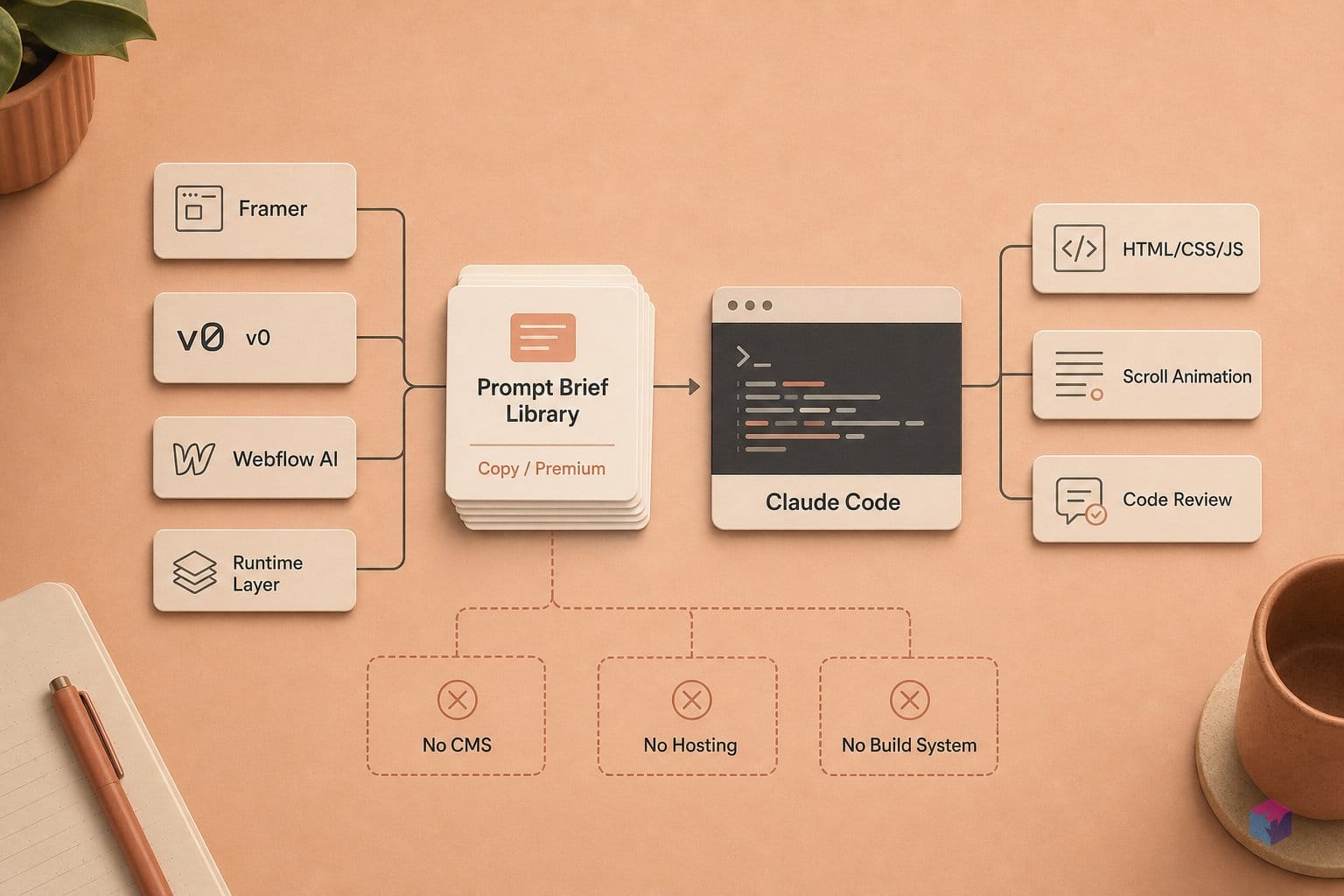
Picking a tool for scroll animation in 2026 comes down to one trade-off: how much motion control you get versus whether you can export and own the code. Framer AI is strongest for canvas-native motion with zero source access, Webflow gives timeline-based GSAP control plus code export, v0 is the weakest animator but the best full-stack generator, and MotionSites + Claude Code is the exportable, cheapest-per-session path that leaves the QA on you.
Framer AI treats motion as its native language — scroll effects, hover states, and micro-interactions live on the canvas without touching source, and it supports React 18-compatible code components . The cost is full platform lock-in: there is no clean code export to hand a dev team.
Webflow is the most production-oriented comparison. Its Interactions system exposes timeline-based scroll animation with native GSAP integration for frame-by-frame control, and its AI generates sections, CMS collection items, React code components, and animated heroes from a prompt — with HTML/CSS export available. v0 by Vercel sits nearest to a Claude Code workflow but hosted: it produces high-fidelity React + Tailwind + shadcn/ui with one-click Vercel deployment . For animation specifically it is the weakest — reviewers report no carousel entrance animations, no transitions between multi-step form steps, and missing skeleton states, so the 2026 workaround is to chain v0 output with a GSAP or Framer Motion layer .
| Tool | Scroll animation | Code export | Entry price (July 7 2026) |
|---|---|---|---|
| Framer AI | Canvas-native, no code | None (lock-in) | Free $0 (500 credits); Basic $10/mo, Pro $30/mo billed yearly |
| Webflow | Timeline + GSAP control | HTML/CSS export | Starter free; Basic $15/mo, Premium $25/mo billed yearly |
| v0 (Vercel) | Weak; chain a motion layer | Full React source | Free $0 ($5 credits); Team $30/user/mo |
| MotionSites + Claude Code | Prompt-driven GSAP/Framer Motion | Full source you own | ~$1 generation cost per session |
The MotionSites + Claude Code quadrant is the one with no subscription lock and the lowest per-run cost, but it is also the one where CMS wiring, SEO metadata, forms, accessibility checks, and QA are entirely on you . The motion-framer skill authors are blunt about the ceiling:
"Pick 3–4 key animations — Claude Code is not a design tool and does not compete with Framer on visual output" — freshtechbro/claudedesignskills motion-framer skill (source: claudedesignskills).
Concrete takeaway: if you need the fastest polished canvas and never touch code, use Framer; if you want export plus timeline control, use Webflow; if you want a full-stack app first and add motion later, use v0; if you want to own the repo and pay pennies per build, drive Claude Code with a MotionSites brief — and budget the QA time you just saved on the builder subscription.
Frequently asked questions
Is MotionSites AI a website builder?
No. MotionSites is a prompt and brief library, not a builder — it ships text assets only, with no runtime, no CMS, and no hosting. The actual site is generated by whatever downstream agent you paste the brief into: Claude Code, Lovable, or v0. Its own homepage frames the product as "ready-to-use prompts" to build landing pages, not a platform that renders or hosts anything . Think of it as front-loaded design intent for a coding agent, not a Framer or Webflow competitor.
What animation libraries appear in Claude Code output from a MotionSites brief?
Typically two: Framer Motion for component-level animation (motion.div, whileInView, AnimatePresence exit transitions, gesture and hover interactions) and GSAP ScrollTrigger for scroll timelines. Both land in package.json automatically when the agent scaffolds a React project. The open-source claudedesignskills motion-framer skill documents production recipes for both, including useGSAP for React cleanup and ease:'none' for scrub-linked timelines .
Can I export source from Framer AI or Webflow AI?
Webflow allows clean HTML/CSS export, so a team can build visually and then leave with the code. Framer does not — you are locked to Framer hosting and own less of a conventional repo . Claude Code output is different again: plain source you own and can push anywhere, since Claude Code edits real files and works with git directly . If portability matters, the MotionSites + Claude Code path or Webflow export both keep you out of a walled garden.
How much does MotionSites cost?
No public pricing is indexed — live search found no priced page on the MotionSites landing surface . A free "Copy" tier exists for individual prompts, with a paid "Go Unlimited" tier for the full catalog, but no numeric figure is published. For a reference point on the alternatives observed July 7, 2026: Framer Basic is $10/month billed yearly , and Webflow Basic is $15/month billed yearly .
Is the "$10K agency website" claim from MotionSites tutorials accurate?
Treat it as marketing framing, not measured evidence. Reported practitioner builds cost roughly $0.72 in generation credits ($0.09 image plus $0.63 video), which is the figure the "$10K website" line stretches against . But output quality depends entirely on prompt skill and your own design judgment, and MotionSites publishes no Lighthouse results, accessibility audits, mobile screenshots, or reproducible Claude Code runs to back the ceiling claim . Read the $3,000–$10,000 comparison as a conditional benchmark, not a guarantee.