

Two design tools, two philosophies of the same protocol: Penpot hands an AI agent a small toolbox and a JavaScript runtime; Figma hands it a long, specialized menu. The gap is deliberate.
Penpot vs. Figma: Generalist Runner Over Specialist Menu
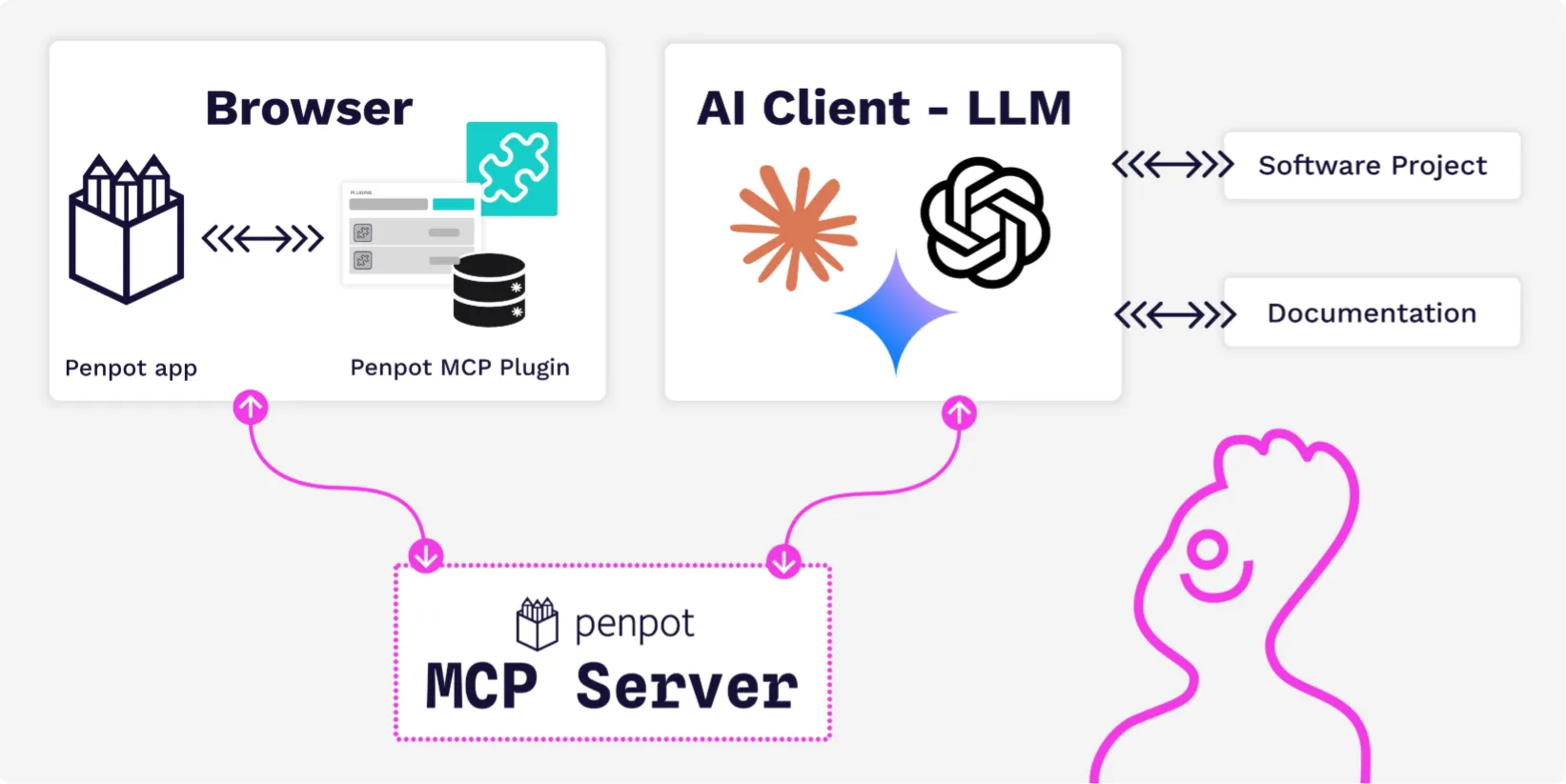
Penpot's Model Context Protocol server exposes exactly five tools — execute_code, high_level_overview, penpot_api_info, export_shape, and import_image — against Figma's roughly two-dozen named-action catalog . The workhorse is execute_code: the agent writes JavaScript, and Penpot runs it inside the editor's plugin sandbox with access to the full Plugins API, so one endpoint covers what a specialist server splits across many .
The following snippet — verified and executed — counts the two catalogs directly:
penpot_tools = [
    "execute_code",
    "high_level_overview",
    "penpot_api_info",
    "export_shape",
    "import_image",
]

figma_tools = [
    "add_code_connect_map",
    "create_new_file",
    "download_assets",
    "generate_diagram",
    "generate_figma_design",
    "get_code_connect_map",
    "get_code_connect_suggestions",
    "get_context_for_code_connect",
    "get_design_context",
    "get_figjam",
    "get_libraries",
    "get_metadata",
    "get_motion_context",
    "get_screenshot",
    "get_shader_effect",
    "get_shader_fill",
    "get_variable_defs",
    "list_shader_effects",
    "list_shader_fills",
    "search_design_system",
    "send_code_connect_mappings",
    "upload_assets",
    "use_figma",
    "whoami",
]

print(f"Penpot MCP: {len(penpot_tools)} tools")
print(f"Figma MCP: {len(figma_tools)} tools (~two dozen)")
print(f"Figma exposes {len(figma_tools) / len(penpot_tools):.1f}x as many tools.")
Penpot's rationale is context economy: fewer tool schemas load less of a model's context window before any real call. It claims a large tool set can consume 10–15% of a smaller model's context — but that figure is Penpot's own, unbacked by a public third-party benchmark, so treat it as design rationale, not a measured result . Licensing differs too: Penpot MCP is MPL-2.0, self-hostable, and marketed with no paywalls, while Figma ties advanced Dev Mode inspection and its MCP server to paid seats with tiered rate limits — 20 tool calls per month on free, up to 600 per day at higher tiers . The canonical code lives in penpot/penpot (≈58k stars) under /mcp on the develop branch; the standalone penpot/penpot-mcp repo was archived on 3 February 2026 and folded in, and it also ships as the npm package @penpot/mcp .
What to Have Before the Handshake
Before an agent can query a Penpot file, you need three things: a Penpot instance, an MCP-capable client, and a connection mode. The instance can be Penpot's cloud at penpot.app or a self-hosted deployment via Docker, Kubernetes, Elestio, or on-prem — it is MPL-2.0 licensed with no cost gating on the MCP server . Any client that speaks MCP over HTTP works, since the server is explicitly client-agnostic: Cursor, Claude Code, VS Code with GitHub Copilot, Codex, or OpenCode are documented .
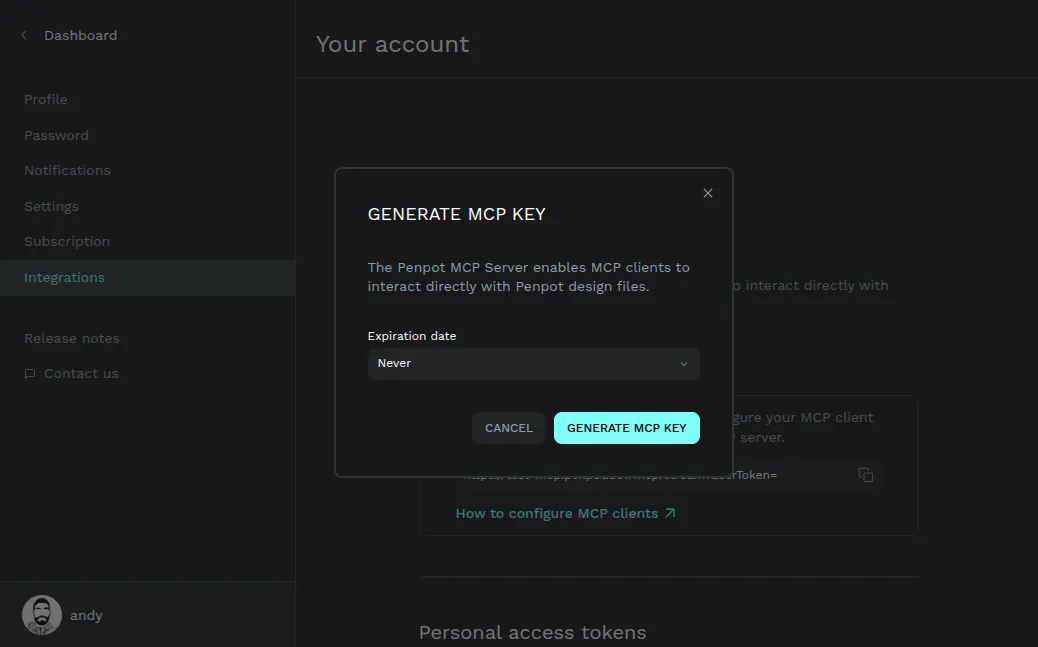
Then pick a mode. Remote mode needs no Node.js — you generate one MCP key per account under Your account → Integrations → MCP Server, shown once and non-recoverable . Local mode requires Node.js v20 or v22 and runs npx @penpot/mcp@stable; defaults are HTTP on localhost:4401/mcp, SSE on localhost:4401/sse, and WebSocket on port 4402 .
Pairing Penpot MCP with Cursor or Claude Code
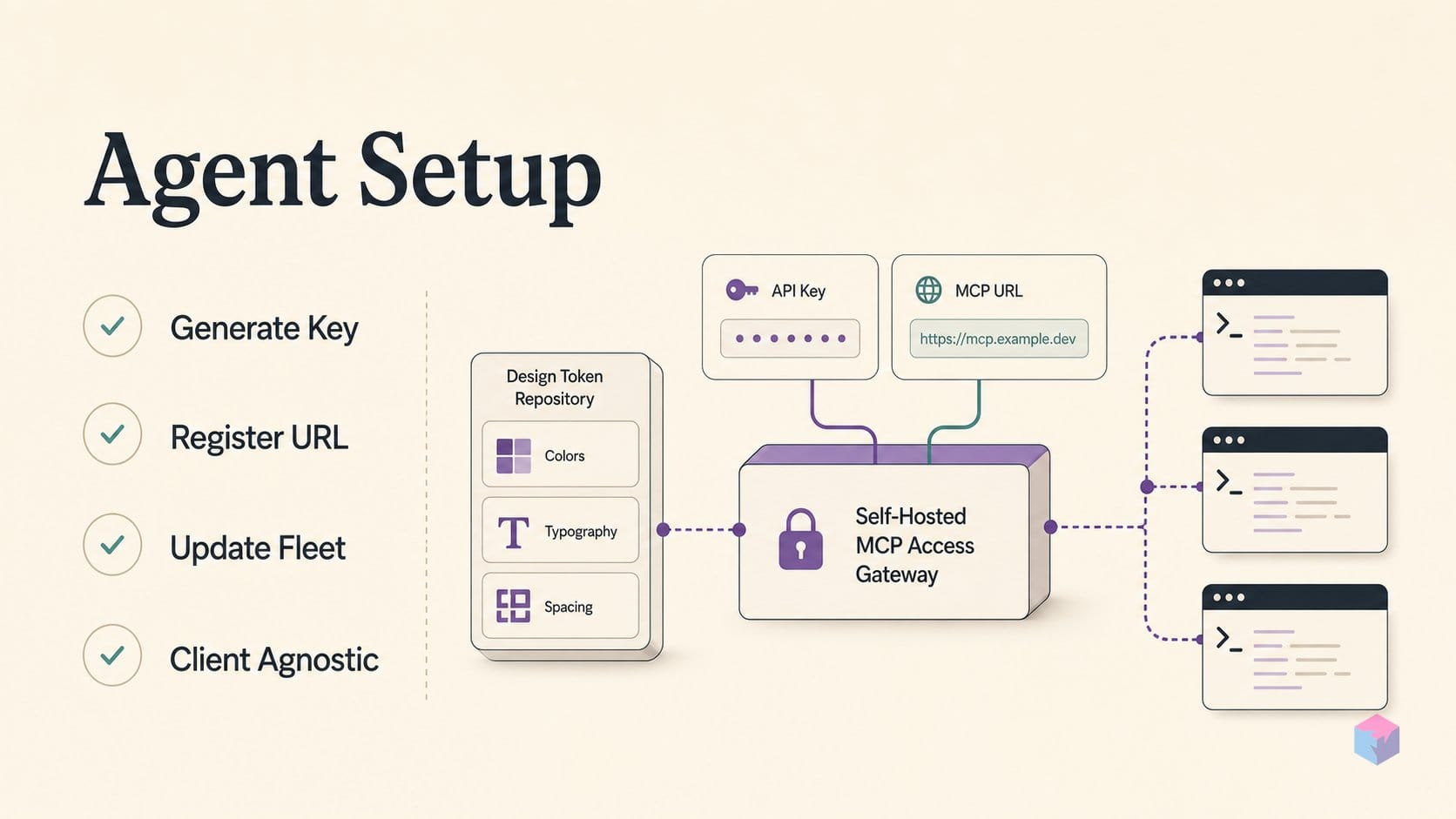
With a mode chosen, three moves connect an agent to a live file. First, generate the MCP key. In the Penpot UI go to Your account → Integrations → MCP Server, where the key is displayed exactly once and cannot be recovered; only one key exists per user at a time . If you lose it, revoke and regenerate — but note that every connected agent config then breaks until you paste the new URL into each one, so treat regeneration as a fleet-wide update, not a local fix.
Second, register the server URL in your client. For remote mode, paste https://<your-penpot-domain>/mcp/stream?userToken=YOUR_MCP_KEY into the MCP server field in Cursor or Claude Code; the server is client-agnostic over HTTP, and Cursor, Claude Code, VS Code/Copilot, and Codex/OpenCode all have documented integrations . For local mode, run the npm package and point the client at localhost:4401/mcp instead — no token, since it rides your active browser session .
Third, open a Penpot file and call high_level_overview. Confirm the agent returns page names, component counts, and color and typography token groups. Once the structure is visible, send a targeted execute_code call — a short JavaScript expression the editor runs inside its plugin sandbox — to pull specific token values or inspect component properties directly from the file rather than a screenshot .
One capability gap decides the mode: local mode adds full export_shape and import_image from local paths, while remote mode restricts both and offers no local file-system access . Some hosted-versus-local wording inconsistencies remain in the docs as of August 2026, so cross-check help.penpot.app/mcp for the current authoritative state before wiring a workflow.
Slow, Expensive, Overwrite-Prone: What Penpot Cautions
Write access is live by default. A paired agent can create, rename, move, delete, and restyle objects on the focused page, so Penpot advises keeping MCP out of critical production files until you have reviewed both agent behavior and the plugin permission scope it runs under . Prefer small, reversible operations while evaluating what an agent actually does to a file.
Penpot is blunt about the ceiling: using MCP to autonomously generate designs is slow, expensive, and error-prone . The durable use case is structured context for better code output — CSS variable generation, component scaffolding, Storybook alignment — not full design autopilot.
"The MCP server describes tools as model-controlled functions and recommends clear UI, visible invocation indicators, and human confirmation before write actions" — Model Context Protocol tools specification, 2025-06-18 (source: modelcontextprotocol.io).
That guidance aligns with Penpot's own: keep a human in the loop on model-controlled writes . No verified accuracy rate exists for design-to-code output — quality depends on the model, prompt, file complexity, and permissions — so do not treat MCP-generated code as production-ready without a review pass.
W3C DTCG Tokens in Penpot 2.14–2.17: What's Programmatically Readable Now
The integration point between MCP and design tokens is the Plugins API, which Penpot 2.14 opened to token values. Released to the community after March 17, 2026 , that update lets external code read and write tokens programmatically — and the release notes explicitly name the consumers.
"AI clients or Penpot MCP" can now work with tokens through the Plugins API — release notes, Penpot 2.14 (source: help.penpot.app).
The values follow the W3C Design Tokens Community Group draft: colors, typography, spacing, shadows, aliases, math in values, token sets, themes, and JSON import/export, with no proprietary sync plugin required — the contrast with Figma Variables . Later releases tightened the workflow: 2.16 (June 2, 2026) surfaced numeric token bindings from a selected element , and 2.17.0 (July 22, 2026) added typography token rows for multi-selected text, propagation optimization, and autocomplete for token forms .
The practical endpoint is execute_code: have the agent enumerate token groups through the Plugins API , export them as DTCG-format JSON, then pipe that into a Storybook config, a CSS custom-property generator, or a Tailwind theme — no manual copy-paste from the design panel. That is the concrete win: not autonomous design, but a self-hostable, standards-based token feed your coding agent can query on demand.
Frequently asked questions
Is Penpot's MCP server free to use?
Yes. Penpot is licensed under Mozilla Public License 2.0 with no paywalls and no per-seat gating for the MCP server . Remote mode is hosted by Penpot on penpot.app, while local mode runs via an npm package (npx @penpot/mcp@stable) on your own machine . Either way, there is no cost beyond running the Penpot instance itself — a contrast with Figma, which ties its MCP server to paid seats and enforces per-tier rate limits .
What happens if I lose my Penpot MCP key?
The key is non-recoverable and shown only once, so a lost key cannot be retrieved — you revoke it and generate a new one under Your account → Integrations → MCP Server . Only one MCP key can exist per user at a time , which means rotating it invalidates every existing connection. After regenerating, update each connected agent configuration with the new userToken value in the server URL. Local mode sidesteps this entirely, since it relies on your active browser session and requires no token.
Can a connected AI agent overwrite or delete objects in my Penpot file?
Yes — write access is on by default. A connected agent can create, rename, move, delete, and restyle objects on the focused page . Penpot explicitly advises keeping MCP away from critical production files and using small, reversible operations while you evaluate agent behavior . Review the plugin permission scope before expanding autonomy: the MCP tool specification itself recommends visible invocation indicators and human confirmation for model-controlled functions .
How does Penpot's token format differ from Figma Variables?
Penpot follows the open W3C Design Tokens Community Group (DTCG) draft format, whereas Figma Variables use a proprietary schema. Penpot tokens export as DTCG-compatible JSON without a conversion plugin, covering colors, typography, spacing, shadows, aliases, and themes . As of Penpot 2.14, tokens are readable and writable through the Plugins API — the release notes explicitly name "AI clients or Penpot MCP" as external tools that can now work with tokens programmatically . MCP agents reach that layer via execute_code.
Which AI coding clients are confirmed to work with Penpot MCP?
Penpot documents integration with Cursor, Claude Code, VS Code with GitHub Copilot, and Codex/OpenCode . The server is explicitly client-agnostic over HTTP transport and positioned to connect "any AI agent, any LLM you trust," so any MCP client that supports HTTP transport should work without a specific LLM vendor . Remote mode has reduced functionality compared to local mode — no local file-system access and limited import_image and export_shape — so pick the mode that matches your client and permissions .
Enjoyed this article? Subscribe to get new stories by email whenever they're published.