

GitHub Copilot started as inline autocomplete. As of mid-2026 it ships its own desktop application that can pick up an issue, open an agent session, and merge the resulting pull request while you are away from your machine.
How the Copilot App Orchestrates Repos and PR Handoffs
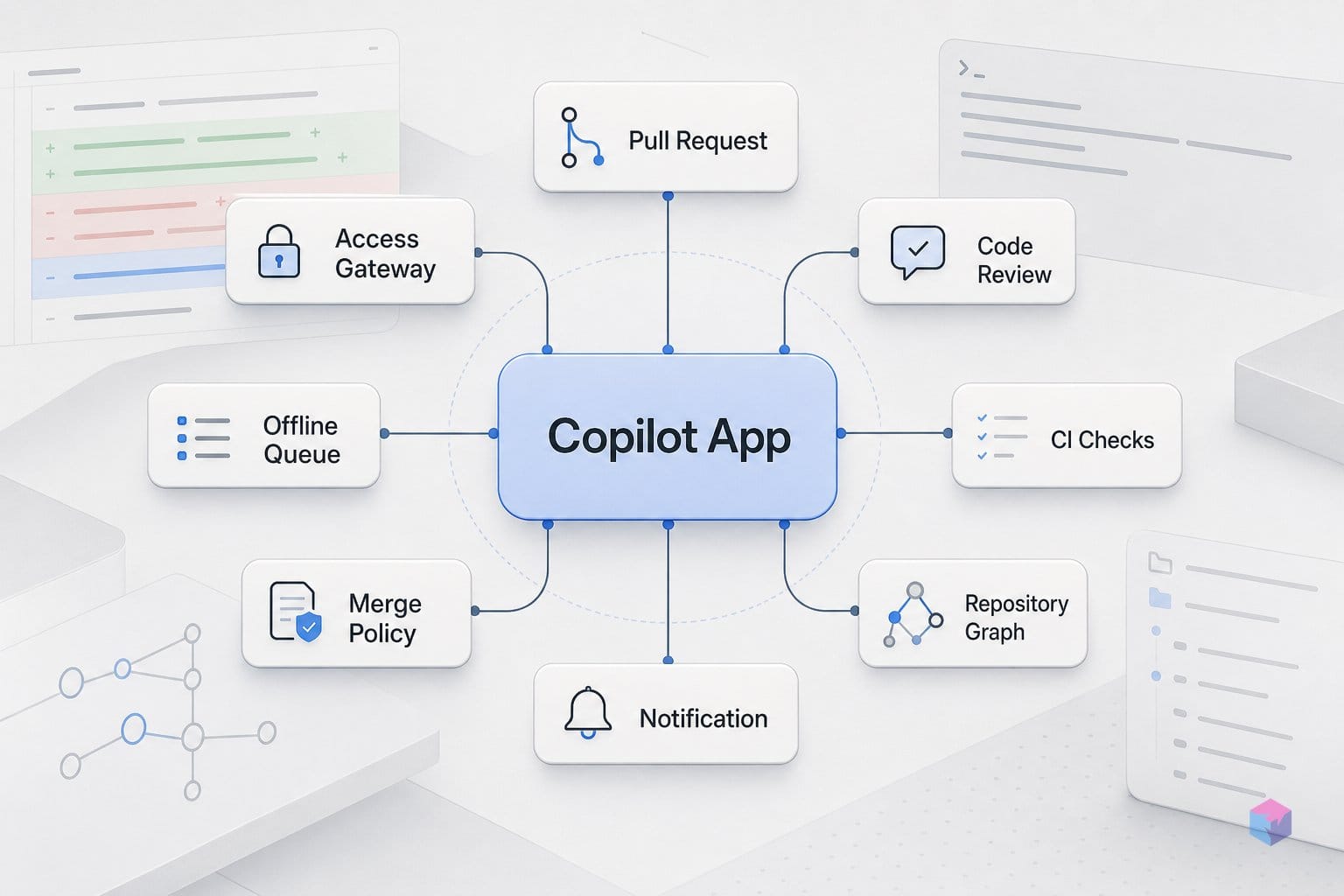
The GitHub Copilot app is an agent-native desktop control center for finding work, starting agent sessions, reviewing diffs, and handling pull requests across repositories — not an IDE replacement and not another chat panel. GitHub announced it at Microsoft Build and detailed it in a blog post dated June 2, 2026. It is built on the Copilot CLI and Copilot SDK, layering a UI for parallel sessions over your repos rather than replacing your editor (source: GitHub Blog, 2026-06).
Navigation splits into four areas: My work surfaces issues and PRs with live CI and review state, Automations holds saved repeatable agent tasks, Search spans repositories, and Sessions lists active agent threads plus Quick chats (source: GitHub Docs). Each session runs in an isolated workspace — typically a new Git worktree — so multiple agents work on separate branches simultaneously without manual conflict resolution.
The handoff that earns the headline is Agent Merge: when enabled, the workspace's Copilot session reads the PR, fixes blockers, and merges once GitHub allows. It runs in the background, survives app restarts, and turns itself off after the merge — which is exactly why GitHub frames it as a high-trust mode. As the product team puts it, the app is designed so an agent can "find work, start agent sessions, steer changes, review diffs, and handle pull requests" from one surface — GitHub Engineering (source: GitHub Blog, 2026-06). That makes branch protection and CI discipline prerequisites, not optional extras.
Copilot App Needs a Paid Seat and One Admin Switch
The Copilot App is not available on the Free tier. Free gives you 2,000 inline suggestions per month and nothing else relevant here — no app access, no cloud agent, and no Copilot-created PR assignment or code review . To run agent sessions and merge PRs from the desktop, you need a paid seat. Individual plans are Pro at $10/mo, Pro+ at $39/mo, and Max at $100/mo (the highest individual allowance); team plans are Business at $19/user/mo and Enterprise at $39/user/mo .
| Plan | Price | Copilot App |
|---|---|---|
| Free | $0 | No (2,000 inline suggestions only) |
| Pro | $10/mo | Yes |
| Pro+ | $39/mo | Yes |
| Max | $100/mo | Yes (highest individual allowance) |
| Business | $19/user/mo | Yes (admin policy required) |
| Enterprise | $39/user/mo | Yes (admin policy required) |
Watch the billing model. Since June 1, 2026, Copilot moved from Premium Request Units to usage-based AI Credits, where 1 credit equals $0.01, metered on input, output, and cached tokens . Agent sessions and Agent Merge draw down credits; inline completions and Next Edit suggestions stay included and do not consume them . One more gate for teams: on Business or Enterprise, an admin must enable the Copilot CLI policy before the app can connect . Check org settings before anyone downloads the installer.
How to Open a Copilot Agent Session and Merge a PR
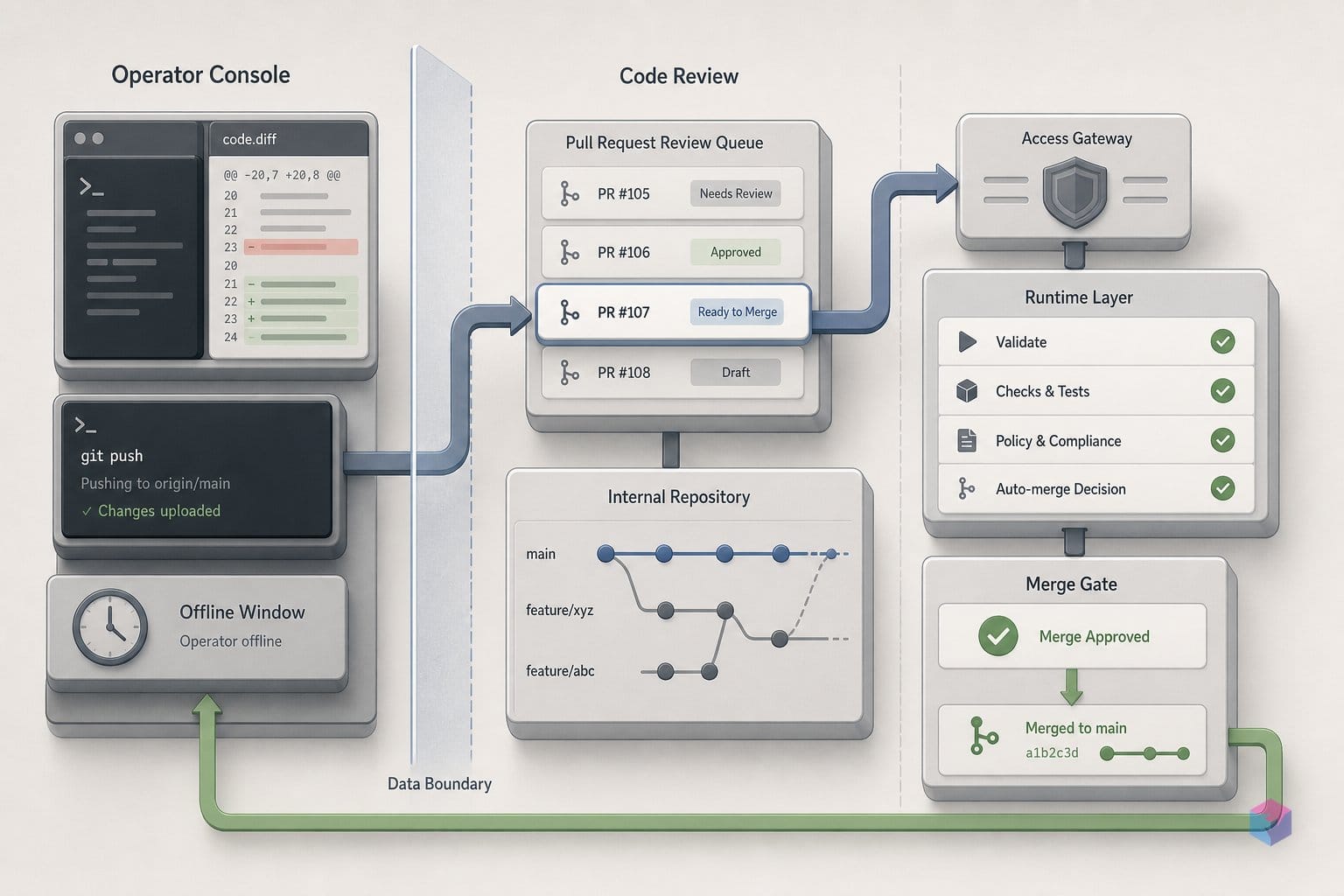
With the policy enabled, the fastest path to a Copilot-merged PR is five steps: install the app, add a repo, scope with a Quick chat, run a session, then enable Agent Merge behind branch protection. Start by downloading from github.com/github/app, which ships builds for Mac Apple Silicon, Mac Intel, Windows x64, Windows ARM, and Linux . On first launch, sign in with GitHub; GitHub Enterprise Server users pick "Use GitHub Enterprise" and enter the server address .
Add a repository in one of four ways: select from recent activity, browse GitHub.com, paste a local folder path, or enter any Git clone URL . Before committing to a session, click + next to Quick chats and ask a repo-scoped question — for example, "give me an overview of the auth module." A Quick chat creates no branch or worktree, so it is the cheapest way to orient yourself (video: GitHub).
For real changes, open a New session. You choose the workspace type — a new Git worktree for parallel branch isolation, an existing local branch, or a cloud sandbox — then pick a mode: Interactive (per-action back-and-forth), Plan (review the approach before execution), or Autopilot (fully delegated iteration) . Set the model and reasoning effort, then write the prompt, referencing issues with # and files with @ .
When the agent opens a PR, inspect the diff under Files changed, click Fix on any flagged review comment, and submit the review from the PR detail view . Enable Agent Merge only after confirming branch protection rules and required CI checks are active — it merges unattended in the background and turns itself off after the merge . If those safeguards are not in place, do not turn it on.
The logic Agent Merge follows is small: when checks pass and no maintainer is online to merge, the bot merges. This verified snippet models that decision (it executed successfully, exit 0):
from dataclasses import dataclass


@dataclass
class PullRequest:
    number: int
    checks: str
    maintainer_online: bool
    merged_by: str | None = None


pr = PullRequest(number=42, checks="success", maintainer_online=False)

if pr.checks == "success" and not pr.maintainer_online:
    pr.merged_by = "github-copilot[bot]"

print(f"PR #{pr.number}: checks={pr.checks}")
print(f"Maintainer online: {pr.maintainer_online}")
print(f"Merged by GitHub Copilot App: {pr.merged_by is not None}")
Copilot App Gotchas: Workspace Wipes and Unreviewed Merges
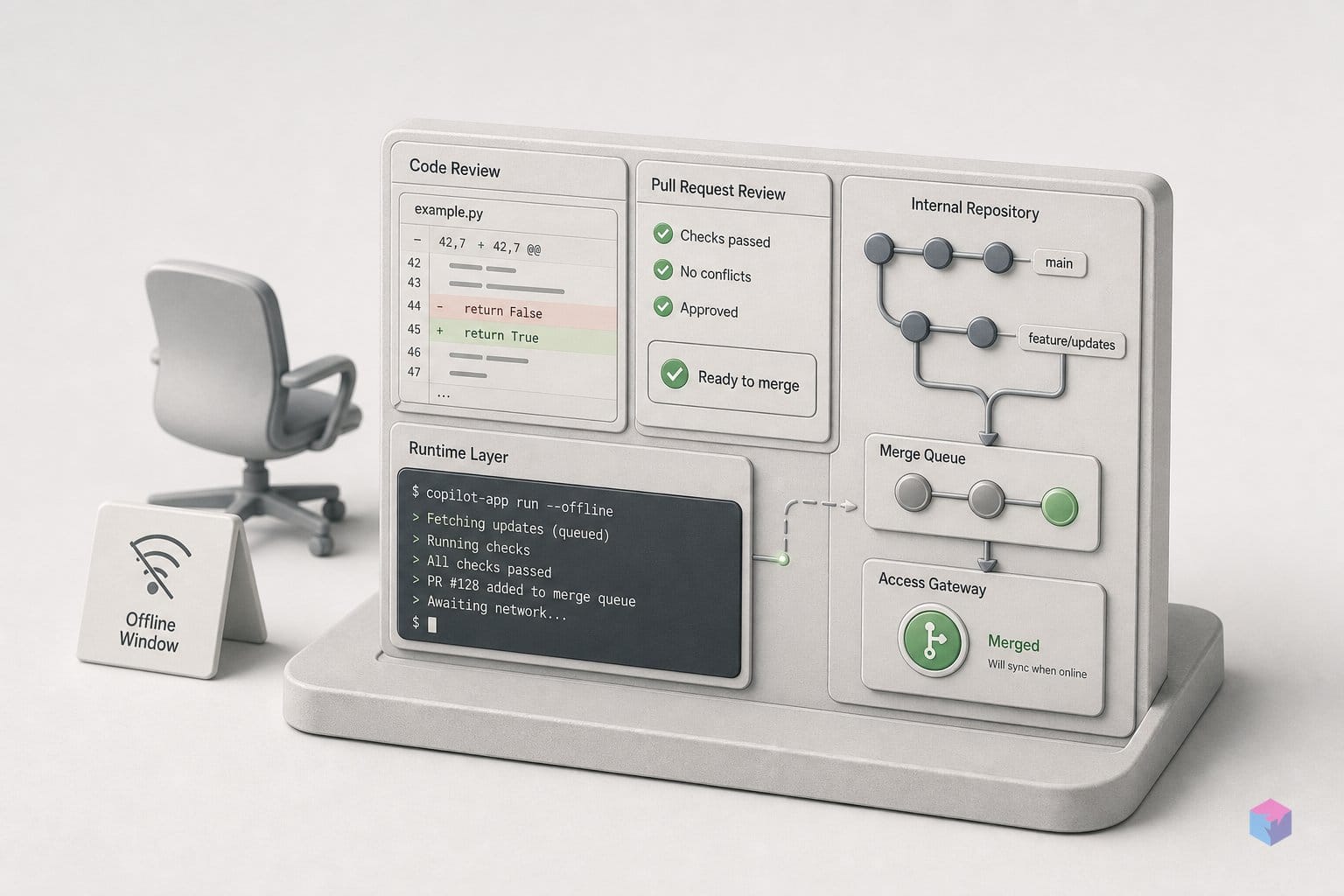
The convenience of background merges comes with four failure modes worth internalizing before you hand the agent real authority. The first is data loss: version 1.0.3, released June 20, 2026, fixed a critical update bug that could wipe workspaces and session history on update . Update before trusting any long-running session, and check the github/app releases page before starting important work.
The second is a hard credit stop. Since the move to usage-based billing on June 1, 2026, hitting your monthly AI Credits ceiling halts all agent activity mid-task — the old graceful fallback to a cheaper model is gone (GitHub Blog, 2026-06). Annual subscribers keep PRU pricing until renewal.
The third is silent spend. Cloud sandboxes are public preview and usage-billed at $0.000024 per compute-second plus $0.000003 per GiB-second of memory , so a stuck session accumulates charges quietly. Set a spend alert in GitHub billing settings.
The fourth is trust. GitHub's responsible-use docs explicitly flag hallucination as a limitation and frame the app as "an accelerator for bounded, reviewable tasks," not unattended authority over production branches. Keep branch protection, CI gates, and human review in place — Agent Merge should clear blockers you would have cleared anyway, not replace the reviewer.
Copilot Automations: the Natural Next Move
Once Agent Merge handles individual PRs reliably, automations turn one-off prompts into scheduled agent tasks. Create one from the app's Automations tab or from a repository's Agents tab on GitHub.com: name it, pick a trigger, write the task prompt, and save . Triggers are Manual, an hourly, daily, or weekly schedule, or issue-created events with an optional keyword filter .
The split that matters: local automations run on your machine, while cloud automations require the Copilot cloud agent enabled for the repo — and on Business or Enterprise plans, org-level admin allowance as well .
- Daily triage — "label new issues as bug or enhancement."
- Morning PR digest — "summarize PRs awaiting my review with CI status."
- Weekly dependency scan — "open issues for packages with known security advisories."
Start with a manual, local automation you can read end to end, then graduate to a schedule once the output earns your trust. The same discipline that governs Agent Merge applies here: bounded, reviewable tasks first.
Frequently asked questions
Does the GitHub Copilot App replace the IDE extension?
No. The Copilot App is a separate desktop control center for agent sessions, PR review, and automations, not an IDE replacement . The IDE extension (VS Code, JetBrains, and others) stays as your inline-completion and Next Edit layer. Both are built on the same Copilot CLI and Copilot SDK foundation, so they coexist rather than compete .
What is the difference between Interactive, Plan, and Autopilot session modes?
The three modes trade developer control for autonomy. Interactive is collaborative and runs on a per-action permission model — good for novel or exploratory tasks. Plan mode has the agent draft a written approach before touching code, so you can redirect before anything executes. Autopilot is high-trust and fully delegated: it writes code, runs tests, and iterates on its own . GitHub recommends scoping a problem with Quick chat, validating with Plan mode, then graduating to Autopilot only once the task is well defined .
How do AI Credits work and is there a surprise-bill risk?
Since June 1, 2026, Copilot bills usage in GitHub AI Credits, where 1 credit equals $0.01, metered on input, output, and cached tokens at published API rates . Credits are consumed by chat, agent sessions, code review, Copilot CLI, and the cloud agent — but not by inline completions or Next Edit suggestions, which stay included on every plan . The graceful fallback to cheaper models was discontinued, so monthly plans now hit a hard ceiling that stops agent activity outright; annual holders keep the old PRU pricing until renewal . Set a spend alert in billing settings and watch cloud sandbox sessions, which bill at $0.000024 per compute-second .
Is Agent Merge safe to enable without CI?
No. Without branch protection rules and required CI checks, Agent Merge can merge incomplete or breaking changes unattended, since it reads the PR, fixes blockers, and merges whenever GitHub allows . GitHub's responsible-use docs list hallucination as a known limitation and stress human oversight . Treat it as an accelerator for bounded, well-scoped tasks that already have automated safety nets — not a substitute for human review on production branches.
Which Copilot pricing tier unlocks the desktop app?
Any paid seat unlocks the Copilot App: Pro at $10/mo or above for individuals, or a Business ($19/user/mo) or Enterprise ($39/user/mo) seat for teams . The Free plan includes 2,000 inline suggestions per month but excludes the Copilot App, cloud agent, and Copilot-created PR features . Students, educators, and maintainers of popular open-source projects may qualify for Pro at no cost .