

Claude Code plugins that promise to slash token usage are multiplying, and one — Ponytail — leads with a striking pitch: cut output "by over 50% without losing any accuracy" . Before testing that number, it helps to understand what the plugin actually does.
What Does Ponytail Do Before Claude Generates Anything?
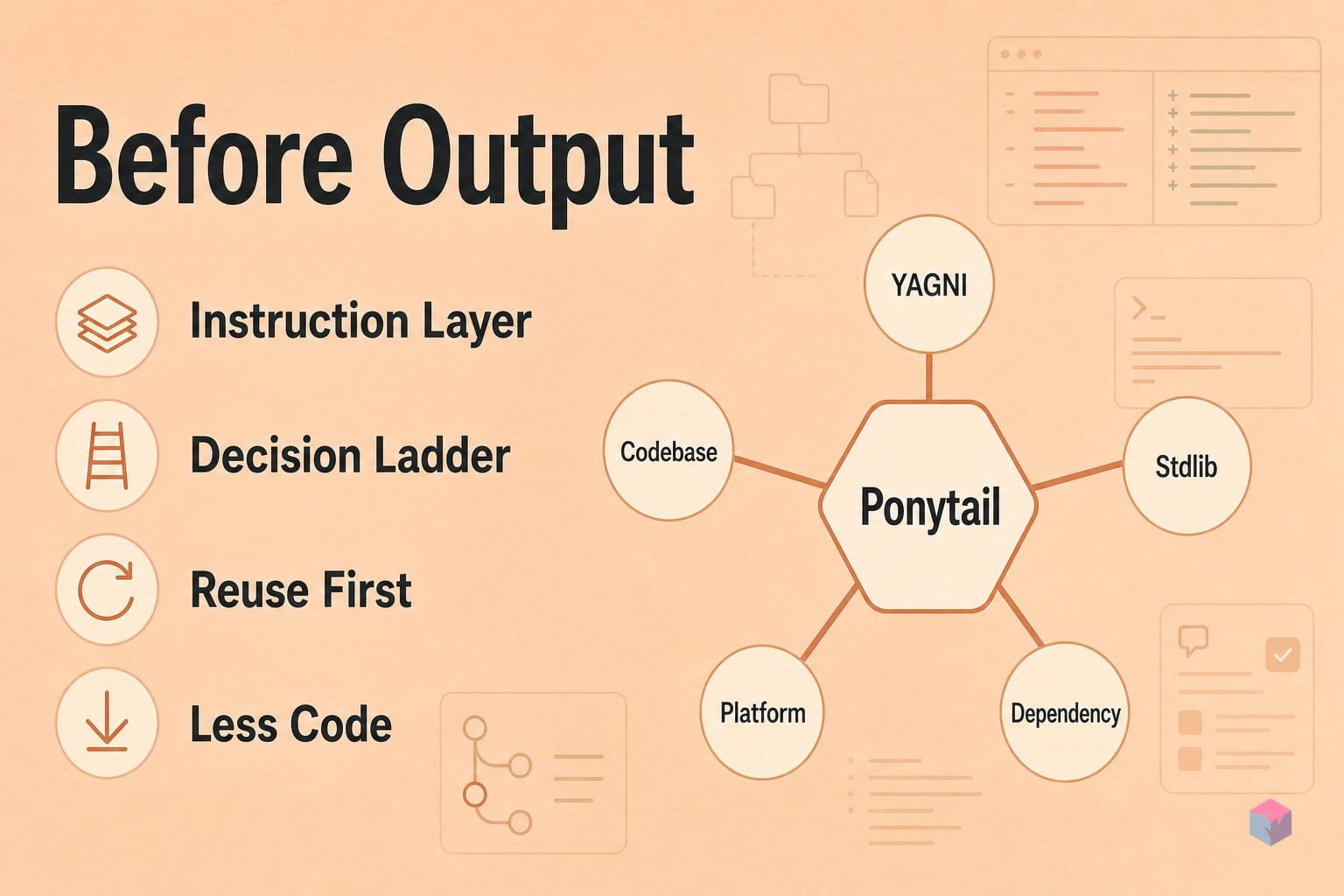
Ponytail is an instruction layer injected into the agent's system context — not a proxy, a compression layer, or a code modifier. It changes what the model decides to write, not how responses are transmitted. Per its first-party description, it is an open-source Claude Code skill by Dietrich Gebert (GitHub DietrichGebert/ponytail, MIT license), with a latest release of v4.8.4 dated June 29, 2026 . Its tagline: "the best code is the code you never wrote."
It works by enforcing a seven-rung decision ladder before the agent generates anything :
- Does this need to exist at all (YAGNI)?
- Is it already in this codebase — reuse it.
- Does the standard library do it?
- Is there a native platform feature?
- Is it in an already-installed dependency?
- Can it be one line?
- Only then, write the minimum.
The repo's canonical example: a modal dialog might default to Radix UI (~30 lines plus a new dependency), whereas Ponytail steers to the native <dialog> element (~8 lines, zero dependencies) . Crucially, the constraint is re-asserted at every turn, so the bias persists across the full session instead of decaying after the opening prompt .
Installing Ponytail and Choosing an Intensity
Installation lives entirely inside Claude Code and takes two slash commands — first register the marketplace, then install the plugin:
/plugin marketplace add DietrichGebert/ponytail
/plugin install ponytail@ponytail
This follows Claude Code's documented plugin model, where marketplaces can be sourced directly from a GitHub repo . The current release is v4.8.4, dated June 29, 2026 .
Ponytail ships four intensity levels — lite, full (default), ultra, and off — switchable at any time with /ponytail [level] . Start on full and only drop to lite if the model begins omitting constraints your codebase genuinely needs; escalate to ultra for aggressive suppression on greenfield work.
After a few sessions, use the audit commands to check what the ladder actually changed: /ponytail-review inspects the current diff, /ponytail-audit scans the full repo, /ponytail-debt surfaces accumulated shortcuts, and /ponytail-gain reports lines avoided .
Because the YAGNI ladder is just injected instructions, it also runs instruction-only on Codex, Copilot CLI, Gemini CLI, OpenCode, Cursor, Windsurf, Cline, Aider, and Zed — the discipline is model-agnostic, even if the slash commands are Claude Code-specific .
Headline vs. Standalone: The −54% and −22% Explained
The "−54%" in circulation measures lines of code, not tokens, and it is not the same figure as Ponytail's standalone token savings. The repository's own benchmark — a mean across 12 feature tasks against a no-plugin baseline — reports −54% lines of code, −22% tokens, −20% cost, and −27% wall time, with 100% of safety guardrails maintained [1]. Lines and tokens track loosely, not one-to-one, so collapsing them into one "over 50%" headline overstates the token result by more than 2x.
The larger circulating number is a combined-stack figure, not Ponytail alone. It stacks output-side suppression with input-side compression: Ponytail on the code the agent writes, Headroom on MCP and tool output, RTK on terminal output, and MarkItDown on documents — positioned as "~50% lower token usage — roughly 2x more usage on the plan you already pay for" [2]. Ponytail covers only the generation half of that saving.
"~50% lower token usage — roughly 2x more usage on the plan you already pay for." — Headroom stack positioning (source: extraheadroom.com)
The most extreme number — a date-picker task shrinking from 404 to 23 lines, roughly 94% fewer lines [4] — is a cherry-picked edge case, not the 12-task mean, and it too counts lines, not tokens. Read the metrics as a distribution, not a single slogan:
| Metric | Ponytail standalone (first-party mean) | Combined-stack claim |
|---|---|---|
| Lines of code | −54% (peak −94% on one task) | Output side only |
| Tokens | −22% | ~−50% (Ponytail + Headroom + RTK + MarkItDown) |
| Cost | −20% | ~2x plan headroom |
| Wall time | −27% | Not separately reported |
| Safety guardrails | 100% maintained | — |
The honest standalone number to plan around is roughly −22% tokens and −20% cost — meaningful, but a long way from the headline the video advertises.
Where Ponytail's Savings Evaporate
Ponytail only suppresses code the agent is about to generate, so on sessions where little new code gets written its saving approaches zero. Debugging, log-heavy exploration, and unfamiliar-codebase reads spend their tokens on the input side — file reads, tool results, and prior turns — which the output-side ruleset never touches. A 2026 arXiv study of agentic coding trajectories found input tokens dominate total cost, that coding-agent tasks can consume roughly 1000x more tokens than a chat exchange, and that repeated runs on the same task can vary by up to 30x. None of that input cost moves when you install Ponytail.
That variance is also why a single before/after run tells you nothing. Because usage is stochastic and heavy-tailed, isolate each task class and run 10–30+ repetitions per bucket, then report medians and p75 rather than means — the gap between Ponytail's 22% mean token saving and its 94% peak line-of-code case is the entire story, and a mean hides it.
One more measurement trap: Ponytail injects into the system-context prefix, and Claude Code's automatic prompt caching reuses only exact unchanged prefixes. Adding the plugin can invalidate the cache on a session's first turn, and since cache reads cost just 0.1x base input price, a cold-cache A/B will make Ponytail look worse than it is. Measure cold-cache and warm-cache runs separately, or the numbers will lie in both directions.
Beyond Ponytail: Pairing It With Headroom and RTK
Ponytail only touches the output side, so the widely-quoted "~50%" figure is a combined-stack result — reach it by adding input-side tools. Headroom compresses MCP tool output and file reads before they land in the context window; RTK suppresses noisy terminal and command output; MarkItDown converts documents to lean markdown. Stacked with Ponytail, these are positioned as roughly 50% lower token usage — about 2x more usage on the plan you already pay for, with Ponytail supplying only the output half.
Before installing anything third-party, check Claude Code's built-in hooks. Anthropic documents a grep hook that filters a 10,000-line log to only its ERROR lines, cutting tens of thousands of tokens to hundreds at zero extra cost (source: code.claude.com/docs/costs).
To measure honestly, run a controlled A/B: cap spend with --max-budget-usd, surface token counts with --verbose, and hold model, effort header, MCP tool list, and permission policy identical across the Ponytail-off and Ponytail-on arms — changing any of them invalidates the comparison (source: CLI reference). The takeaway: treat Ponytail as one lever in a stack, benchmark it in isolation first, and let your own numbers — not a video's headline — decide whether it earns a slot in your toolchain.
Frequently asked questions
Is Ponytail's claimed 50% token reduction independently verified?
No. Ponytail's own benchmark — a mean across 12 feature tasks versus a no-skill baseline — reports −22% tokens and −54% lines of code, not "over 50%" tokens. The larger circulating figures conflate two different things: a best-case lines-of-code outlier (a date-picker task cut 404→23 lines, roughly 94% fewer lines) and a multi-tool stack result that pairs Ponytail with input-side tools like Headroom and RTK for ~50% lower combined token usage. No independent replication of the standalone number is publicly documented as of July 2026 (source: the seed video).
Does Ponytail break Claude Code's accuracy or safety guardrails?
Not in the first-party test: the repo benchmark reports 100% of safety guardrails maintained across the 12 tasks. The real risk is over-suppression rather than outright breakage. On complex multi-file refactors, a heavily constrained model can omit error handling, type guards, or edge-case logic it would otherwise have written, producing an incomplete fix. The follow-up remediation to add those back can cost more than the tokens you saved, so treat accuracy as task-dependent and verify with your own tests (source: Ponytail repository).
Will Ponytail work with agents other than Claude Code?
Yes. Beyond the Claude Code plugin, Ponytail runs in instruction-only mode on Codex, Copilot CLI, Gemini CLI, OpenCode, Cursor, Windsurf, Cline, Aider, and Zed. The seven-rung YAGNI decision ladder is a plain instruction prefix injected into the agent's system context, so it is model-agnostic and needs no plugin infrastructure — you can paste the ruleset into any agent that accepts custom system instructions (source: Ponytail repository).
How does Ponytail interact with Claude Code's automatic compaction?
They operate on different dimensions and compose without inherent conflict. Auto-compaction manages context size on the input side; Ponytail suppresses generation on the output side, so neither cancels the other. The one caveat: Ponytail re-asserts its constraint each turn to keep the bias from decaying, and a compaction cycle that drops those injected instructions mid-session would break the YAGNI bias for the remaining turns. Anthropic documents auto-compaction and prompt caching as built-in defaults you should also control for when benchmarking (source: Claude Code costs docs).
Which intensity level should I start with?
Start with full, the default. The plugin exposes lite, full, ultra, and off levels via the /ponytail [level] command. Switch to lite if the model starts dropping constraints your project actually needs — error boundaries, type guards, or accessibility attributes. Reserve ultra for greenfield throwaway scripts where maximally sparse output is acceptable and there is little downstream code to maintain (source: Ponytail repository).
Enjoyed this article? Subscribe to get new stories by email whenever they're published.