

Drop a folder of raw footage into a directory, type one sentence, and get back a finished final.mp4 — no timeline, no presets, no menus. The twist behind video-use is that the model never actually watches your footage.
The Transcript-as-DOM Insight: 12 KB vs. 45 Million Noisy Samples
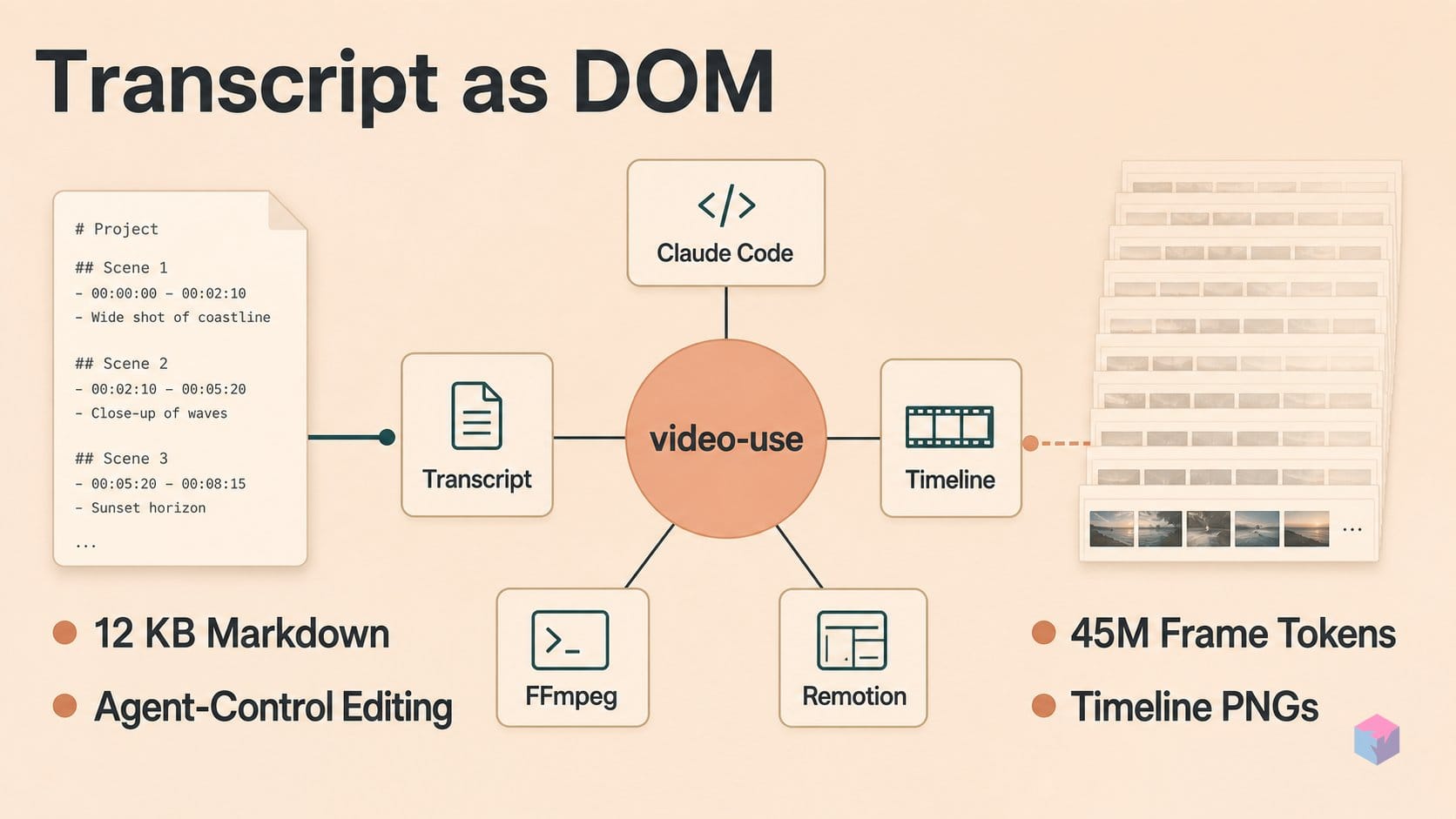
video-use works because it refuses to feed pixels to the model. It is an open-source, agent-driven editing tool from the browser-use organization that treats editing as an agent-control problem, not a new video model. Its core claim: a naive frame-by-frame approach burns roughly 30,000 frames × 1,500 tokens ≈ 45 million tokens of largely redundant visual data the model cannot act on editorially, while a packed transcript of about 12 KB of Markdown plus on-demand timeline PNGs carries the same editing signal .
Quick Answer: video-use lets a coding agent like Claude Code edit video by reading a ~12 KB Markdown transcript instead of ingesting ~30,000 frames (~45 million tokens) of pixel data. Editorial decisions — cuts, filler removal, retake choice — are made over text; the agent only renders PNG frames when a judgment call needs pixels .
The idea is a direct port of browser-use's DOM thesis. Instead of forcing an agent to infer meaning from screenshots, browser-use hands it the structured DOM and accessibility tree as a control surface. video-use applies the same move to footage: the transcript is the DOM, a timeline_view PNG is a screenshot summoned only on demand, and ffmpeg is the actuator that performs the physical edit . The agent scrubs text to find cut points the way a human editor scans subtitles, and reaches for a rendered frame only at ambiguous silences or retake comparisons.
"The LLM does not watch videos — it reads," the creator explains in the video-use launch walkthrough (source: YouTube).
The project is young but visible. Checked July 9, 2026, the repo showed roughly 16.1k GitHub stars, ~1.9k forks, 18 commits, no published releases, and an MIT license . The first visible commit landed on April 12, 2026 . For scale, the parent browser-use repo carries around 104k stars — so video-use is a small, fast-moving offshoot, and its maturity should be judged by mechanism rather than star count.
What makes that mechanism worth reading closely is how each stage is concrete and file-based: transcribe, pack, reason, emit an edit decision list, render, and self-evaluate. The rest of this piece walks that pipeline — starting with how footage becomes text in the first place.
Transcribing Footage: ElevenLabs STT, Speaker Diarization, and Timestamp Precision
Footage becomes text through a single, deterministic step: helpers/transcribe.py extracts a mono 16 kHz WAV track with ffmpeg, then POSTs it to ElevenLabs' speech-to-text endpoint and caches the structured result as JSON . That JSON — not the pixels — is what every downstream stage reasons over, so the accuracy of this call bounds the quality of the entire edit.
The request is opinionated. It hits https://api.elevenlabs.io/v1/speech-to-text with diarize=true, tag_audio_events=true, and timestamps_granularity=word . In return, ElevenLabs' Scribe model gives back three things video-use actually needs :
- Word-level timestamps — a start and end time for every word, the coordinates the agent later snaps cuts to.
- Speaker diarization — labels such as
S0andS1that separate an interviewer from a guest without any manual tagging. - Tagged audio events — non-speech markers like
(laughter)or(applause)written inline, so the agent can preserve a reaction beat or trim dead air it can't hear.
Results are cached as JSON under edit/transcripts/<source>.json, so re-running an edit on the same footage never pays for transcription twice . That caching matters, because Scribe is a paid, metered service: video-use requires an ELEVENLABS_API_KEY in .env, making STT a hard external dependency with a per-minute cost . For developers, that dependency carries three practical constraints worth weighing up front: budget (long footage runs up transcription charges), privacy (audio leaves the machine and reaches a third-party API), and language coverage (diarization and word-timing quality vary by language).
The local prerequisites are lighter: ffmpeg for the audio extraction, a Python environment via uv or pip, and — optionally — yt-dlp to pull footage from an online source before transcription begins . Everything after this point is just reasoning over the cached text.
takes_packed.md: The Packed Representation the Agent Reads
Once the transcript is cached, pack_transcripts.py collapses the raw word-level JSON into a compact, human-legible script called takes_packed.md — the primary artifact the editor sub-agent actually reads. The packer groups individual word entries into phrase lines, starting a new line whenever it hits a silence gap of at least 0.5 seconds or a change in speaker . The result is a document that reads less like a data dump and more like a subtitle file with editorial hooks baked in.
Each line follows a fixed shape: a bracketed timestamp range, a speaker label, then the phrase text. For example:
[002.52-005.36] S0 Ninety percent of what a web agent does is completely wasted.Here 002.52-005.36 is the start and end time in seconds, S0 is the diarized speaker, and the remainder is the transcribed phrase . That single line carries everything the agent needs to locate the clip in the source footage without opening it.
This is the mechanism that replaces the entire timeline UI. Instead of scrubbing a waveform or dragging clips, the LLM reasons over text where the editorially relevant marks are already explicit: filler words sit inline as their own short phrases, dead-air gaps show up as breaks between lines, and retake boundaries surface wherever the same sentence repeats. The two break conditions do most of the heavy lifting here. A silence gap of 0.5 seconds or more, and every speaker turn, become natural cut-point candidates the agent can find by reading — not by inspecting a single pixel .
The payoff is density. The naive alternative — roughly 30,000 frames at about 1,500 tokens each, near 45 million tokens of redundant noise — is what this representation sidesteps, compressing a full talking-head take into a few kilobytes of Markdown the agent can hold in context and edit against . Everything downstream, from cut selection to overlay timing, keys off this packed script as the source of truth.
How the Agent Specifies Each Clip: grade, beat, overlays, subtitles
The agent turns its reading of takes_packed.md into an Edit Decision List (EDL): a JSON array where each entry is one clip the renderer will splice. Every entry carries a fixed set of fields — source, start, end, beat, quote, reason, grade, overlays, subtitles, and total_duration_s . This is the actual contract between reasoning and rendering: the agent never manipulates pixels directly, it declares intent as data and lets helpers/render.py execute it.
| EDL field | What it specifies |
|---|---|
source / start / end | Which take and the word-boundary in/out timestamps to extract |
beat / quote / reason | Narrative role of the clip and why it was kept — an audit trail, not just cut coordinates |
grade | Per-segment color treatment applied at extraction time |
overlays | Named animation engine(s) to composite over the segment |
subtitles | Caption text, rendered last in the pipeline |
total_duration_s | Target runtime the self-eval pass checks against |
The grade field encodes color per segment rather than one global LUT, so a dim retake and a well-lit punchline can be normalized independently. The overlays field names which motion engine composites the animation — HyperFrames, Remotion, Manim, or PIL — and these are installed lazily and generated in parallel sub-agents, one slot per animation, so overlay work does not block the main edit . It is the same delegation pattern browser-use uses for concurrent web actions , ported to a render graph.
Pixels enter the loop only on demand. When the transcript alone cannot resolve a decision — an ambiguous pause, two near-identical retakes, or a questionable cut edge — the agent fires the timeline_view tool, which renders a single PNG composite of filmstrip frames, an audio waveform, word labels, and silence-gap candidates for that window . It inspects one image at a judgment point instead of streaming frames, keeping token cost bounded to the moments that actually need visual confirmation.
After render, a self-eval pass validates the output against the EDL and can trigger up to three fix-and-rerender cycles if the check finds audible cut-point clicks at splice boundaries, loudness violations against the target, or overlay timing that drifts off its segment . Because loudness normalization to −14 LUFS and the 30 ms boundary fades are applied by helpers/render.py , the self-eval loop is checking a deterministic render — each rerun re-emits a corrected EDL rather than nudging an opaque timeline, which keeps the whole edit reproducible and inspectable.
Filler Removal, Retake Arbitration, and Ask-Confirm-Render
The agent's editorial decisions are governed by hard rules in SKILL.md, and the strictest one is a cutting constraint: never cut inside a spoken syllable. Every cut edge must snap to the nearest word boundary and then pad outward by 30–200 ms, because ElevenLabs Scribe timestamps can drift 50–100 ms. That padding is deliberate slack — it absorbs the STT jitter so a trim lands in silence rather than clipping the first phoneme of the next word.
Removal candidates are surfaced from the packed transcript, not from pixels. Any silence gap of 0.5 s or longer is flagged for possible cutting, filler words such as "umm," "uh," and false starts are auto-marked, and when the footage contains multiple takes of the same passage the agent is prompted to select the strongest one and drop the rest. This is retake arbitration handled the way a human editor works a subtitle track — comparing wording and delivery in text before spending a frame render on it.
Because these operations are physical and irreversible on long footage, SKILL.md enforces an ask → confirm → execute sequence: the agent proposes an edit strategy, waits for user approval, and only then runs ffmpeg. That gate matters when a single misjudged EDL could splice hours of source, and it keeps the human in the loop on the one step that cannot be cheaply undone.
Motion work is fanned out rather than serialized. Animation slots are handed to parallel sub-agents — one per animation — drawing on optional engines including HyperFrames, Remotion, Manim, and PIL, which are installed lazily and generated concurrently (video: Nate Herk | AI Automation). Across invocations, the session state persists in project.md inside the footage folder's edit/ directory, so a later run resumes with the prior plan, cached transcripts, and decisions intact rather than re-reasoning from scratch.
From EDL to final.mp4: Segment Splicing, Color Passes, and Loudness Normalization
The render stage is where the agent's Edit Decision List becomes a playable file. helpers/render.py walks each EDL entry in order, extracts that segment from its source clip, applies the specified color grade, and lays down a short audio fade at both edges before stitching everything together — the physical edit that the transcript reasoning only described. Nothing here re-reasons about content; render.py is a deterministic actuator that executes the JSON it was handed, which keeps the creative decisions auditable and the output reproducible.
Two details prevent the seams from showing. Each segment gets a 30 ms audio fade at both boundaries so that hard cuts between words do not produce audible clicks, and segments are joined losslessly with ffmpeg's -c copy concat rather than a full re-encode, preserving the source codec and quality. Because the concat step copies streams instead of transcoding them, render time scales with the number of cuts rather than with total resolution or bitrate.
Overlays and subtitles are layered on top of the assembled timeline. Animations are composited with an setpts=PTS-STARTPTS+T/TB expression, which resets each overlay's presentation timestamps and offsets it by T so the motion graphic anchors to the correct moment in the final cut rather than to its own source timing. Subtitles run as the last pass, defaulting to 2-word UPPERCASE chunks, with styling configurable per project [1][13].
The final optional pass is loudness normalization targeting -14 LUFS integrated, -1 dBTP true peak, and LRA 11. That triplet is the practical delivery spec for YouTube and most podcast platforms, so the output arrives at the loudness distributors expect instead of being clipped or turned down on ingest. Taken together — grade, fades, lossless concat, timestamp-anchored overlays, captions, and broadcast-standard loudness — the render step closes the loop that began with a 12 KB transcript, producing edit/final.mp4 without a timeline UI touching the footage.
video-use, ELLMPEG, and Remotion: What Each Solves in Agent-Driven Editing
video-use, ELLMPEG, and Remotion occupy three distinct layers of the agent-driven editing stack, so they complement rather than compete. video-use handles editorial synthesis — deciding which take survives, where filler is cut, and how overlays are timed — by reasoning over a transcript-derived Edit Decision List . ELLMPEG handles command synthesis. Remotion handles programmatic composition. Understanding which problem each one actually solves is the difference between picking the right tool and expecting one to do another's job.
ELLMPEG, a representative ffmpeg-agent submitted to arXiv on January 17, 2026, auto-generates and locally verifies executable FFmpeg and VVenC commands using tool-aware retrieval-augmented generation plus self-reflection, reporting 78% average command-generation accuracy across 480 prompts with Qwen2.5 . That is a different task from video-use's: ELLMPEG turns "crop and transcode this" into a correct ffmpeg invocation, while FFmpeg itself remains the mature substrate for recording, converting, and streaming . video-use sits one layer above command synthesis and treats ffmpeg as its actuator, not its intelligence.
Remotion is a composition framework where React code is the source of truth, scaffolded with npx create-video@latest; its docs, updated July 8, 2026, now include coding-agent authoring instructions . It goes deeper than video-use for designed explainers, data videos, and scalable personalized templates. But video-use can call Remotion — alongside Manim or PIL — as one optional animation engine, which makes them complementary: use Remotion when the graphics are the point, use video-use when existing footage needs curation.
"When browser users automated the web, they passed screen layout diagrams instead of screenshots. I translated that exact idea into a video," — video-use's creator, on porting browser-use's control-surface thesis (source: primary demo video).
| Tool | Problem solved | Source of truth | Best fit |
|---|---|---|---|
| video-use | Editorial synthesis (cut, arbitrate takes, time overlays) | Transcript-derived EDL | Talking-head, interview, montage, launch footage |
| ELLMPEG | Command synthesis (crop, transcode, compress) | Verified ffmpeg/VVenC commands | Programmatic media conversion |
| Remotion | Programmatic composition | React code | Designed explainers, data videos, templates |
One caveat cuts across this space: much of the quantified evidence is first-party. VideoAgent v2, revised July 3, 2026, claims 87–95% orchestration success, a 60% API-cost reduction, and quality 4% below human-created videos — all on its own evaluations . video-use's own 12 KB-versus-45M-token figure is an illustrative README claim, not an independent benchmark . Treat cross-tool comparisons as directional until third-party numbers exist.
ElevenLabs Coupling, Transcript Jitter, and What to Scrutinize Before Depending on It
Before you route real footage through video-use, weigh maturity against enthusiasm. As of July 9, 2026 the repository carries no published releases across just 18 commits, with a fast-moving star count near 16,100 . Stars measure interest, not production stability — an MIT-licensed project this young has no changelog discipline, no version pins, and no track record for a pipeline you would trust with a client edit. Popularity is not a proxy for reliability here.
The headline efficiency figure warrants the same caution. The 12 KB-versus-45M-token framing is an illustrative README claim, not an independently reproduced benchmark, and the quality and re-render success rates cited for the tool come from first-party material only . No third-party evaluation yet confirms that transcript-driven editing matches a human cut across varied footage.
The operational constraints are concrete. ElevenLabs Scribe is paid, cloud-only, and rate-limited, so cost per minute of footage, data-privacy exposure, language accuracy, and diarization quality all become dependencies you inherit — and its word-level timestamps can drift 50–100 ms, which is exactly why the skill pads cut edges rather than trusting boundaries verbatim . Fully autonomous agent post-production also lacks external validation at scale: the earlier LAVE research found that LLM-assisted editing still benefited from manual UI refinement, and nothing since has retired the human reviewer.
The pragmatic takeaway: treat video-use as a reproducible, inspectable first pass for talking-head, tutorial, and launch footage — not a hands-off render farm. Budget the STT cost, keep a person on the final review, and pin your own fork until the project ships a versioned release.
Frequently asked questions
Does video-use require a GPU or a specialized video model?
No. video-use needs no GPU and no video-generation model. Transcription runs on ElevenLabs' cloud speech-to-text API , editorial reasoning is handled by any shell-capable coding agent — Claude Code, Codex, Hermes, or Openclaw — and the physical edit is done by local ffmpeg as the renderer . The repo is roughly 76% Python with ffmpeg doing the encoding work . The intelligence here is editorial, not generative: the agent decides what to keep, not how to hallucinate new pixels.
What does a takes_packed.md line actually look like?
Each line pairs a timestamp range, a speaker ID, and the spoken phrase — for example: [002.52-005.36] S0 Ninety percent of what a web agent does is completely wasted. . The bracketed numbers are start and end times in seconds, S0 is the diarized speaker, and the rest is the phrase text. pack_transcripts.py builds these lines by grouping word-level entries and breaking on silence of 0.5 seconds or more, or on a speaker change — which is exactly what turns each gap into a natural, addressable cut-point marker for the agent.
Can video-use handle multi-speaker interviews or podcasts?
Yes. The transcribe step calls ElevenLabs with diarize=true and tag_audio_events=true, so the API returns per-speaker labels (S0, S1, …) alongside events such as (laughter) or (applause) . pack_transcripts.py then breaks phrase lines on every speaker change , so each participant's contributions stay clearly attributed and individually selectable in the packed transcript. Interview, panel, and podcast footage all fit this model — with the caveat that diarization quality and timestamp drift depend on the underlying STT and are worth spot-checking.
How is this different from asking an AI assistant to write ffmpeg commands?
ffmpeg-agent systems synthesize correct commands from a description; video-use sits one layer above that. ELLMPEG, a representative 2026 academic ffmpeg-agent, auto-generates and locally verifies executable FFmpeg commands and reports 78% average command-generation accuracy on 480 prompts — that is command synthesis (crop, transcode, compress). video-use does editorial synthesis: it reads the transcript to judge which take is stronger, where filler ends, and which silence is intentional, then derives an Edit Decision List that ffmpeg executes . One writes the command; the other decides the cut.
What does the self-evaluation loop actually check after each render?
After render.py produces an output, the agent inspects it for cut-point click artifacts, loudness violations against the -14 LUFS / -1 dBTP target, and overlay timing drift . When it finds a problem it issues corrected EDL entries and re-renders, up to a maximum of three fix-and-rerender passes before returning edit/final.mp4 . The 30 ms audio fades at segment boundaries exist to prevent the click artifacts the loop guards against . It is a bounded check, not an open-ended quality guarantee — a human final review is still warranted.
Enjoyed this article? Subscribe to get new stories by email whenever they're published.