

Most coding agents can write a Worker and run wrangler deploy in the same loop — and then freeze at a login screen they cannot click through. Cloudflare's --temporary flag, shipped June 19, 2026, removes that wall by deploying first and authenticating later.
What wrangler --temporary provisions in 60 seconds
wrangler deploy --temporary deploys a Worker to a live workers.dev URL with no credentials present, by provisioning a temporary Cloudflare account server-side. When an agent runs the command logged out, Cloudflare creates a temporary preview account, issues Wrangler an API token to work with, and pushes the Worker live in seconds . The flow requires Wrangler 4.102.0 or later, and the agent must be logged out — --temporary returns an error if Wrangler can already use OAuth, CLOUDFLARE_API_TOKEN, or a global API key .
Alongside the live URL, Cloudflare generates a claim URL. The agent hands this back to a human, who can take permanent ownership by signing in to or creating a normal Cloudflare account within the window — at which point the account and everything on it become a standard account that person controls . This inverts the usual order: the deployment exists first, and authentication happens only at the moment someone decides to keep it.
The temporary account is cached and reused while it and its claim URL remain valid, so an agent can iterate without re-provisioning. The practical loop looks like this:
- Run
wrangler deploy --temporary— get a liveworkers.devURL and a claim URL. - Edit the code, rerun the same command — the same temporary preview account is reused.
curlthe resulting URL and verify the output before anyone claims it .
The option is also discoverable from the CLI itself. If an agent starts with a plain wrangler deploy and no credentials are found, Wrangler now prints guidance telling it to rerun with --temporary — so an agent does not need prior knowledge of the flag from the documentation to find it . That detail matters for autonomous tooling: discovery happens in-band, in the output the agent already reads, rather than requiring the model to have memorized an option name. The result is a deploy path designed for builders of background and "vibe-coding" agents who want generated code to reach a working URL with no human pausing to sign in .
The authentication wall that blocked unattended pipelines
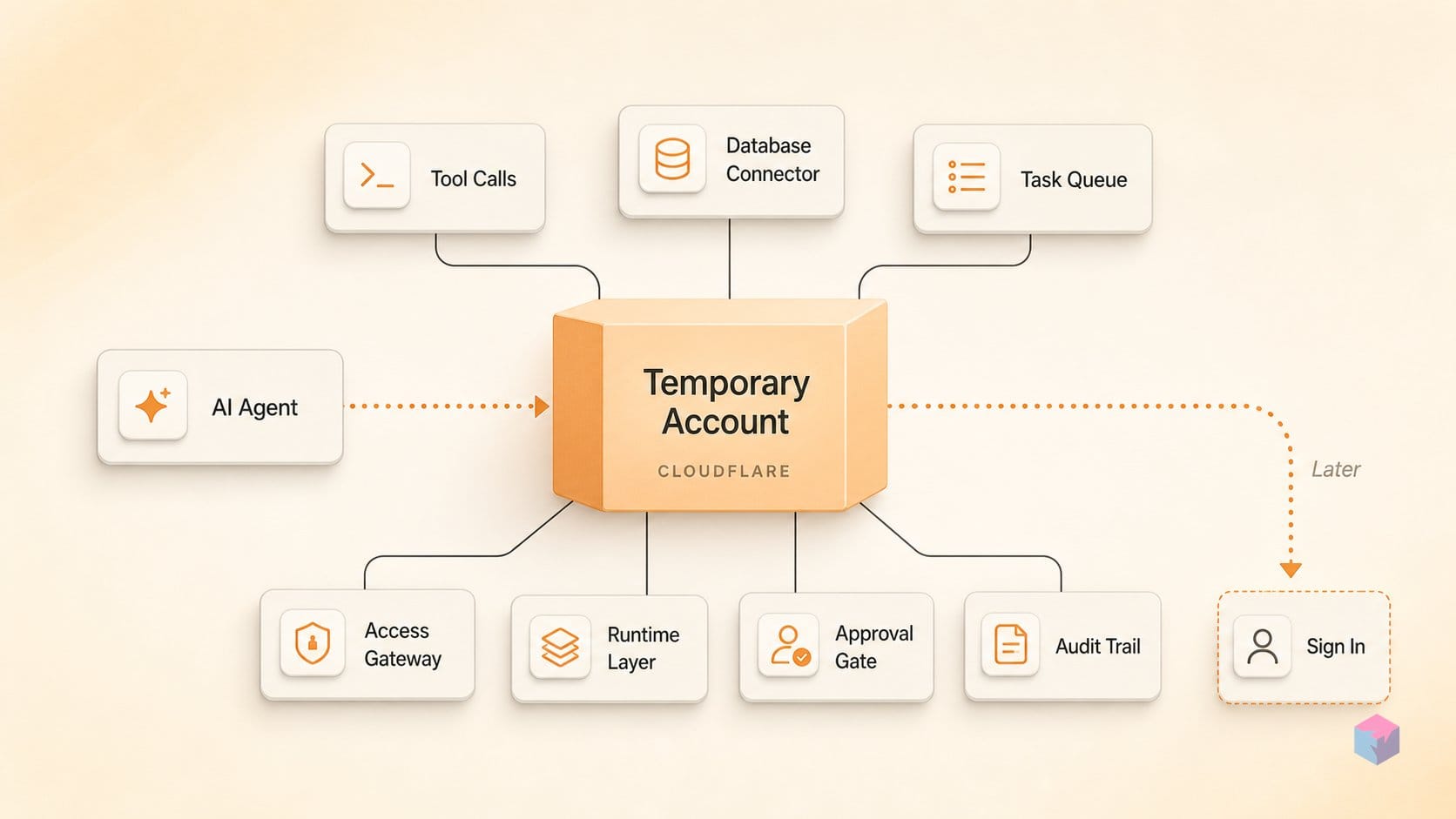
The wall that --temporary removes is human authentication, and every standard path to it assumes a person is present. Interactive OAuth opens a browser, an MFA prompt waits for a code, an API-token flow expects a copy-paste, and a dashboard step expects a click. Each is trivial for a developer at a keyboard and impossible for a background agent with no one watching. Cloudflare names this as the failure mode the feature targets: an agent writes code, runs wrangler deploy, and stalls at browser-based OAuth with the job stuck until a human intervenes .
The distinction between friction and a hard stop is the whole point. For an interactive copilot, forced sign-in is an annoyance — the developer alt-tabs, approves, and returns. For an unattended pipeline it is unrecoverable: the process blocks on input that will never come, and the deploy cannot resume without external intervention. The build loop that produced working code halts one step before the code reaches a URL, not because the code failed but because the platform expected a person.
Concretely, the blocking steps a background agent cannot clear on its own include:
- Browser-based OAuth —
wrangler loginlaunches a redirect flow that needs a human to approve in a browser session. - MFA prompts — a second-factor challenge that waits on a code from a device the agent does not hold.
- API-token copy-paste — generating
CLOUDFLARE_API_TOKENin the dashboard and pasting it into the environment. - Dashboard clicks — any account or confirmation step that exists only in the web UI.
Any one of these turns a fully automated deploy into a manual handoff. The temporary path is built precisely so none of them sit in the critical line between generated code and a live workers.dev URL .
Independent practitioner commentary read the change the same way. Writing on June 21, 2026, Simon Willison flagged the launch as significant for agent ergonomics, framing the inversion — deploy first, authenticate later — as a meaningful UX shift while cautioning that the abuse model is unproven at this stage .
"The really interesting trick here is that you can deploy first and authenticate later — the agent gets a working URL and a human only signs in when they decide to keep it," — Simon Willison, independent developer and writer (source: simonwillison.net).
That reordering is what makes the flag matter for tooling builders. The constraint was never that agents could not write deployable code; it was that the deploy step assumed a logged-in human. Removing the authentication wall from the critical path lets the agent finish its loop — write, deploy, verify against a real URL — and leaves the sign-in decision to the moment a person actually wants ownership .
How Cloudflare provisions a temporary account on your agent's behalf
The provisioning happens entirely server-side, so the agent never sees, handles, or stores a credential. When wrangler deploy --temporary runs with no auth present, Cloudflare creates a temporary preview account, issues Wrangler an API token scoped to that account, and Wrangler uses it automatically to push the Worker live on a workers.dev subdomain . There is no human-visible authentication step in the loop — no browser redirect, no token paste — which is precisely what lets a background agent finish unattended.
The path is gated on the absence of credentials. --temporary only triggers when Wrangler finds no usable auth: no OAuth session, no CLOUDFLARE_API_TOKEN, and no global API key. If any of those are present, the flag returns an error rather than silently creating a throwaway account . That guard matters: it prevents an authenticated developer or a CI runner from accidentally deploying into an ephemeral account that disappears an hour later. The feature requires Wrangler 4.102.0 or later, and Cloudflare is explicit that production and CI/CD should still use wrangler login or a real API token .
Alongside the token, Cloudflare generates a claim URL and hands it back through Wrangler's output for the agent to surface to a human. That URL is the sensitive part of the flow — it grants ownership, so Cloudflare treats it as a secret rather than a shareable link . Opening it in a browser, then signing in to an existing Cloudflare account or creating one, transfers the temporary account permanently to the claimant. Everything running on it comes along: the Worker, any D1 databases, KV namespaces, Durable Objects, and other bindings all become resources on a standard account the person controls .
The window is fixed at 60 minutes. While it stays open, the same preview account and claim URL are cached and reused, so an agent can iterate — update code, rerun wrangler deploy --temporary, curl the URL, check the output — before anyone claims it . If no one claims it within those 60 minutes, Cloudflare deletes the account and all associated deployments and resources, with no recovery path . The default is disposal; ownership is something a human opts into, not the resting state.
Workers, D1, KV, and Queues: what's included and where the bounds are
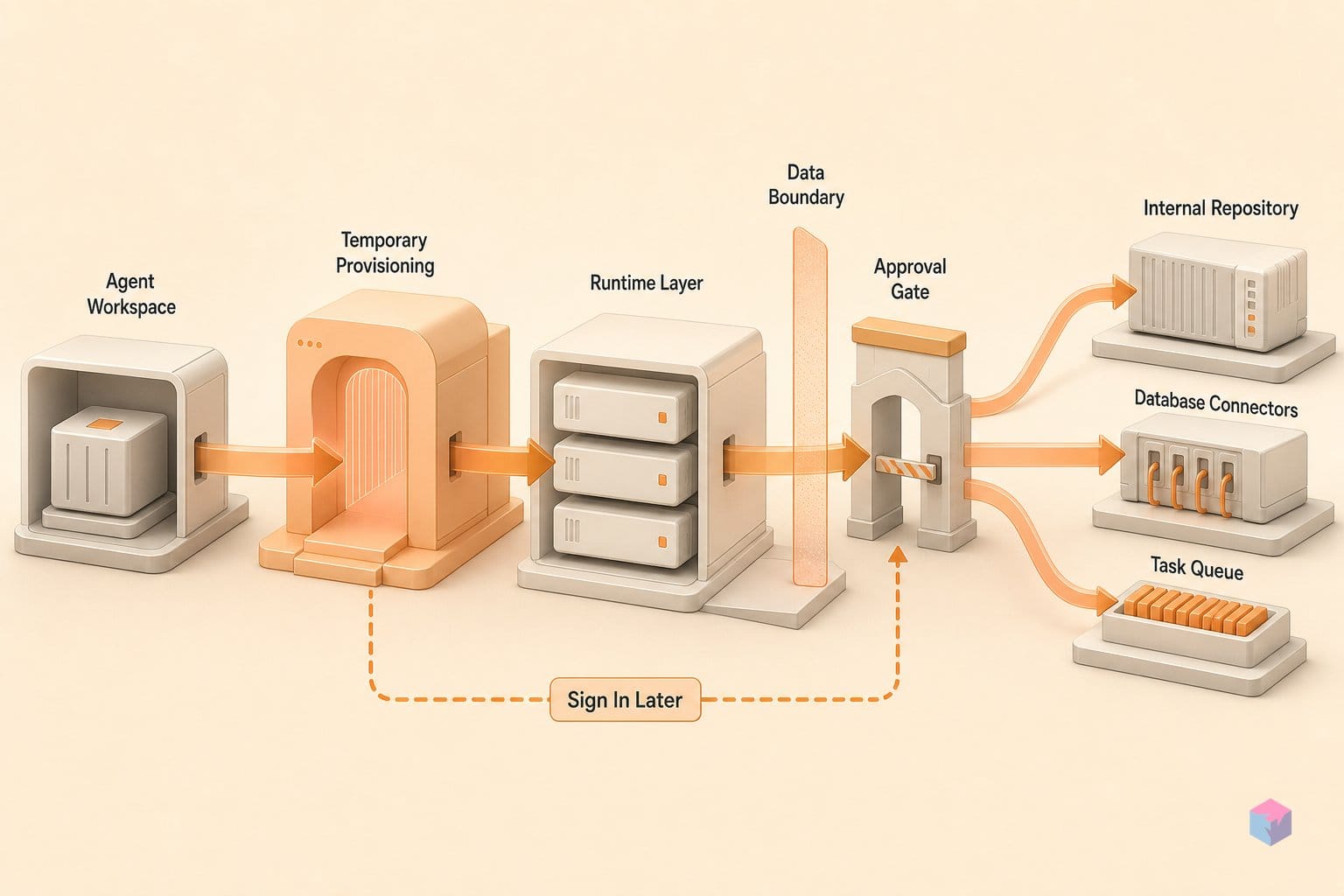
The supported-resource list for a temporary account is deliberately narrow and quota-capped at launch. Workers deploy to a workers.dev subdomain only — no custom domain until a human claims the account — and the surrounding products each carry hard limits sized for evaluation rather than production . The point is to let an agent prove a working stack end to end, not to run real traffic on an unclaimed identity.
The launch matrix breaks down as follows:
| Product | What's included on a temporary account |
|---|---|
| Workers | Deploy to a workers.dev subdomain only; no custom domain without claiming |
| Workers Static Assets | Up to 1,000 files per deploy, each file up to 5 MiB |
| Workers KV | Supported via temporary credentials |
| D1 | One database per account, 100 MB per database and 100 MB total |
| Durable Objects | Supported via temporary credentials |
| Hyperdrive | Up to 2 database configurations and 10 connections |
| Queues | Up to 10 queues |
| SSL/TLS | Certificate commands via temporary credentials |
Those numbers are precise. Static Assets are bounded at 1,000 files per deploy with a 5 MiB ceiling per asset, enough for a small SPA or docs build but not a media-heavy site. D1 gives a single database capped at 100 MB per database and 100 MB total, so an agent can schema-migrate and seed test rows without touching production data. Hyperdrive is held to two database configurations and 10 connections, and Queues to 10 queues . KV, Durable Objects, and SSL/TLS commands work through the temporary credentials Wrangler is issued, with no separate enrollment step.
The omissions matter as much as the inclusions. There is no custom-domain binding, no Pages, and nothing outside this list — if your build depends on a product Cloudflare hasn't enabled here, the temporary path won't carry it, and you fall back to a claimed account. Cloudflare is explicit that the matrix is not final and that more products will be added over time, so treat the current limits as a snapshot of the June 2026 launch rather than a stable contract . Build against it defensively, and check the changelog before assuming a resource is available.
How Cloudflare prevents anonymous misuse before provisioning an account
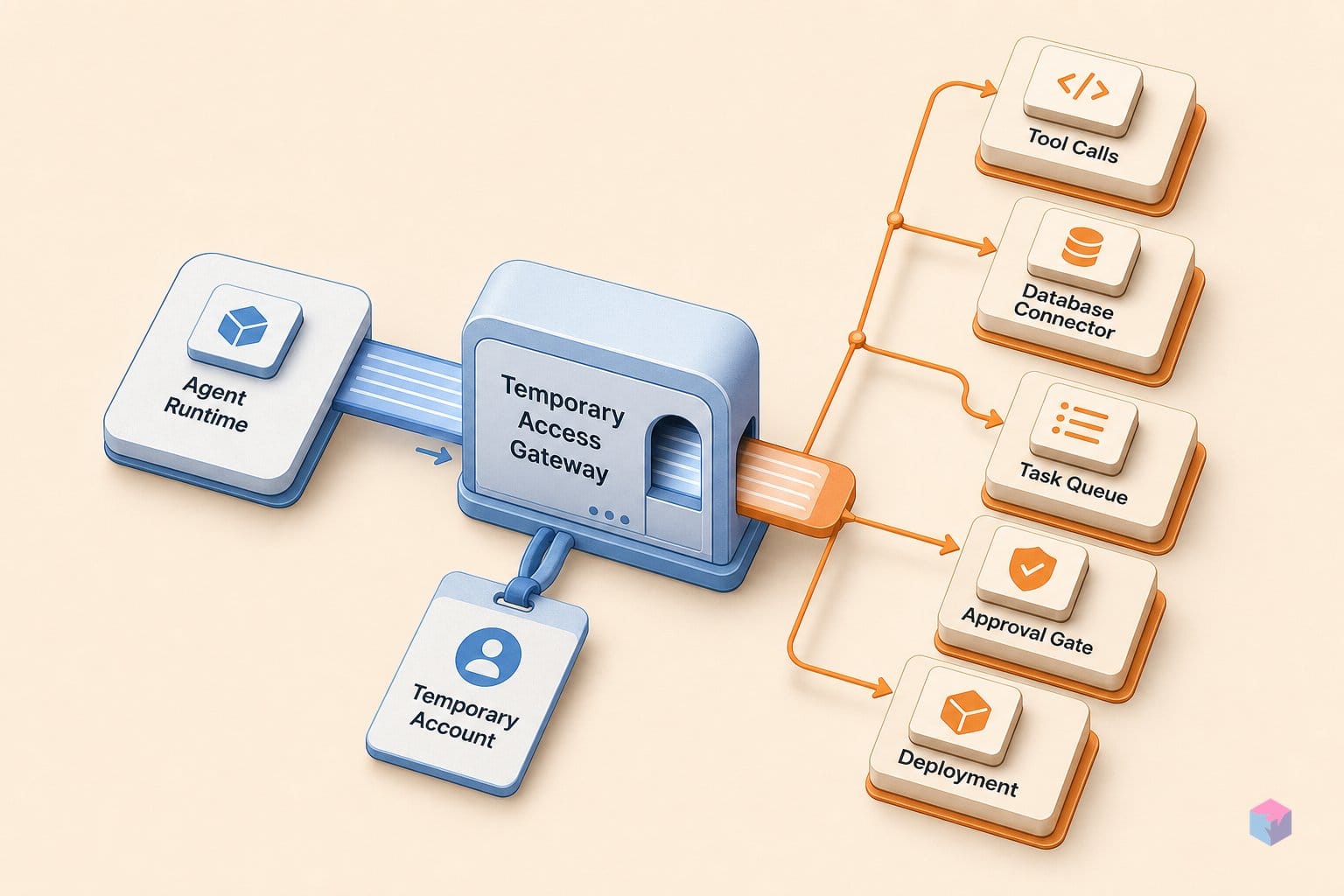
The unauthenticated deployment path is gated by a proof-of-work challenge that Wrangler must solve before Cloudflare provisions a temporary preview account. The CLI handles this automatically — no captcha, no extra input from the agent or the operator — so the only visible effect is a short delay while the computation runs . The design intent is straightforward: make each account creation cost something in compute, so a script firing off thousands of anonymous deployments pays a measurable price per attempt.
Proof-of-work is not the only control. Cloudflare also rate-limits how quickly temporary preview accounts can be created and layers on additional abuse-prevention checks that it does not describe in detail . The exact throughput ceilings, the proof-of-work parameters, and the full set of adversarial checks are unpublished. That is a deliberate posture — exposing the thresholds would hand attackers a tuning guide — but it also means you cannot reason precisely about how the path behaves at scale from the documentation alone.
The abuse surface here is real, not hypothetical. This is, by construction, a way for anonymous, unauthenticated callers to spin up live deployments on a workers.dev subdomain, and anything reachable from the open internet that creates running infrastructure for free invites probing. Independent practitioner commentary flagged the launch as significant for agent ergonomics while noting the security model's real-world resilience is unproven this early . Proof-of-work plus rate limiting is a reasonable opening hand, but its behavior under coordinated, distributed load is the kind of thing that gets stress-tested in production rather than in a changelog.
The control that matters most on the operator's side is the claim URL. Cloudflare treats it as sensitive precisely because it grants ownership: whoever opens that URL and signs in takes permanent control of the account and everything running on it — the Worker plus any databases, bindings, and other attached resources . Hand a claim URL to an unintended recipient and you have handed over the account. If your agent logs CLI output, posts it to a chat channel, or surfaces it in a CI artifact, treat the claim URL like a credential, not a status link.
Temporary provisioning vs. Stripe Projects: what each addresses
Temporary accounts and Stripe Projects are two different rungs of Cloudflare's agentic-cloud push, and they solve opposite ends of the deployment lifecycle. wrangler deploy --temporary, shipped June 19, 2026 , gives an agent an anonymous throwaway preview — no payment, no domain, no subscription, and a 60-minute auto-expiry — built for evaluation and agent-generated demos with zero authentication friction . Stripe Projects, announced April 30, 2026 by Sid Chatterjee and Brendan Irvine-Broque, handles the production end: an agent provisions a full paid account, registers a domain, and receives a permanent API token to deploy with .
The split matters because the two never overlap in intent. Temporary provisioning is the no-commitment first touch; Stripe Projects is the commitment itself. In the Stripe flow, Stripe acts as identity provider and supplies a tokenized payment credential — raw card details never reach the agent — with a default cap of $100.00 USD/month per provider . That protocol was co-designed with Stripe, but Cloudflare states it is still working toward a more formal specification, so the April design is not yet a standardized protocol .
| Dimension | Temporary accounts (Jun 19, 2026) | Stripe Projects (Apr 30, 2026) |
|---|---|---|
| Purpose | Throwaway preview, evaluation, demos | Production provisioning |
| Payment | None | Tokenized, $100/mo default cap per provider |
| Domain / subscription | None — workers.dev only | Domain registration + paid subscription |
| Credential lifetime | Expires in 60 minutes | Permanent API token |
| Identity | Anonymous until claimed | Stripe identity attestation |
A third effort sits nearby but is not the same problem. Cloudflare's May 2026 collaboration with WorkOS on auth.md covers agents registering users with third-party apps via scoped, short-lived, revocable OAuth tokens . That is about delegated access to other apps, not provisioning a Cloudflare account, so do not conflate it with either deployment path. The practical takeaway: reach for --temporary when an agent should ship and demo before anyone signs in, and use the Stripe path — or a plain wrangler login — the moment that work needs to outlive 60 minutes.
Frequently asked questions
How long does a temporary Cloudflare account stay live before it's deleted?
A temporary Cloudflare account stays live for 60 minutes from provisioning . Within that window a human can open the claim URL, sign in or create a normal account, and take permanent ownership of everything running on it. If the account goes unclaimed, Cloudflare deletes it and every associated resource — Workers, D1, KV, and Queues — with no recovery .
Can I use wrangler deploy --temporary in a standard CI/CD pipeline?
No. Cloudflare is explicit that --temporary is not a replacement for production or CI/CD authentication . For persistent pipelines, use a permanent account via wrangler login or a CLOUDFLARE_API_TOKEN. The temporary path only activates when Wrangler finds no existing credentials — if OAuth, an API token, or a global API key is already usable, --temporary returns an error rather than provisioning a throwaway account.
What happens to D1 databases and Durable Objects if the temporary account expires unclaimed?
They are deleted along with the account. When a temporary account expires unclaimed after 60 minutes, Cloudflare removes everything running on it — Workers, D1 databases, KV namespaces, Durable Objects, and Queues — with no recovery path . Claiming the account before expiry transfers all of those resources intact to the new permanent account with no data loss, since the claim converts the same account rather than migrating data between accounts .
Does the proof-of-work challenge slow down every wrangler deploy call?
No — the proof-of-work challenge applies only to temporary provisioning, not to standard authenticated deploys. Before Wrangler creates a temporary preview account, Cloudflare requires a proof-of-work challenge that the CLI solves automatically, with no operator input required, though it can add a short delay before the account is created . A normal wrangler deploy backed by existing credentials skips this step entirely .
What's the difference between Cloudflare's temporary accounts and Stripe Projects?
Temporary accounts are anonymous, payment-free preview deployments with a 60-minute TTL, built for throwaway evaluation — no payment, no domain, no subscription, and automatic expiry . Stripe Projects, announced April 30, 2026, instead provisions a full paid account with Stripe-supplied identity, domain registration, and a permanent API token, with a default maximum spend of $100.00 USD per month per provider — designed for production provisioning, not evaluation .